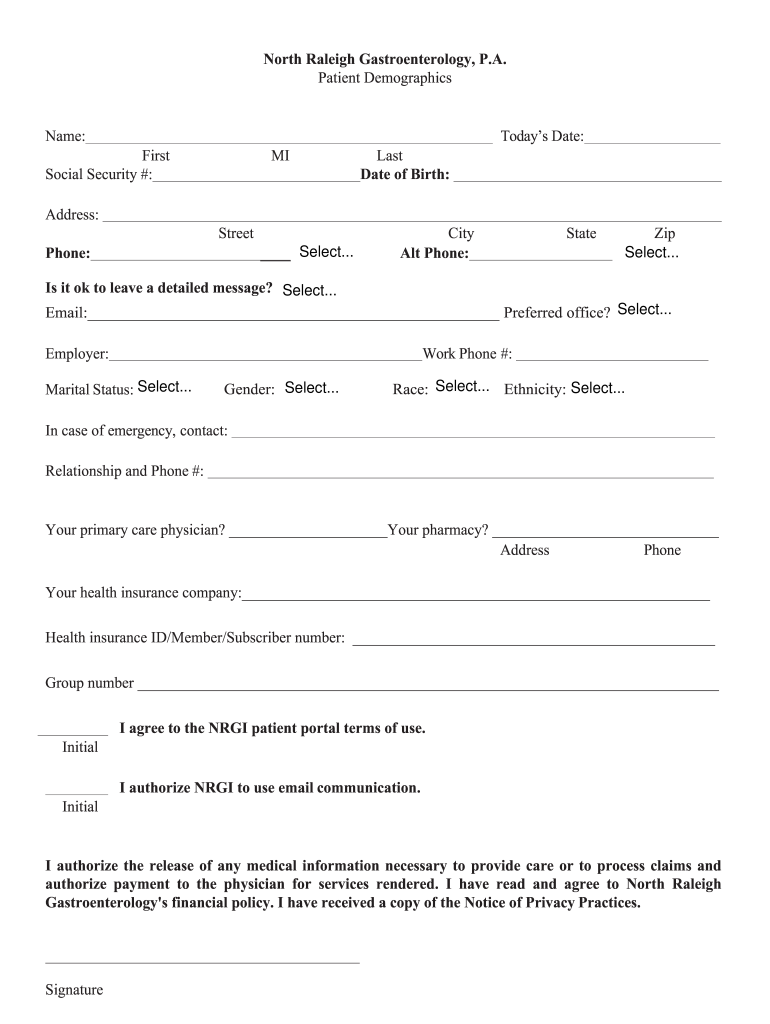
North Raleigh Gastroenterology, P.A. Patient DemographicsName:Todays Date:First Social Security #:MILast Date of Birth:Address: Street Phone: Select...City Alt Phone:StateZip Select...Is it ok to.
Loading

Open form follow the instructions

Easily sign the form with your finger

Send filled & signed form or save
How to fill out the NGRI Patient Demographics online
Filling out the NGRI Patient Demographics form accurately is essential for efficient processing and communication regarding your medical care. This guide offers a step-by-step approach to help you complete the form in an easy and efficient manner.
Follow the steps to complete the form successfully.
- Press the ‘Get Form’ button to access the document and open it in your preferred editing tool.
- In the 'Name' field, enter your full name, including your first name, middle initial, and last name. Make sure to double-check the spelling for accuracy.
- Input today’s date in the designated area; use the format MM/DD/YYYY.
- Fill in your Social Security number in the appropriate section. Ensure that all digits are entered correctly.
- Provide your date of birth as per the specified format. This information helps in identifying your medical records.
- In the 'Address' section, list your current street address, including any apartment or unit number, followed by your city, state, and zip code.
- Enter your primary and alternate phone numbers. Confirm that you are using the appropriate country code if applicable.
- Indicate if it is acceptable to leave a detailed message by selecting your preference in the provided options.
- Provide your email address in the designated space. Make sure it is an active account you regularly check.
- Select your preferred office from the drop-down menu to determine where you wish to receive medical services.
- Fill out your employer's name and work phone number. This information may be used for insurance purposes.
- Indicate your marital status by choosing from the available options.
- Select your gender from the available choices.
- Choose your race and ethnicity from the corresponding drop-down menus.
- In case of an emergency, provide the contact details for a person to reach, including their relationship to you and their phone number.
- Specify your primary care physician's name and your preferred pharmacy, along with their respective addresses and phone numbers.
- Complete the health insurance section by entering your insurance company name, health insurance ID or member number, and group number.
- Sign to agree to the NGRI patient portal terms of use by adding your initials in the designated space.
- Authorize NRGI to use email communication by initialing in the specified area.
- Authorize the release of any necessary medical information by signing the form at the bottom.
- Once all sections are completed, review your form for any potential errors. Save changes, and you can decide to download, print, or share the completed form as needed.
Start filling out your NGRI Patient Demographics online today to ensure your information is correctly recorded!
Experience a faster way to fill out and sign forms on the web. Access the most extensive library of templates available.
Related content
by JL Moskowitz · 1999 · Cited by 25 — NGRIs and civil inpatients produced...
“Our study elucidated patterns in institutional violence among NGRI inpatients. Data...
Get answers to your most pressing questions about US Legal Forms API.
What is the NGRI?
NGRI stands for Not Guilty by Reason of Insanity, a legal term used to describe a defendant who, due to mental illness, cannot appreciate the nature of their actions. This concept is significant in understanding NGRI Patient Demographics, as it focuses on individuals who are often misunderstood within the legal system. By advocating for their needs, we can promote better mental health treatment and resource allocation. US Legal Forms offers tools to assist in navigating the complexities of NGRI cases for legal professionals.
What is the insanity defense in Texas?
In Texas, the insanity defense allows a defendant to argue that they should not be held criminally responsible due to a severe mental disorder. This defense examines NGRI Patient Demographics to determine how mental health affects behavior. If successful, the defendant may receive treatment rather than imprisonment. This approach emphasizes the importance of justice drawing from both legal and psychological perspectives.
How common is NGRI?
NGRI, or Not Guilty by Reason of Insanity, is relatively rare in the United States. Studies indicate that it is used in less than 1% of all criminal cases. Many factors influence NGRI Patient Demographics, including the severity of mental illness and the circumstances of the crime. Understanding these demographics helps to clarify the judicial approach to mental health and criminal responsibility.
What is an NGRI patient?
An NGRI patient is someone who has been found Not Guilty by Reason of Insanity, indicating that they were not in a sound state of mind during the commission of a crime. This classification places them in psychiatric care rather than correctional facilities, showcasing a unique aspect of NGRI Patient Demographics. By understanding this definition, you can appreciate the complexities surrounding mental illness and its intersection with the legal system.
What is the percentage of NGRI?
The percentage of individuals found Not Guilty by Reason of Insanity (NGRI) is relatively low, generally around 1% of all criminal cases. This statistic is vital for understanding NGRI Patient Demographics, which include those individuals receiving psychiatric intervention instead of traditional judicial penalties. Awareness of this percentage can inform discussions about mental health, justice, and community safety.
How to handle psychiatric patients?
When handling psychiatric patients, it is essential to approach them with empathy and respect. Establishing a safe environment and providing clear communication fosters trust and eases anxiety. Additionally, understanding NGRI Patient Demographics allows caregivers to tailor their approach based on individual needs, ensuring effective interaction and support.
What percentage of patients in psychiatric institutions today are admitted voluntarily?
Currently, the percentage of patients admitted voluntarily to psychiatric institutions stands at about 50%. This statistic highlights a significant aspect of NGRI Patient Demographics, as many individuals seek treatment willingly for psychological issues. Understanding this dynamic can help you recognize the broader trends in mental health care and how they affect various patient populations.
How to give a patient case presentation?
Giving a patient case presentation involves organizing the information logically and engaging your audience. Start with the patient's demographics, presenting concerns, and treatment history, integrating insights into NGRI patient demographics where relevant. Good structure will make your case compelling and informative.
How to present a psychiatric case?
When presenting a psychiatric case, it is essential to communicate the patient’s background, symptoms, and treatment responses clearly. Incorporating variables from NGRI patient demographics enhances the discussion and allows for a broader understanding of their needs. This approach fosters a collaborative environment for optimal patient care.
How to present a psychiatric patient case?
Presenting a psychiatric patient case effectively requires clarity. Begin with a thorough assessment of the patient's history, symptoms, and diagnosis. Highlight any relevant factors in the NGRI patient demographics to provide deeper insight into their unique challenges and crafting appropriate treatment plans.
Use professional pre-built templates to fill in and sign documents online faster. Get access to thousands of forms.
If you believe that this page should be taken down, please follow our DMCA take down process here.