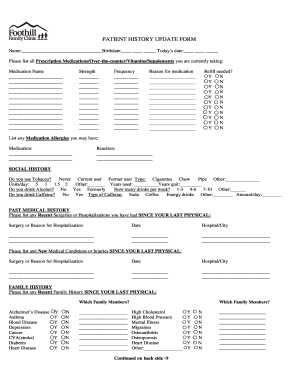
Get Foothill Family Clinic Patient History Update Form 2015-2025
How it works
-

Open form follow the instructions
-

Easily sign the form with your finger
-

Send filled & signed form or save
How to fill out the Foothill Family Clinic Patient History Update Form online
Completing the Foothill Family Clinic Patient History Update Form is essential for maintaining accurate and up-to-date medical records. This guide will provide you with clear, step-by-step instructions to easily fill out the form online, ensuring all necessary information is captured effectively.
Follow the steps to successfully complete the Patient History Update Form.
- Click ‘Get Form’ button to obtain the form and open it in the editor.
- Begin by entering your personal information at the top of the form. This includes your name, birthdate, and today's date. Make sure all details are accurate.
- Navigate to the section for listing all prescription medications, over-the-counter drugs, vitamins, and supplements. For each entry, provide the medication name, strength, frequency, and the reason for taking it. Indicate if a refill is needed by checking the appropriate box.
- In the medication allergies section, list any known allergies along with their reactions. Be thorough to ensure your healthcare provider is aware of these important details.
- Next, proceed to the social history section. Answer questions about tobacco use, alcohol consumption, and caffeine intake. Provide specific details such as the type of substances and quantities to give a clear picture of your habits.
- In the past medical history section, document any recent surgeries or hospitalizations along with their dates and locations. Additionally, note any new medical conditions or injuries since your last physical.
- For family history, indicate any relevant conditions present in your family members, such as heart disease or diabetes, along with the family relationships.
- Review the review of systems section carefully. Circle any items that relate to your current state of health. Leaving an item unmarked indicates a negative response.
- Once you have filled out all necessary sections, review your entries for accuracy and completeness.
- Finally, save your changes, download a copy for your records, print the form if needed, or share it with your healthcare provider.
Take a moment to complete the Patient History Update Form online today for comprehensive healthcare management.
Getting your health history form is easy. You can visit the Foothill Family Clinic’s website to download the Foothill Family Clinic Patient History Update Form directly. Alternatively, if you prefer in-person assistance, contact the clinic and request the form. This form will serve as a helpful tool in organizing and updating your health information efficiently.
Industry-leading security and compliance
-
In businnes since 199725+ years providing professional legal documents.
-
Accredited businessGuarantees that a business meets BBB accreditation standards in the US and Canada.
-
Secured by BraintreeValidated Level 1 PCI DSS compliant payment gateway that accepts most major credit and debit card brands from across the globe.