Loading
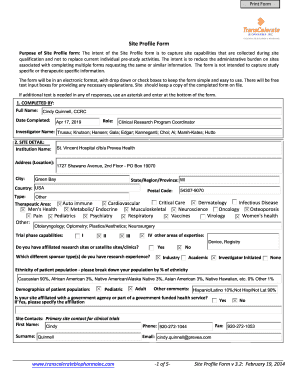
Get Prevea Transcelerate Site Profile Form 2014-2026
How it works
-

Open form follow the instructions
-

Easily sign the form with your finger
-

Send filled & signed form or save
How to fill out the Prevea TransCelerate Site Profile Form online
Filling out the Prevea TransCelerate Site Profile Form online is a crucial step for capturing site capabilities effectively. This guide provides clear, step-by-step instructions to help users complete the form with ease, ensuring all relevant information is accurately captured.
Follow the steps to complete the online form seamlessly.
- Press the ‘Get Form’ button to obtain the form and open it in your preferred electronic format.
- Begin with the 'Completed By' section by entering your full name, date completed, and role. Provide the names of investigators as needed.
- In the 'Site Detail' section, fill in the institution name, address, city, state, and postal code. Specify the type of therapeutic area and trial phase capabilities, ensuring you check all applicable boxes.
- Provide detailed demographic information regarding the patient population, including ethnic breakdown and specifics about pediatric or adult demographics if applicable.
- Complete the 'Ethical Committee Review Process' section by providing relevant information about your institutional review board or ethics committee, its location, and the steps for obtaining study approval.
- Fill out the 'Informed Consent' section, addressing whether your site requires written policies for informed consent and any necessary language translations.
- Complete the 'Site Qualifications/Training' section by indicating if your site has a training program and if it follows Good Clinical Practice guidelines.
- In the 'Facilities and Equipment' section, outline the local lab details, equipment capabilities, and computer capabilities, answering yes or no as applicable to the questions posed.
- Provide the necessary information regarding the delivery and handling of investigational products in the 'Investigational Product (IP)' section, including storage details and contact information.
- Complete any additional questions specific to the destruction of investigational products and controlled substances.
- In the 'Source Documentation/CRFs/Site Monitoring' section, specify the format of site source documents and any required access limitations.
- Finally, review the information entered for accuracy and completeness, then save your changes. You can download, print, or share the completed form as needed.
Start filling out your Prevea TransCelerate Site Profile Form online today to ensure your site details are accurately captured.