Loading
Form preview
  • US Legal Forms
  • Form Library
  • More Forms
  • More Uncategorized Forms
  • Bus Pass Form

Get Bus Pass Form

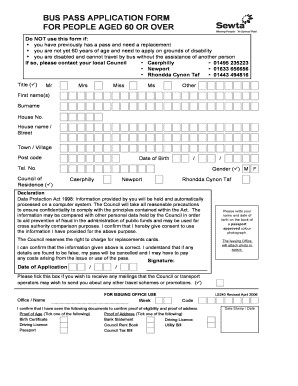
BUS PASS APPLICATION FORM FOR PEOPLE AGED 60 OR OVER Do NOT use this form if: you have previously has a pass and need a replacement you are not yet 60 years of age and need to apply on grounds of.

How it works

  1. Open form

    Open form follow the instructions

  2. Easily sign form

    Easily sign the form with your finger

  3. Share form

    Send filled & signed form or save

How to fill out the Bus Pass Form online

Filling out the Bus Pass Form online is a straightforward process designed to help people aged 60 or over obtain their travel pass. This guide will provide you with step-by-step instructions to ensure your application is completed accurately and efficiently.

Follow the steps to complete your Bus Pass Form online.

  1. Click the ‘Get Form’ button to access the Bus Pass Form and open it in your preferred document editor.
  2. Begin by filling out your personal information. Include your title, first name(s), surname, house number, house name/street, town/village, and postcode.
  3. Provide your date of birth in the specified format, and ensure to include a valid telephone number for contact purposes.
  4. Select your council of residence from the provided options: Caerphilly, Newport, or Rhondda Cynon Taf.
  5. Indicate your gender by selecting either 'M' for male or 'F' for female.
  6. Read the declaration section carefully. By signing, you confirm the accuracy of the information provided and consent to its use under the Data Protection Act.
  7. Attach a recent passport-approved color photograph. Write your name and date of birth on the back of the photograph before attaching it.
  8. Provide your signature and the date of application at the end of the form.
  9. Optionally, tick the box if you wish to receive mailings about other travel schemes or promotions that the council may offer.
  10. Finally, review all the information to ensure its accuracy. Once completed, save the form, download it for your records, print a hard copy, or share it as needed.

Complete your Bus Pass Form online today to ensure you receive your travel pass promptly.

Get form

Experience a faster way to fill out and sign forms on the web. Access the most extensive library of templates available.
Get form

Related content

Fares And Passes
buspassdesk@gopasco.com. Opens in new window . BUS PASSES BY MAIL (PDF) If you would like...
Learn more
ACCESS PASS APPLICATION
Unitrans drivers may request identification for verification at the time of boarding...
Learn more
Applying for Access
Complete the Access Transit. Evaluation Information Sheet on page 7 of this booklet. You...
Learn more

Related links form

VT Form CFC706 2018 SC DHEC 1799 2019 VT Registered Family Child Care Programs STARS Application 2019 SC DHEC 0217 2019

Questions & Answers

Get answers to your most pressing questions about US Legal Forms API.

Contact support

Generating a QR code for your bus pass card involves using an online tool or app designed for this purpose. Fill out your bus pass form as requested, and then utilize the QR code generator linked on the site. This process allows you to create a unique QR code that can be printed or stored on your device, enhancing your travel convenience.

To get your QR code, first, ensure your bus pass form is filled out correctly and submitted through the transit provider’s website or app. After processing your request, your QR code will be sent to you via email or made available in your user account. Having the QR code easily accessible on your phone simplifies your travel experience.

To get a QR code for your bus pass, complete the bus pass form through the online portal provided by your local transit authority. After submission, you will receive a digital QR code via email or directly in the app. Simply download or save this code, as it will serve as your ticket for bus travel, streamlining your commute.

To use a QR code on the bus, first, ensure you have the bus pass form ready on your mobile device or printed out. When you board the bus, show the QR code to the driver or the ticketing machine. The system will scan the code, confirming your payment and allowing you to ride. This process makes travel convenient and efficient.

To put your bus pass on your phone, first, you need to download the designated app that supports your local bus pass. Once you have the app, sign in or create an account if necessary. Afterward, look for the option to upload or add your bus pass form, which typically involves taking a photo or selecting an existing digital copy. Your bus pass will then sync with your phone, allowing you to easily access it whenever you need.

Everyone over state pension age and eligible disabled people are entitled to free off-peak local bus travel anywhere in England. Local authorities can offer further benefits to their residents and in some areas you can get a pass for free travel if you are over the age of 60 so it is best to check local information.

For a majority of people, travelling in the UK using public transport is far from free. Whether you're in England, Scotland, Wales or Northern Ireland, most adults will have to shell out a few quid for bus tickets, or pay a heftier fee for monthly passes or train tickets.

Free bus pass and transport concessions. If you're 60 or over or you have a disability, you might be eligible for public transport concessions – from discounts on your rail journeys to a free bus pass.

In England you can get a bus pass for free travel when you reach the State Pension age. If you live in London, you can travel free on buses, tubes and other transport when you're 60, but only within London. In Wales you can get a bus pass when you reach 60.

Older person's bus pass (England) You, or the person you care for, can get a bus pass for free travel when you reach female State Pension age, whether you are a man or a woman.

Get This Form Now!

Use professional pre-built templates to fill in and sign documents online faster. Get access to thousands of forms.
Get form
If you believe that this page should be taken down, please follow our DMCA take down processhere.

Industry-leading security and compliance

US Legal Forms protects your data by complying with industry-specific security standards.
  • In businnes since 1997
    25+ years providing professional legal documents.
  • Accredited business
    Guarantees that a business meets BBB accreditation standards in the US and Canada.
  • Secured by Braintree
    Validated Level 1 PCI DSS compliant payment gateway that accepts most major credit and debit card brands from across the globe.
Get Bus Pass Form
Get form
  • Adoption
  • Bankruptcy
  • Contractors
  • Divorce
  • Home Sales
  • Employment
  • Identity Theft
  • Incorporation
  • Landlord Tenant
  • Living Trust
  • Name Change
  • Personal Planning
  • Small Business
  • Wills & Estates
  • Packages A-Z
  • Affidavits
  • Bankruptcy
  • Bill of Sale
  • Corporate - LLC
  • Divorce
  • Employment
  • Identity Theft
  • Internet Technology
  • Landlord Tenant
  • Living Wills
  • Name Change
  • Power of Attorney
  • Real Estate
  • Small Estates
  • Wills
  • All Forms
  • Forms A-Z
  • Form Library
  • Legal Hub
  • About Us
  • Help Portal
  • Legal Resources
  • Blog
  • Affiliates
  • Contact Us
  • Delete My Account
  • Site Map
  • Industries
  • Forms in Spanish
  • Localized Forms
  • State-specific Forms
  • Forms Kit
  • Real Estate Handbook
  • All Guides
  • Notarize
  • Incorporation services
  • For Consumers
  • For Small Business
  • For Attorneys
  • USLegal
  • FormsPass
  • pdfFiller
  • signNow
  • altaFlow
  • DocHub
  • Instapage
Form Packages
  • Adoption
  • Bankruptcy
  • Contractors
  • Divorce
  • Home Sales
  • Employment
  • Identity Theft
  • Incorporation
  • Landlord Tenant
  • Living Trust
  • Name Change
  • Personal Planning
  • Small Business
  • Wills & Estates
  • Packages A-Z
Form Categories
  • Affidavits
  • Bankruptcy
  • Bill of Sale
  • Corporate - LLC
  • Divorce
  • Employment
  • Identity Theft
  • Internet Technology
  • Landlord Tenant
  • Living Wills
  • Name Change
  • Power of Attorney
  • Real Estate
  • Small Estates
  • Wills
  • All Forms
  • Forms A-Z
  • Form Library
Customer Service
  • Legal Hub
  • About Us
  • Help Portal
  • Legal Resources
  • Blog
  • Affiliates
  • Contact Us
  • Delete My Account
  • Site Map
  • Industries
  • Forms in Spanish
  • Localized Forms
  • State-specific Forms
  • Forms Kit
Legal Guides
  • Real Estate Handbook
  • All Guides
Prepared for you
  • Notarize
  • Incorporation services
Our Customers
  • For Consumers
  • For Small Business
  • For Attorneys
Our Sites
  • USLegal
  • FormsPass
  • pdfFiller
  • signNow
  • altaFlow
  • DocHub
  • Instapage
Social Media
Call us now toll free:
+1 833 426 79 33
As seen in:
© Copyright 1999-2026 airSlate Legal Forms, Inc. 3720 Flowood Dr, Flowood, Mississippi 39232
  • Your Privacy Choices
  • Terms of Service
  • Privacy Notice
  • Content Takedown Policy
  • Bug Bounty Program