Loading
Form preview
  • US Legal Forms
  • Form Library
  • More Forms
  • More Multi-State Forms
  • Eccd Is Form

Get Eccd Is Form

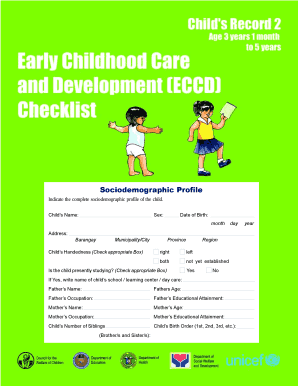
Sociodemographic Profile Indicate the complete sociodemographic profile of the child. Childs Name: Sex: Date of Birth: month day year Address: Barangay Municipality/City Childs Handedness (Check appropriate.

How it works

  1. Open form

    Open form follow the instructions

  2. Easily sign form

    Easily sign the form with your finger

  3. Share form

    Send filled & signed form or save

How to fill out the Eccd Is Form online

Completing the Eccd Is Form online can streamline your documentation process and ensure that all important information is accurately recorded. This guide will provide you with step-by-step instructions to help you efficiently fill out the form.

Follow the steps to successfully complete the form.

  1. Click ‘Get Form’ button to obtain the form and open it in the online editor.
  2. Begin by filling out the child’s sociodemographic profile. Include the child's name, sex, and date of birth. Ensure each detail is accurately entered, as this information is crucial for identification.
  3. Next, provide the child’s address details, including barangay, municipality or city, province, and region. Check that all information is correct to avoid confusion later.
  4. Indicate the child’s handedness by checking the appropriate box for right, left, both, or not yet established. This detail helps in understanding the child’s development.
  5. Respond to whether the child is presently studying by selecting ‘Yes’ or ‘No.’ If ‘Yes,’ write down the name of the child’s school, learning center, or daycare.
  6. Fill out the details regarding both parents, including names, ages, occupations, and educational attainments. This family background is essential for a comprehensive profile.
  7. Record the child’s number of siblings and birth order (1st, 2nd, etc.). This contextual information can provide insights into the child’s social environment.
  8. For the Early Childhood Care and Development (Eccd) Checklist, it is vital to accurately compute the child’s age if needed for assessments.
  9. Complete the assessments for gross motor, fine motor, self-help, and other developmental domains. Carefully follow the instructions for each task, marking the child's abilities.
  10. Once all fields are filled, save the changes. You can then choose to download, print, or share the completed form as needed.

Start completing your documents online today to ensure efficiency and accuracy.

Get form

Experience a faster way to fill out and sign forms on the web. Access the most extensive library of templates available.
Get form

Related content

ECCD/APCAB-001 On-Road Exemption Application for...
This application must be filled out for those add-on and modified parts for which vehicle...
Learn more
Effects of electron cyclotron current drive on...
by JC Li · 2017 · Cited by 23 — These equations form a closed system, which can...
Learn more
Errata Sheet
Nov 6, 2020 — • When writing to ECCD, bit ECCD.10 should be written as 0B. • When...
Learn more

Related links form

Books Issued And Returned Form FORM 1A/TT - Hpcsa Co Sample Tax Form RRB-1099/1099-R (1-2017) - Rrb Visa Services Platform Enjaz

Questions & Answers

Get answers to your most pressing questions about US Legal Forms API.

Contact support

Calculating age in the ECCD checklist involves determining the child's age in months from their date of birth to the date of assessment. For example, if a child is evaluated on September 1 and they were born on June 1, they would be 3 months old at the time of the assessment. Accurate age calculation is vital for ensuring the appropriate evaluation and support for each developmental domain. US Legal Forms provides detailed guidance for this calculation, aiding in your understanding of Eccd Is Form.

The complete ECCD checklist serves as a valuable tool for assessing various aspects of childhood development. It includes indicators across different developmental domains, ensuring a comprehensive evaluation of a child's progress. Utilizing the complete ECCD checklist helps parents and educators track developmental milestones and adapt strategies to meet each child's unique needs.

The long form of ECCD is Early Childhood Care and Development. This term captures the essence of policies and practices aimed at supporting young children in their most crucial years. Recognizing the long form of ECCD allows you to appreciate its relevance in early education and community planning.

The ECCD checklist includes seven domains that assess children's development and well-being. These domains encompass physical development, emotional development, social development, cognitive development, language development, creative expression, and moral development. Addressing all these areas ensures a well-rounded approach to childhood development and aligns with the overarching goal that ECCD Is Form.

ECCD stands for Early Childhood Care and Development. This concept encompasses a comprehensive approach to nurturing children's growth during their formative years. Understanding the full form of ECCD helps stakeholders appreciate its importance in shaping policies and practices that benefit young children across various domains.

The ECCD framework outlines the essential components of quality early childhood development programs. It includes guidelines for promoting health, education, and nutrition among young children. By adhering to the ECCD framework, educators and parents can create an environment that supports children’s cognitive and emotional development, emphasizing the importance of early experiences.

Administering an ECCD checklist is crucial during key developmental milestones in early childhood. It is best to use this checklist during regular intervals to assess children's progress and development. By doing this, caregivers and educators can identify areas where children may need additional support. Utilizing the ECCD checklist will help guide interventions and ensure children meet essential growth markers.

ECCD for kindergarten focuses on preparing children for the transition into formal schooling. It includes strategies and practices that address children's developmental needs in a structured environment. By incorporating Eccd principles, kindergarten programs aim to create a comprehensive learning experience. This approach benefits children's readiness for academic challenges ahead.

ECCD programs in the Philippines encompass a variety of initiatives designed to support early childhood care and education. These programs prioritize access to quality education and holistic child development. They range from government-sponsored initiatives to community-based programs, catering to diverse needs. Engaging in ECCD programs can provide families with the resources necessary for nurturing their children's growth.

The seven domains of Eccd in the Philippines include physical development, socio-emotional development, cognitive development, language development, literacy development, numeracy development, and creative arts development. These domains work together to provide a well-rounded approach to child growth. Understanding these areas can help educators and parents support children's progress. Identifying each domain's importance ensures a comprehensive developmental framework.

Get This Form Now!

Use professional pre-built templates to fill in and sign documents online faster. Get access to thousands of forms.
Get form
If you believe that this page should be taken down, please follow our DMCA take down processhere.

Industry-leading security and compliance

US Legal Forms protects your data by complying with industry-specific security standards.
  • In businnes since 1997
    25+ years providing professional legal documents.
  • Accredited business
    Guarantees that a business meets BBB accreditation standards in the US and Canada.
  • Secured by Braintree
    Validated Level 1 PCI DSS compliant payment gateway that accepts most major credit and debit card brands from across the globe.
Get Eccd Is Form
Get form
  • Adoption
  • Bankruptcy
  • Contractors
  • Divorce
  • Home Sales
  • Employment
  • Identity Theft
  • Incorporation
  • Landlord Tenant
  • Living Trust
  • Name Change
  • Personal Planning
  • Small Business
  • Wills & Estates
  • Packages A-Z
  • Affidavits
  • Bankruptcy
  • Bill of Sale
  • Corporate - LLC
  • Divorce
  • Employment
  • Identity Theft
  • Internet Technology
  • Landlord Tenant
  • Living Wills
  • Name Change
  • Power of Attorney
  • Real Estate
  • Small Estates
  • Wills
  • All Forms
  • Forms A-Z
  • Form Library
  • Legal Hub
  • About Us
  • Help Portal
  • Legal Resources
  • Blog
  • Affiliates
  • Contact Us
  • Delete My Account
  • Site Map
  • Industries
  • Forms in Spanish
  • Localized Forms
  • State-specific Forms
  • Forms Kit
  • Real Estate Handbook
  • All Guides
  • Notarize
  • Incorporation services
  • For Consumers
  • For Small Business
  • For Attorneys
  • USLegal
  • FormsPass
  • pdfFiller
  • signNow
  • altaFlow
  • DocHub
  • Instapage
Form Packages
  • Adoption
  • Bankruptcy
  • Contractors
  • Divorce
  • Home Sales
  • Employment
  • Identity Theft
  • Incorporation
  • Landlord Tenant
  • Living Trust
  • Name Change
  • Personal Planning
  • Small Business
  • Wills & Estates
  • Packages A-Z
Form Categories
  • Affidavits
  • Bankruptcy
  • Bill of Sale
  • Corporate - LLC
  • Divorce
  • Employment
  • Identity Theft
  • Internet Technology
  • Landlord Tenant
  • Living Wills
  • Name Change
  • Power of Attorney
  • Real Estate
  • Small Estates
  • Wills
  • All Forms
  • Forms A-Z
  • Form Library
Customer Service
  • Legal Hub
  • About Us
  • Help Portal
  • Legal Resources
  • Blog
  • Affiliates
  • Contact Us
  • Delete My Account
  • Site Map
  • Industries
  • Forms in Spanish
  • Localized Forms
  • State-specific Forms
  • Forms Kit
Legal Guides
  • Real Estate Handbook
  • All Guides
Prepared for you
  • Notarize
  • Incorporation services
Our Customers
  • For Consumers
  • For Small Business
  • For Attorneys
Our Sites
  • USLegal
  • FormsPass
  • pdfFiller
  • signNow
  • altaFlow
  • DocHub
  • Instapage
Social Media
Call us now toll free:
+1 833 426 79 33
As seen in:
© Copyright 1999-2026 airSlate Legal Forms, Inc. 3720 Flowood Dr, Flowood, Mississippi 39232
  • Your Privacy Choices
  • Terms of Service
  • Privacy Notice
  • Content Takedown Policy
  • Bug Bounty Program