Get Form 31 A Medical Certificate
How it works
-

Open form follow the instructions
-

Easily sign the form with your finger
-

Send filled & signed form or save
How to fill out the Form 31 A Medical Certificate online
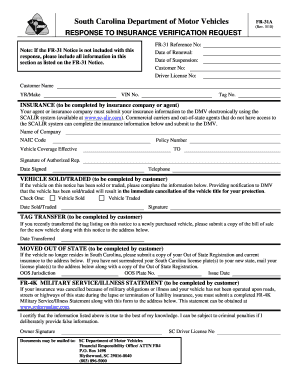
Filling out the Form 31 A Medical Certificate online is a straightforward process that ensures you provide all necessary medical information accurately. This guide will walk you through each section of the form, helping you understand the requirements and submit your document with confidence.
Follow the steps to complete your Form 31 A Medical Certificate online.
- Press the ‘Get Form’ button to access the form and launch it in your editing tool.
- Begin by entering the FR-31 Reference Number found in the notice you received. This helps link your submission to your case.
- Next, fill in the Date of Renewal, which indicates when your insurance coverage was last updated.
- Provide the Date of Suspension if applicable; this information is essential for your records.
- Input your Customer Number as well as your Driver License Number to identify your record accurately.
- Complete the Customer Name field with your full legal name, ensuring the information matches official documents.
- Enter the Year/Make of the vehicle, which includes the model year and manufacturer.
- Input the Vehicle Identification Number (VIN), a unique code for your vehicle.
- Fill in the Tag Number that corresponds to your vehicle's registration.
- Insurance information must be provided by your insurance company or agent. They should submit details electronically using the SCALIR system. If this isn't possible, they can complete the required fields themselves.
- Have your insurance company fill in their Name, NAIC Code, and Policy Number accurately.
- Provide the effective dates for your vehicle coverage to ensure clarity regarding your insurance status.
- The authorized representative of your insurance should sign and date this section, including their telephone number for follow-up inquiries.
- If applicable, indicate if the vehicle has been sold or traded, and provide the relevant date and your signature.
- For tag transfers, include the date of transfer and attach the bill of sale for the new vehicle.
- If you moved out of state, submit a copy of your Out of State registration along with current insurance, detailing the new jurisdiction and plate numbers.
- If applicable, complete the Military Service/Illness section by submitting the FR-4K statement along with this form.
- Lastly, certify that all provided information is accurate by signing the form. Ensure to send the completed document to the designated DMV address.
- Once all information is filled out correctly, you can save your changes, download a copy of the form, print it, or share it as required.
Take control of your documentation needs by completing your Form 31 A Medical Certificate online today.
To claim Form 31 19 10C and 10D, start by gathering the required documentation that supports your claim. Once prepared, you can fill out the forms accurately, ensuring all fields reflect true information. Submitting these forms through the US Legal Forms platform allows for easy navigation and direct assistance. It streamlines the claiming process, helping you to complete everything efficiently.