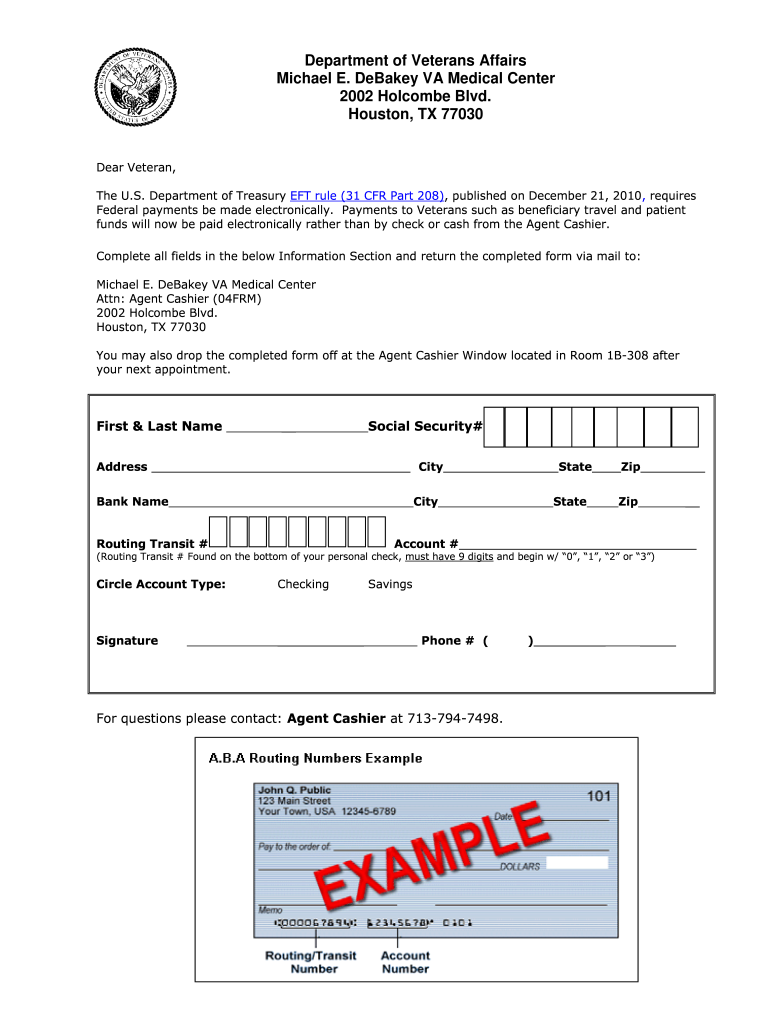
Ember 21, 2010, requires Federal payments be made electronically. Payments to Veterans such as beneficiary travel and patient funds will now be paid electronically rather than by check or cash from the Agent Cashier. Complete all fields in the below Information Section and return the completed form via mail to: Michael E. DeBakey VA Medical Center Attn: Agent Cashier (04FRM) 2002 Holcombe Blvd. Houston, TX 77030 You may also drop the completed form off at the Agent Cashier Window located in Room.
Loading

Open form follow the instructions

Easily sign the form with your finger

Send filled & signed form or save
How to fill out the EFT Set Up Form - Michael E. DeBakey VA Medical Center - Houston VA online
Completing the EFT Set Up Form for the Michael E. DeBakey VA Medical Center is essential for streamlining electronic payments for Veterans. This guide offers a step-by-step approach to ensure that you fill out the form accurately and efficiently.
Follow the steps to successfully complete the EFT Set Up Form.
- Press the ‘Get Form’ button to access the EFT Set Up Form and open it for editing.
- In the Information Section, carefully enter your first and last name as required.
- Provide your Social Security Number in the designated field.
- Fill in your address, including the street address, city, state, and zip code.
- Enter the name of your bank and the corresponding city where it is located.
- Input your bank's routing transit number, ensuring it is 9 digits and begins with ‘0’, ‘1’, ‘2’, or ‘3’.
- Provide your account number in the specified field.
- Circle the appropriate account type, either Checking or Savings.
- Sign the form where indicated to confirm your details.
- Include your phone number for any follow-up questions or communication.
- Once completed, you can save changes, download, print, or share the form as needed. Then, return the completed form via mail or drop it off at the designated location.
Complete your EFT Set Up Form online today to ensure timely electronic payments.
Experience a faster way to fill out and sign forms on the web. Access the most extensive library of templates available.
Related content
Apr 11, 2025 — Our main campus provides primary care and specialty health services...
Michael E. DeBakey accepted the chairship of the Department of Surgery at Baylor College...
Get answers to your most pressing questions about US Legal Forms API.
How to register at the local VA hospital?
To register at your local VA hospital, you need to gather essential documents, such as your identification and discharge papers. Then, visit the hospital or their website for specific registration instructions. Utilizing the EFT Set Up Form - Michael E. DeBakey VA Medical Center - Houston Va can also enhance your payment method once you're registered.
Why did I get an EFT payment?
You received an EFT payment because it is likely related to your VA benefits or services rendered. EFT payments improve efficiency, ensuring you receive your payments directly into your bank account. For more details and to stay informed on your transactions, consider using the EFT Set Up Form - Michael E. DeBakey VA Medical Center - Houston Va.
What is EFT and how does it work?
EFT is a system that allows you to transfer funds electronically. It works by routing transactions through banks and clearinghouses, eliminating the need for paper checks. By completing the EFT Set Up Form - Michael E. DeBakey VA Medical Center - Houston Va, you enable these efficient transactions, ensuring faster access to your entitled benefits.
What is EFT VA?
EFT VA refers to the Electronic Funds Transfer program specifically within the Veterans Affairs system. This program aims to support veterans by providing convenient and secure payment methods. By utilizing the EFT Set Up Form - Michael E. DeBakey VA Medical Center - Houston Va, veterans can easily manage their payments and access their benefits effectively.
How do I schedule a VA Houston appointment?
Scheduling an appointment at VA Houston is straightforward. You can call the facility directly or use the online scheduling system available through the VA's website. Additionally, the EFT Set Up Form - Michael E. DeBakey VA Medical Center - Houston Va. can help make your scheduling seamless by ensuring all your information is up to date and ready for your visit.
Does the VA have a provider portal?
Yes, the VA offers a provider portal that enables you to manage your health care efficiently. Through this portal, you can access various services, track appointments, and review your medical records. This resource complements the EFT Set Up Form - Michael E. DeBakey VA Medical Center - Houston Va., as it streamlines your interactions with VA services.
How do I transfer my care to VA Houston?
To transfer your care to the VA Houston, you first need to contact your current provider for medical records. Next, complete the EFT Set Up Form - Michael E. DeBakey VA Medical Center - Houston Va. This form will help facilitate your transition and ensure all your medical needs are met at the new facility. Once submitted, the staff will assist you in establishing your care.
Does Houston VA have valet parking?
Valet parking for Veterans : Valet parking is available free of charge to our Veterans with appointments at the main entrance, Monday through Friday, 5:30 a.m. to 6:00 p.m.
How to make an appointment at the Houston VA hospital?
Resources and support. Call us. 800-698-2411. Visit a medical center or regional office. Find a VA location.
How do I call the VA hospital in Houston?
VA Health Connect: Speak with professionally trained registered nurses 24/7 at 713-794-8985 or toll-free 800-639-5137.
Use professional pre-built templates to fill in and sign documents online faster. Get access to thousands of forms.
If you believe that this page should be taken down, please follow our DMCA take down process here.