Loading
Get Departamento De Obras Publicas
How it works
-

Open form follow the instructions
-

Easily sign the form with your finger
-

Send filled & signed form or save
How to fill out the Departamento De Obras Publicas online
This guide provides a comprehensive overview for users on how to fill out the Departamento De Obras Publicas form online. Follow the step-by-step instructions to ensure accurate completion of the application.
Follow the steps to complete the form effectively.
- Press the ‘Get Form’ button to access the form and open it in the online editor.
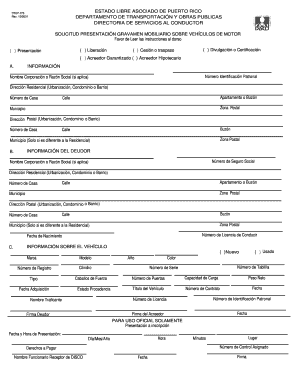
- Begin by filling in section A with the necessary identification details. This includes entering the employer identification number, the name of the corporation or business name (if applicable), residential address including urbanization, condominium or neighborhood, house number, apartment or box number, street name, postal zone, and municipality. Additionally, if the postal address differs from the residential address, complete the postal address fields.
- Move to section B and provide the debtor's information. Similar to section A, include the social security number, name of the corporation or business name (if applicable), and the complete residential and postal addresses.
- In section C, provide detailed information about the vehicle. Indicate whether the vehicle is new or used, followed by entering the make, registration number, type, acquisition date, model, year, color, cylinder capacity, horsepower, origin state, license plate number, serial number, number of doors, load capacity, net weight, vehicle title number, contract number, and relevant dates.
- Ensure to sign in the designated spaces for both the creditor and the debtor.
- For official use only, leave the section that includes registration date and time, control number, fees to be paid, receiving official's name, location, minutes, and signature blank.
- Review your information for accuracy, complete any missing fields, and ensure that all necessary documents accompany the form before final submission.
- Once completed, save changes, and download, print, or share the form as needed.
Start filling out your Departamento De Obras Publicas form online today!
O fiscal de obras da prefeitura atua garantindo que as obras públicas sejam realizadas de acordo com as especificações e normas estabelecidas. Ele verifica a qualidade dos materiais, a execução correta dos serviços e o cumprimento dos prazos. O trabalho do fiscal é crucial para assegurar que o investimento público seja utilizado eficientemente pelo Departamento De Obras Publicas.