Loading
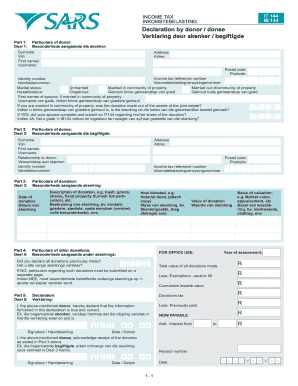
Get It144 Declaration By Donor
How it works
-

Open form follow the instructions
-

Easily sign the form with your finger
-

Send filled & signed form or save
How to fill out the It144 Declaration By Donor online
The It144 Declaration By Donor is an important document for individuals wishing to declare a donation for tax purposes. This guide will provide you with clear and detailed instructions on how to successfully fill out this form online.
Follow the steps to complete the It144 Declaration By Donor.
- Click ‘Get Form’ button to access the It144 Declaration By Donor and open it in your preferred online editor.
- In Part 1, provide the particulars of the donor. Fill in your surname, first names, address, postal code, income tax reference number, and identity number. Indicate your marital status by selecting from the options provided. If married in community of property, state if the donation was made from joint assets.
- If you indicated that you are married in community of property, confirm whether your spouse has submitted an IT144 regarding their share of the donation. Answer 'yes' or 'no' as applicable.
- In Part 2, enter the details of the donation. This includes the date of donation and a description of the donation (e.g., cash, goods, shares, fixed property). Be as detailed as possible.
- Specify how the donation was made, such as through a notarial deed, and if applicable, attach a copy.
- Complete the declaration section by confirming that the information provided is true and correct. Sign and date the document.
- In the financial section, record the total value of all donations made, applicable exemptions, cumulative taxable value, donations tax, and any previously paid amounts. Calculate the amount now payable.
- If applicable, provide particulars of any other donations made, and declare if all previous donations have been reported.
- In Part 5, enter the particulars of the donee. Fill in their surname, first names, relationship to the donor, and identity number.
- Once you have filled out each section and confirmed that all information is accurate, save your changes. You can then download, print, or share the completed form as needed.
Start completing your It144 Declaration By Donor online today.
Related links form
To get a QR code for donations, you can use online platforms that generate these codes for fundraising purposes. Many organizations now include QR codes on their donation pages, allowing supporters to donate quickly and easily. You can also integrate this feature via your website by utilizing tools that create a QR code linked to your It144 Declaration By Donor for seamless transaction tracking.