Loading
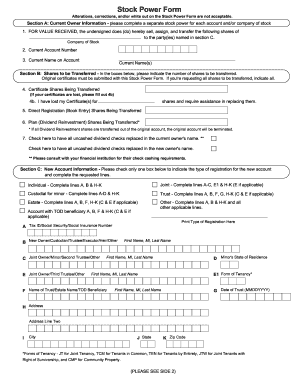
Get Fillable Stock Power Form
How it works
-

Open form follow the instructions
-

Easily sign the form with your finger
-

Send filled & signed form or save
How to fill out the Fillable Stock Power Form online
The Fillable Stock Power Form is a critical document used to transfer ownership of shares from one person or entity to another. This guide provides clear and supportive instructions to help you fill out the form accurately and efficiently online.
Follow the steps to complete the Fillable Stock Power Form online.
- Click ‘Get Form’ button to obtain the form and open it in the editor.
- Begin with Section A, Current Owner Information. Fill in the following details: the company of stock, your current account number, and your name as it appears on the account.
- Proceed to Section B, Shares to be Transferred. Here, indicate the number of shares you wish to transfer in the appropriate boxes. If you are transferring all shares, make this clear. Remember, original certificates must accompany this form.
- If you have lost any certificates, complete item 4b to request assistance in replacing them.
- Continue in Section B by filling in the amounts for Direct Registration Shares and Plan (Dividend Reinvestment) Shares, if applicable.
- In Section C, New Account Information, select the appropriate account type by checking one box and completing the corresponding lines with the required details about the new owner or entity.
- In Section D, Medallion Signature Guarantee, all current owners must sign the form and ensure their signature is guaranteed by a member of a Medallion Stamp Program.
- If you are transferring shares due to a deceased owner, complete Section E with the required information about the deceased's death and share ownership.
- Finally, complete Section F to provide your Taxpayer Identification Number and any necessary certifications.
- Once all sections are filled, review the form for accuracy, then save changes, download, print, or share the completed form as needed.
Complete your Fillable Stock Power Form online today for a smooth and efficient transfer.
Related links form
To fill a stock power form, begin by entering the name of the current stockholder and the recipient's details. Specify the type of stock being transferred along with the exact number of shares. Ensure that both parties sign to authorize the transfer. For efficiency, consider using our Fillable Stock Power Form, which streamlines the entire process and helps to avoid common mistakes.