Loading
Get Dch 3877
How it works
-

Open form follow the instructions
-

Easily sign the form with your finger
-

Send filled & signed form or save
How to fill out the DCH 3877 online
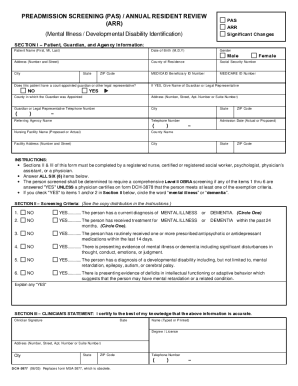
The DCH 3877 is a crucial document used for identifying individuals who may require mental health services upon admission to nursing facilities. This guide will walk you through the steps necessary to complete this form online effectively.
Follow the steps to complete the DCH 3877 online.
- Click 'Get Form' button to obtain the DCH 3877 and open it in the editor.
- Begin by filling out Section I, which includes patient information such as their name, date of birth, gender, and address. Ensure all details are accurate and complete.
- Indicate whether the patient has a court-appointed guardian or legal representative. If applicable, provide the guardian's name and contact information.
- Complete the referring agency's information, including their name and telephone number. Specify the nursing facility's name and admission date.
- Move on to Section II, where a clinician will assess the screening criteria. It is paramount that these items are filled out by a qualified professional, such as a registered nurse or physician.
- In Section II, answer all screening criteria questions accurately, circling the appropriate terms ('mental illness' or 'dementia') where indicated. Add explanations for any 'YES' responses.
- Finalize by having the clinician complete Section III, which includes signing, dating, and providing their name and credentials.
- Review the completed form for accuracy before saving changes. You can then download, print, or share the form as needed.
Start filling out the DCH 3877 online today to ensure a smooth admission process.
Get form
Experience a faster way to fill out and sign forms on the web. Access the most extensive library of templates available.
Related links form
Get This Form Now!
Use professional pre-built templates to fill in and sign documents online faster. Get access to thousands of forms.