Loading
Form preview
  • US Legal Forms
  • Other Templates
  • More Forms
  • More Uncategorized Forms
  • Florida Marriage License

Get Florida Marriage License

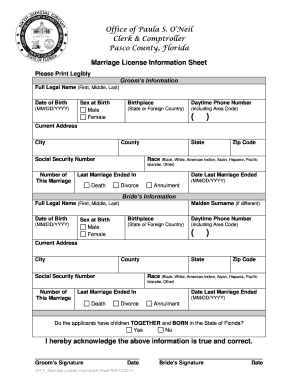
MARRIAGE LICENSE INFORMATION Please complete the following form. All information requested below is required to process your Marriage License Application. PLEASE PRINT LEGIBLY GROOM S INFORMATION.

How it works

  1. Open form

    Open form follow the instructions

  2. Easily sign form

    Easily sign the form with your finger

  3. Share form

    Send filled & signed form or save

How to fill out the Florida Marriage License online

Filling out the Florida marriage license online is a crucial step for individuals looking to formalize their partnership. This guide will provide clear instructions on how to complete the marriage license form, ensuring you successfully navigate each section.

Follow the steps to complete your marriage license form online.

  1. Click ‘Get Form’ button to access the Florida marriage license form and open it for editing.
  2. In the groom’s information section, fill in the full legal name, date of birth (MM/DD/YYYY), sex at birth, and birthplace. Provide a daytime phone number, current address including city, county, state, and zip code. Enter the Social Security number and race. Indicate the number of this marriage and state how the last marriage ended (death, divorce, annulment) along with the date it ended.
  3. In the bride’s information section, similarly fill in the full legal name, date of birth (MM/DD/YYYY), and sex at birth. If applicable, enter the maiden surname, birthplace, daytime phone number, current address including city, county, state, and zip code. Provide the Social Security number and race. Indicate the number of this marriage and how the last marriage ended and the date it ended.
  4. Answer the question regarding whether the applicants have children together who were born in the state of Florida by selecting 'Yes' or 'No.'
  5. Both the groom and bride should acknowledge the accuracy of the provided information by signing in the respective signature fields. Finally, indicate the date of signing.
  6. Once all sections are completed, review the form for accuracy. Save your changes, and then download or print the document for your records.

Begin completing your marriage license form online today!

Get form

Experience a faster way to fill out and sign forms on the web. Access the most extensive library of templates available.
Get form

Related content

Marriage Licenses
Couples wishing to become legally married in the state of Florida must apply for a...
Learn more
So You are Getting Married in Florida!1 - SMART...
Once your license application and paperwork have been accepted and the appropriate fee has...
Learn more
1999 BRFSS Codebook
Aug 8, 2000 — To Apply for a Marriage License. 158. 0.86. 0.90. 06. For Military...
Learn more

Related links form

Table Tennis Mail-in Registration Form - Overseas Chinese Culture ... GPS INSIGHT PRICING SCHEDULE Pa Name Change 2070 Mustang Skid Steer Service Manual Au

Questions & Answers

Get answers to your most pressing questions about US Legal Forms API.

Contact support

After getting married in Florida, your officiant is responsible for signing and returning the marriage license to the county clerk’s office. The clerk will then file it, making your marriage official. Once filed, you can request certified copies for legal matters, such as name changes or spousal benefits.

A Florida Marriage License is valid for 60 days from the date of issuance. This means you must conduct your marriage ceremony within this period. If the ceremony doesn't happen within these 60 days, you will need to apply for a new license.

In Florida, the officiant must return your completed marriage license to the county clerk's office within 10 days after your wedding. If this timeline is not met, the marriage license will not be recorded, which can lead to complications in proving your marriage status. Thus, it's important to ensure this is handled promptly.

After obtaining your Florida Marriage License, the next step is to select a date and an officiant for your ceremony. Make sure the officiant signs the license post-ceremony, as this is crucial for legal validation. Finally, don’t forget to return the completed license to the county clerk's office within the required timeframe.

A Florida Marriage License allows a couple to legally marry within the state. Once issued, the license does not require a waiting period, so you can get married immediately. It's essential to note that the license need to be signed by the officiant and returned to the clerk's office for official registration.

To file for a Florida Marriage License, both partners need to appear in person at a county clerk's office. Bring valid identification, such as a driver's license or passport, and be prepared to provide personal information, including your Social Security numbers. You can also check if your chosen county has an online application option for added convenience.

In Florida, the process of getting a marriage license generally takes about 30 minutes to a few hours, depending on the county and time of day. If you have all your documents ready, you can expedite this process. Be sure to contact your local clerk’s office for specifics to ensure a smooth experience.

To secure a Florida Marriage License, both parties must be at least 18 years old and present valid photo identification. Additionally, if either partner has been divorced, they need to provide the date of the final judgment. Meeting these requirements ensures you can start your wedding planning with confidence.

The quickest way to get married in Florida is to obtain your Florida Marriage License, then find an officiant who can perform the ceremony immediately. Once you take care of the necessary paperwork, the actual marriage ceremony can occur without reservation, which is particularly appealing for couples seeking a spontaneous wedding.

Obtaining a Florida Marriage License is relatively quick. Most couples can get the license within a few hours if they present the required documents. Keep in mind that processing times may vary slightly based on the county, so check ahead for specific details to avoid delays.

Get This Form Now!

Use professional pre-built templates to fill in and sign documents online faster. Get access to thousands of forms.
Get form
If you believe that this page should be taken down, please follow our DMCA take down processhere.
Get Florida Marriage License
Get form
  • Adoption
  • Bankruptcy
  • Contractors
  • Divorce
  • Home Sales
  • Employment
  • Identity Theft
  • Incorporation
  • Landlord Tenant
  • Living Trust
  • Name Change
  • Personal Planning
  • Small Business
  • Wills & Estates
  • Packages A-Z
  • Affidavits
  • Bankruptcy
  • Bill of Sale
  • Corporate - LLC
  • Divorce
  • Employment
  • Identity Theft
  • Internet Technology
  • Landlord Tenant
  • Living Wills
  • Name Change
  • Power of Attorney
  • Real Estate
  • Small Estates
  • Wills
  • All Forms
  • Forms A-Z
  • Other Templates
  • Legal Hub
  • About Us
  • Help Portal
  • Legal Resources
  • Blog
  • Affiliates
  • Contact Us
  • Delete My Account
  • Site Map
  • Industries
  • Forms in Spanish
  • Localized Forms
  • State-specific Forms
  • Forms Kit
  • Real Estate Handbook
  • All Guides
  • Notarize
  • Incorporation services
  • For Consumers
  • For Small Business
  • For Attorneys
  • USLegal
  • FormsPass
  • pdfFiller
  • signNow
  • altaFlow
  • DocHub
  • Instapage
Form Packages
  • Adoption
  • Bankruptcy
  • Contractors
  • Divorce
  • Home Sales
  • Employment
  • Identity Theft
  • Incorporation
  • Landlord Tenant
  • Living Trust
  • Name Change
  • Personal Planning
  • Small Business
  • Wills & Estates
  • Packages A-Z
Form Categories
  • Affidavits
  • Bankruptcy
  • Bill of Sale
  • Corporate - LLC
  • Divorce
  • Employment
  • Identity Theft
  • Internet Technology
  • Landlord Tenant
  • Living Wills
  • Name Change
  • Power of Attorney
  • Real Estate
  • Small Estates
  • Wills
  • All Forms
  • Forms A-Z
  • Other Templates
Customer Service
  • Legal Hub
  • About Us
  • Help Portal
  • Legal Resources
  • Blog
  • Affiliates
  • Contact Us
  • Delete My Account
  • Site Map
  • Industries
  • Forms in Spanish
  • Localized Forms
  • State-specific Forms
  • Forms Kit
Legal Guides
  • Real Estate Handbook
  • All Guides
Prepared for you
  • Notarize
  • Incorporation services
Our Customers
  • For Consumers
  • For Small Business
  • For Attorneys
Our Sites
  • USLegal
  • FormsPass
  • pdfFiller
  • signNow
  • altaFlow
  • DocHub
  • Instapage
Social Media
Call us now toll free:
+1 833 426 79 33
As seen in:
© Copyright 1999-2026 airSlate Legal Forms, Inc. 17 Station Street, Ste. 203, Brookline, MA 02445
  • Your Privacy Choices
  • Terms of Service
  • Privacy Notice
  • Content Takedown Policy
  • Bug Bounty Program