Loading
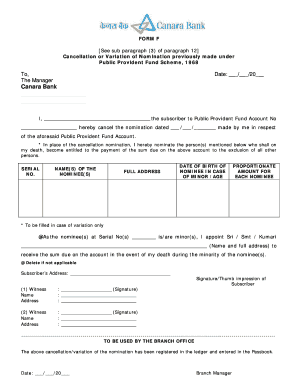
Get Canara Bank Ppf Account
How it works
-

Open form follow the instructions
-

Easily sign the form with your finger
-

Send filled & signed form or save
How to fill out the Canara Bank Ppf Account online
Filling out the Canara Bank Public Provident Fund Account form is an essential process for managing your financial future. This guide provides clear, step-by-step instructions to help you navigate the online form with ease.
Follow the steps to complete the form accurately.
- Click the ‘Get Form’ button to obtain the form and open it in the editor.
- Begin by entering the date in the format provided, ensuring accuracy for record-keeping purposes.
- Clearly state your name as the subscriber to the Public Provident Fund Account. Include your account number for identification.
- In the cancellation section, indicate the date of the previous nomination that you wish to cancel.
- List the details of the new nominee(s) in the designated fields provided for their names and full addresses.
- If any nominee is a minor, provide their date of birth and specify the proportionate amount for each nominee as needed.
- Designate a guardian for minor nominees by providing their full name and address in the corresponding section.
- Complete the subscriber's address section for clarity and to ensure proper correspondence.
- Include the names and addresses of two witnesses in the spaces provided, ensuring their signatures or thumb impressions are entered.
- Review all the information for accuracy. Once confirmed, save the changes to keep your entries secure.
- Finally, download or print the completed form for your records, ensuring you share it as necessary.
Complete your Canara Bank Ppf Account form online today!
Yes, an online Canara Bank PPF account is safe, provided you follow security guidelines. Canara Bank employs strong encryption and secure protocols to protect your information. Always ensure your login credentials are secure and avoid sharing them with anyone.