Loading
Get Ahs Insite
How it works
-

Open form follow the instructions
-

Easily sign the form with your finger
-

Send filled & signed form or save
How to fill out the Ahs Insite online
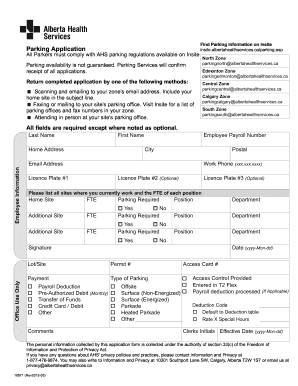
Filling out the Ahs Insite form can be a straightforward process if you follow the right steps. This guide provides a comprehensive overview of each section and field within the form to ensure you complete it accurately and efficiently.
Follow the steps to successfully complete your Ahs Insite application.
- Click the ‘Get Form’ button to obtain the form and open it in your editor.
- Begin by filling in your last name, first name, and home address in the designated fields. Ensure all entries are accurate and clearly legible.
- Enter your employee payroll number, city, and postal code as these details are essential for processing your application.
- Provide your email address and work phone number in the respective fields to ensure that Parking Services can contact you if needed.
- List your vehicle information by entering the licence plate numbers in the available fields. You may include up to three plates, with the second and third being optional.
- Indicate all work sites by listing them along with the full-time equivalent (FTE) of each position. This information helps determine your parking requirements based on your employment status.
- Specify whether parking is required for each site listed, along with your position and department. Check 'Yes' or 'No' for the parking required field.
- Sign and date the form in the signature area at the bottom. This signature certifies that the information provided is true and complete.
- If applicable, indicate your payment method by selecting from the options provided such as payroll deduction or credit card/debit.
- Review all completed fields carefully to ensure accuracy before finalizing your application.
- Once your application is complete, you can save the changes, download the file, print it, or share it as needed.
Begin your document submission process online today for a smoother experience.
The format for AA email addresses typically follows this structure: firstnamelastname@aa. If you're using AHS Insite for communication related to AA, ensure you confirm the specific address format from their resources. Adhering to this structure will enhance your communication effectiveness.