Loading
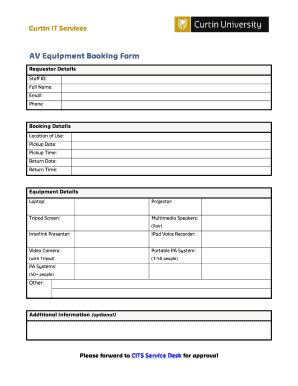
Get Equipment Booking Form Template
How it works
-

Open form follow the instructions
-

Easily sign the form with your finger
-

Send filled & signed form or save
How to fill out the equipment booking form template online
Filling out an equipment booking form online can streamline the process of reserving necessary tools for your event or project. This guide provides a clear and practical overview of each section of the Equipment Booking Form Template to ensure successful submissions.
Follow the steps to complete your booking form effectively.
- Click ‘Get Form’ button to obtain the form and open it in the editor.
- Complete the requestor details section by providing your staff ID, full name, email, and phone number. This information helps the processing team contact you if needed.
- In the booking details section, specify the location of use for the equipment, along with the preferred pickup date and pickup time. Additionally, indicate the return date and return time to ensure proper scheduling.
- Fill out the equipment details section by indicating your needs. Mark the boxes next to the required items, which may include options such as a laptop, projector, tripod screen, multimedia speakers, interlink presenter, iPod voice recorder, video camera, and portable PA system. Specify any additional equipment if necessary.
- If you have any additional information or special requests, include them in the additional information section. This part is optional but can provide helpful context for your booking.
- After completing all necessary fields, review your entries for accuracy. Once confirmed, you can save your changes, download the form, print it, or share it for approval. Ensure you forward the form to the CITS Service Desk for the necessary approvals.
Begin your booking process online by completing the form today.
Writing a booking form requires attention to detail and clarity. Include clear headings for each section, and use straightforward language for the instructions. By utilizing an Equipment Booking Form Template, you can create a comprehensive and organized document that facilitates easy bookings while ensuring all necessary information is gathered.