Loading
Form preview
  • US Legal Forms
  • Form Library
  • More Forms
  • More Multi-State Forms
  • Aflac Continuing Disability Form 2019

Get Aflac Continuing Disability Form 2019

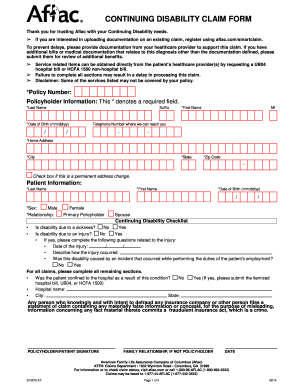
DUCK CONTINUING DISABILITY CLAIM FORM Thank you for trusting Aflac with your Continuing Disability needs. If you are interested in uploading documentation on an existing claim, register using aflac.com/smartclaim.

How it works

  1. Open form

    Open form follow the instructions

  2. Easily sign form

    Easily sign the form with your finger

  3. Share form

    Send filled & signed form or save

How to fill out the Aflac Continuing Disability Form 2019 online

Filing a continuing disability claim can feel overwhelming, but understanding the Aflac Continuing Disability Form 2019 is the first step toward securing the benefits you need. This guide provides clear, step-by-step instructions on how to complete the form efficiently online.

Follow the steps to fill out the form seamlessly.

  1. Click ‘Get Form’ button to access the Aflac Continuing Disability Form 2019. This will allow you to obtain the document and open it in your preferred online platform.
  2. Begin filling out the policy number and your personal information in the 'Policyholder Information' section. Ensure to complete all required fields marked with an asterisk (*), which include your last name, first name, date of birth, telephone number, home address, city, state, and zip code.
  3. In the 'Patient Information' section, input the patient’s last name, first name, date of birth, sex, and relationship to the policyholder. Make sure all required fields are filled in.
  4. Complete the Continuing Disability Checklist. Answer whether the disability is due to sickness or injury. If due to injury, provide additional details such as the date of the injury and how it occurred.
  5. Indicate if the patient was confined to a hospital due to this condition. If yes, include the hospital name and location.
  6. Proceed to fill out the Employer’s Statement section if applicable, providing necessary details about the employee, their employer, and their status of work during the disability.
  7. In the Physician’s Statement, include the attending physician's details, diagnosis information, treatment dates, and their recommendations regarding the patient's ability to return to work.
  8. Once all sections are complete, review the form for accuracy. Make sure that you have attached any required documentation that may support your claim.
  9. Finally, save your changes and download the filled form. You may also choose to print or share the form as necessary.

Complete your Aflac Continuing Disability Form 2019 online today for a smoother claims process.

Get form

Experience a faster way to fill out and sign forms on the web. Access the most extensive library of templates available.
Get form

Related content

FAQ - Benefits and Retirement Administration |...
To cancel Aflac coverage, District government employees can: Call 1-800-992-3522; or;...
Learn more
Aflac Cancer Protection Assurance
CONTINUATION OF COVERAGE BENEFIT: Aflac will waive all monthly premiums due for the policy...
Learn more
Proxy Statement
Mar 28, 2018 — Management and the Board of Directors respectfully request that (if you...
Learn more

Related links form

PARENT SYLLABUS FOR CLASS NURSERY 2015-2016 80, 82, 140 & 142 DURASTALL Shower Stalls Garmin Gpsmap 702 902 Series Manual DIRECTORATE OF DISTANCE EDUCATION Integral University ...

Questions & Answers

Get answers to your most pressing questions about US Legal Forms API.

Contact support

You have a total of 90 days to file a claim with Aflac after the event occurs. To ensure a smooth process, gather all necessary forms and supporting documents beforehand, including the Aflac Continuing Disability Form 2019. Being proactive can help you avoid missing the deadline and ensure you receive your benefits without hassle.

Aflac may deny a claim for several reasons, including incomplete documentation or failure to meet policy terms. For instance, if your claim lacks the necessary information from the Aflac Continuing Disability Form 2019, it might be rejected. It is advisable to thoroughly review your policy and understand the conditions that could affect your claim approval.

Aflac typically offers a grace period of 30 days for premium payments. During this time, you can still maintain coverage without any penalties. It's essential to review your policy details for specific information regarding the Aflac Continuing Disability Form 2019 to understand how this may apply to your benefits and claims.

Long-term disability insurance from Aflac provides financial assistance when you cannot work due to illness or injury. To benefit from this, you need to complete the Aflac Continuing Disability Form 2019, which initiates the claims process. Once Aflac approves your claim, you will receive monthly benefit payments to help cover your expenses. It's essential to understand the terms of your policy, as coverage details may vary.

AFLAC typically takes about 7 to 10 business days to review submitted documents once they are received. However, the review process can vary depending on the complexity of your claim and the completeness of your submitted forms, including the Aflac Continuing Disability Form 2019. Stay patient and refer to your online account for updates regarding your claim status.

You can mail your AFLAC claim forms to the address specified in your policy documents or on the AFLAC website. Be sure to include all necessary documents, including your Aflac Continuing Disability Form 2019, to support your claim. It's wise to use a trackable mailing service for confirmation of delivery.

To fax your AFLAC cancellation form, locate the dedicated fax number (usually provided on AFLAC's official website or in your policy documents). Before sending, ensure all fields are accurately completed on the Aflac Continuing Disability Form 2019, if applicable, to prevent any delays in processing your cancellation request.

To upload documents for your AFLAC claim, first, log in to your online account. Navigate to the claims section and select the option to upload files. Make sure to have the completed Aflac Continuing Disability Form 2019 ready, as well as any other necessary documents to support your claim for a smooth process.

Typically, you have 60 days to submit your AFLAC claims after the date of the incident or the beginning of the disability. It's important to gather all required documents, like the Aflac Continuing Disability Form 2019, promptly to comply with this timeline. Be sure to check specific policy details, as timelines may vary based on your coverage.

Submitting documents to Aflac is straightforward. You can send the required paperwork, including the Aflac Continuing Disability Form 2019, via their online portal or by mail. If you prefer printing and mailing documents, ensure that you keep copies for your records. If you need assistance, the uslegalforms platform provides resources to help you with the submission process.

Get This Form Now!

Use professional pre-built templates to fill in and sign documents online faster. Get access to thousands of forms.
Get form
If you believe that this page should be taken down, please follow our DMCA take down processhere.

Industry-leading security and compliance

US Legal Forms protects your data by complying with industry-specific security standards.
  • In businnes since 1997
    25+ years providing professional legal documents.
  • Accredited business
    Guarantees that a business meets BBB accreditation standards in the US and Canada.
  • Secured by Braintree
    Validated Level 1 PCI DSS compliant payment gateway that accepts most major credit and debit card brands from across the globe.
Get Aflac Continuing Disability Form 2019
Get form
  • Adoption
  • Bankruptcy
  • Contractors
  • Divorce
  • Home Sales
  • Employment
  • Identity Theft
  • Incorporation
  • Landlord Tenant
  • Living Trust
  • Name Change
  • Personal Planning
  • Small Business
  • Wills & Estates
  • Packages A-Z
  • Affidavits
  • Bankruptcy
  • Bill of Sale
  • Corporate - LLC
  • Divorce
  • Employment
  • Identity Theft
  • Internet Technology
  • Landlord Tenant
  • Living Wills
  • Name Change
  • Power of Attorney
  • Real Estate
  • Small Estates
  • Wills
  • All Forms
  • Forms A-Z
  • Form Library
  • Legal Hub
  • About Us
  • Help Portal
  • Legal Resources
  • Blog
  • Affiliates
  • Contact Us
  • Delete My Account
  • Site Map
  • Industries
  • Forms in Spanish
  • Localized Forms
  • State-specific Forms
  • Forms Kit
  • Real Estate Handbook
  • All Guides
  • Notarize
  • Incorporation services
  • For Consumers
  • For Small Business
  • For Attorneys
  • USLegal
  • FormsPass
  • pdfFiller
  • signNow
  • altaFlow
  • DocHub
  • Instapage
Form Packages
  • Adoption
  • Bankruptcy
  • Contractors
  • Divorce
  • Home Sales
  • Employment
  • Identity Theft
  • Incorporation
  • Landlord Tenant
  • Living Trust
  • Name Change
  • Personal Planning
  • Small Business
  • Wills & Estates
  • Packages A-Z
Form Categories
  • Affidavits
  • Bankruptcy
  • Bill of Sale
  • Corporate - LLC
  • Divorce
  • Employment
  • Identity Theft
  • Internet Technology
  • Landlord Tenant
  • Living Wills
  • Name Change
  • Power of Attorney
  • Real Estate
  • Small Estates
  • Wills
  • All Forms
  • Forms A-Z
  • Form Library
Customer Service
  • Legal Hub
  • About Us
  • Help Portal
  • Legal Resources
  • Blog
  • Affiliates
  • Contact Us
  • Delete My Account
  • Site Map
  • Industries
  • Forms in Spanish
  • Localized Forms
  • State-specific Forms
  • Forms Kit
Legal Guides
  • Real Estate Handbook
  • All Guides
Prepared for you
  • Notarize
  • Incorporation services
Our Customers
  • For Consumers
  • For Small Business
  • For Attorneys
Our Sites
  • USLegal
  • FormsPass
  • pdfFiller
  • signNow
  • altaFlow
  • DocHub
  • Instapage
Social Media
Call us now toll free:
+1 833 426 79 33
As seen in:
© Copyright 1999-2026 airSlate Legal Forms, Inc. 3720 Flowood Dr, Flowood, Mississippi 39232
  • Your Privacy Choices
  • Terms of Service
  • Privacy Notice
  • Content Takedown Policy
  • Bug Bounty Program