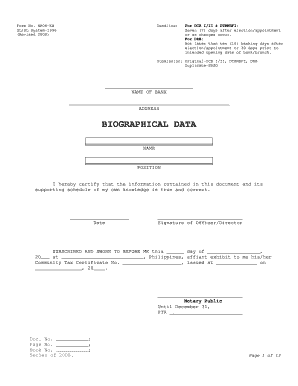
Get Biographical Data
How it works
-

Open form follow the instructions
-

Easily sign the form with your finger
-

Send filled & signed form or save
How to fill out the Biographical Data online
Filling out the Biographical Data form online is a crucial step for accurately representing your personal and professional information. This guide will lead you through the process, ensuring that you can confidently complete each section without difficulty.
Follow the steps to accurately complete your Biographical Data form.
- Click ‘Get Form’ button to obtain the form and open it in the editor.
- Begin filling in the 'Name of Bank' field by entering the official name of the financial institution associated with the Biographical Data form. Ensure the name is spelled correctly to avoid mistakes.
- In the 'Address' section, input the complete address of the bank, ensuring that all details such as street name, city, and postal code are accurate.
- Proceed to the 'Personal Information' section. Fill in your 'Surname,' 'Given Name,' and 'Middle Name.' All names should reflect your legal identification.
- Complete the 'Tax Identification Number (TIN)' field with your personal TIN as this is necessary for official documentation. Include the 'Updated As Of' date to indicate when this information was last amended.
- If applicable, list any 'Other Names Used' in the designated field. This is important for legal identification purposes.
- Specify your 'Management Level' by selecting between options such as Director or Officer, which indicates your role within the institution.
- Fill in the 'Date Elected / Re-elected / Appointed / Position Changed' field to reflect your current standing.
- Complete the 'Residence Address' and 'Telephone No.' fields with your current contact details.
- Include your 'Email Address' for further correspondence and any business-related communication.
- In the 'Civil Status' field, select the appropriate status: Single, Married, Divorced/Separated, or Widow.
- Indicate your 'Sex' by selecting either Male or Female.
- Provide your 'Date of Birth' along with your 'Citizenship' and 'Place of Birth.' These details are vital for identification.
- Continue with the 'Education and Training' section by listing your educational attainments, including the degree/course, school last attended, and years graduated/attended.
- Transition to the 'Work Experience' section, documenting your current position within the institution and previous roles in other organizations, both private and governmental. Indicate dates and positions clearly.
- Fill out the 'Family Relations' section, ensuring you provide complete details about your spouse and relevant family members as required.
- In the 'Others' section, disclose any real properties owned and banking information as previously requested.
- Answer the question regarding any judicial or administrative offenses, being truthful and complete in your response.
- Finally, review all the information you have entered for accuracy before proceeding to sign and date the document. Ensure you have the necessary certifications as required.
- Once completed, you can save changes, download, print, or share the Biographical Data form as needed.
Act now and complete your Biographical Data online for a smoother application process.
A biographical data form is a document designed to collect essential information about an individual's personal history. This form is commonly used in various applications, including immigration, employment, and academic purposes. The biographical data contained within helps organizations assess qualifications and background. If you need a professional-looking biographical data form, the US Legal Forms platform offers a variety of customizable options.
Industry-leading security and compliance
-
In businnes since 199725+ years providing professional legal documents.
-
Accredited businessGuarantees that a business meets BBB accreditation standards in the US and Canada.
-
Secured by BraintreeValidated Level 1 PCI DSS compliant payment gateway that accepts most major credit and debit card brands from across the globe.