Loading
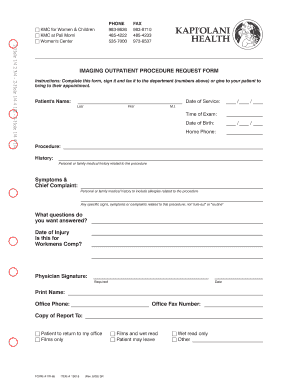
Get Outpatient Imaging Procedure Request Form - Kapi'olani Medical ... - Kapiolani
How it works
-

Open form follow the instructions
-

Easily sign the form with your finger
-

Send filled & signed form or save
How to fill out the Outpatient Imaging Procedure Request Form - Kapiʻolani Medical online
Completing the Outpatient Imaging Procedure Request Form is essential for ensuring the proper handling of imaging requests at Kapiʻolani Medical. This guide provides clear instructions to help you fill out the form effectively and efficiently.
Follow the steps to accurately complete the form.
- Click ‘Get Form’ button to obtain the form and open it in your editor.
- Enter the patient’s name in the designated fields, ensuring you include the last name, first name, and middle initial. This information is crucial for identifying the individual undergoing the imaging procedure.
- Next, fill in the date of service using the specified format (MM/DD/YYYY) to indicate when the imaging is scheduled.
- Input the time of the exam in the provided field to clarify when the procedure will take place.
- Record the patient’s date of birth using the same format (MM/DD/YYYY) to maintain accurate personal data.
- Enter the home phone number of the patient. This may be necessary for contact purposes regarding the procedure.
- Specify the imaging procedure required by filling out the corresponding section. Detail the exact nature of the request to ensure clarity.
- Provide relevant medical history in the history section. This includes personal or family medical issues that pertain to the imaging request, as well as any allergies.
- In the symptoms and chief complaint field, outline any specific signs, symptoms, or complaints related to the procedure to guide the medical team.
- Detail any questions you wish to have answered regarding the procedure to facilitate communication between you and the imaging professionals.
- If applicable, indicate the date of injury and specify if this request is related to Workers' Compensation by marking the appropriate field.
- Ensure the physician signature is completed, with the date signed, to validate the request.
- Print the physician's name, office phone, and office fax number to ensure the imaging department can reach the provider if needed.
- Indicate where the copy of the report should be sent by checking the appropriate box: whether to the patient’s office, only films, films and wet read, or wet read only.
- Finally, review all entries for accuracy. Once confirmed, save changes, then proceed to download or print the form as necessary for submission.
Complete your documents online to ensure a seamless imaging request process.