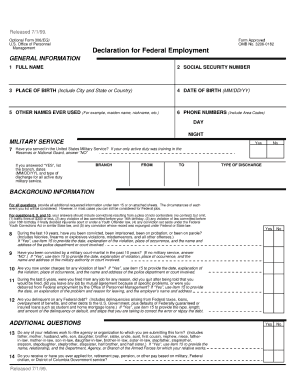
Released 7/1/99. Optional Form 306(EG) U.S. Office of Personnel Management Form Approved OMB No. 3206-0182 Declaration for Federal Employment 2 SOCIAL SECURITY NUMBER GENERAL INFORMATION 1 FULL NAME.
Open form follow the instructions
Easily sign the form with your finger
Send filled & signed form or save
How to fill out the Form Omb No 3206 0182 online
Filling out Form Omb No 3206 0182 online can help streamline your documentation process. This guide provides step-by-step instructions to ensure clear and accurate completion, catering to users with varying levels of experience.
Follow the steps to successfully complete the form online.
- Click the ‘Get Form’ button to access the form and open it in your preferred browser. This button will allow you to obtain a digital version of Form Omb No 3206 0182.
- Review the form title and ensure you are working with Form Omb No 3206 0182. This is essential for correct processing of your submission.
- Begin filling out the initial sections, which often include personal information such as your name, contact details, and address. Make sure to enter this information accurately.
- Proceed to the next section that may request specific identifiers or documentation related to the purpose of the form. Carefully follow any prompts or instructions provided.
- Complete any additional sections as required, ensuring all fields are filled out as per the guidelines. Review all entered information for completeness and accuracy.
- Once you have finished filling out the form, you can opt to save your changes. This ensures you preserve the information you have entered.
- After saving, you may download the form for your records, print it for physical submission, or share it as necessary.
Take the next step and fill out your document online today.
Experience a faster way to fill out and sign forms on the web. Access the most extensive library of templates available.
Related content
(*This form may also be used to assess fitness for federal contract employment). Form...
Get answers to your most pressing questions about US Legal Forms API.
What is the OMB number on a form?
The OMB number on a form, such as Form OMB No. 3206-0182, indicates that the form has been approved by the Office of Management and Budget. This approval signifies that the form complies with federal standards for data collection and reporting. Recognizing this number can help you ensure that you are using a legitimate and recognized form for your submission.
What is the form 306?
Form 306 generally refers to the OMB No. 3206-0182 document, which is essential for federal employment processes. This form collects information necessary for agencies to verify the eligibility of applicants. Understanding how to properly fill out this form can significantly enhance your chances of success in obtaining federal employment.
What is navsup form 306?
NAVSUP Form 306 is a specific variation of the 306 form used within the Navy Supply System. It focuses on collecting data pertinent to supply and logistics personnel. If you are navigating this form, remember that it falls under the OMB No. 3206-0182 guidelines, which ensures it meets federal compliance.
How to complete a 306?
Completing the 306 form involves providing accurate personal information, employment history, and any relevant certifications. It is essential to fill out each section thoroughly to avoid delays in processing. To assist you with this, the US Legal Forms platform provides clear guidelines and templates that simplify the completion of Form OMB No. 3206-0182.
What is a 306 used for?
The 306 form serves multiple purposes, primarily related to employment screening and eligibility verification. Organizations use this form to collect necessary data about individuals applying for public service roles. By utilizing Form OMB No. 3206-0182, agencies can streamline their hiring process while ensuring they adhere to government standards.
What is the 306 form?
The 306 form, also known as Form OMB No. 3206-0182, is a federal document required for various reporting purposes. It is often used by government agencies to gather important information regarding employment and service records. This form helps in maintaining accurate records and ensuring compliance with federal regulations.
How to complete OF-306?
Completing the OF-306 involves filling out personal, employment, and background details accurately and truthfully. You should carefully read the instructions provided, which include guidance on specific sections that may require additional information. As you work through the form, keep in mind Form Omb No 3206 0182 for help with understanding data collection and submission protocols.
What is an OF-306?
The OF-306 is a Declaration for Federal Employment, crucial for anyone seeking a federal job. It requires you to disclose personal information and previous employment details, which assist in the evaluation of your suitability for federal service. When submitting the OF-306, reference Form Omb No 3206 0182 for instructions on protecting your privacy during this critical step.
What is the TSA form 306?
The TSA Form 306 is an official document required by the Transportation Security Administration (TSA). It is essential for individuals who are applying for positions that require security clearance at transportation facilities. When filling out the TSA Form 306, you may also refer to Form Omb No 3206 0182 for detailed guidelines on handling personal information.
What does OMB stand for?
OMB stands for the Office of Management and Budget, a division of the Executive Office of the President. This office oversees the federal budget and evaluates the impact of agency regulations, including those forms that require an OMB number. Understanding the role of OMB can help you appreciate the significance of Form Omb No 3206 0182 and similar documents.
Use professional pre-built templates to fill in and sign documents online faster. Get access to thousands of forms.
If you believe that this page should be taken down, please follow our DMCA take down process here.