Loading
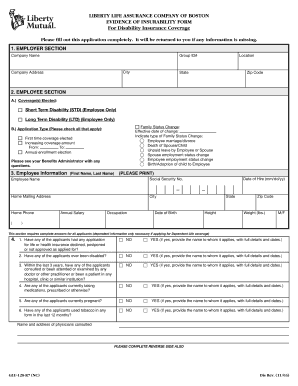
Get Liberty Mutual Evidence Of Insurability Form
How it works
-

Open form follow the instructions
-

Easily sign the form with your finger
-

Send filled & signed form or save
How to fill out the Liberty Mutual Evidence Of Insurability Form online
Completing the Liberty Mutual Evidence Of Insurability Form online is a straightforward process that helps ensure your application for disability insurance coverage is accurate and complete. This guide offers clear, step-by-step instructions to assist you in filling out the form efficiently.
Follow the steps to complete the online form accurately.
- Click ‘Get Form’ button to access the form and open it in the designated editor.
- In the employer section, enter the company name, group ID number, city, company address, location, state, and zip code as required.
- Move to the employee section. Under 'Coverage(s) Elected', select the appropriate coverage options such as Short Term Disability (STD) or Long Term Disability (LTD). If there has been a family status change, note the effective date and type of change.
- Indicate the application type by checking all applicable boxes: first-time coverage, increasing coverage amount, or annual enrollment election. If needed, consult your Benefits Administrator with any questions.
- Provide your personal information in the employee information section, including your first name, last name, social security number, mailing address, home phone, annual salary, occupation, date of birth, date of hire, height, weight, and gender.
- Answer the eligibility questions honestly. For each item, select 'Yes' or 'No' regarding past health insurance applications, disabilities, consultations with doctors, current medications, pregnancies, or tobacco use within the last year. If applicable, provide full details and dates to ensure accuracy.
- Indicate whether you have experienced any relevant diseases or symptoms. Check 'Yes' or 'No' for conditions listed and provide details as necessary for transparency.
- At the end of the form, review and confirm that all information is accurate. Provide your signature and the date to validate your application. Ensure that the application is filled out entirely before submission.
- Save the changes made to the form. You can then download or print it for your records. Lastly, return the completed form to the address specified on the form.
Complete your documents online today to ensure a smooth application process!
To find your declaration page on Liberty Mutual, visit their website and log into your account. Navigate to the 'Documents' section, where you will typically find your declaration page listed under your policy details. Should you need further assistance, connecting with Liberty Mutual's customer service can provide additional support.
Industry-leading security and compliance
US Legal Forms protects your data by complying with industry-specific security standards.
-
In businnes since 199725+ years providing professional legal documents.
-
Accredited businessGuarantees that a business meets BBB accreditation standards in the US and Canada.
-
Secured by BraintreeValidated Level 1 PCI DSS compliant payment gateway that accepts most major credit and debit card brands from across the globe.