Loading
Get Myprotein Returns
How it works
-

Open form follow the instructions
-

Easily sign the form with your finger
-

Send filled & signed form or save
How to fill out the Myprotein Returns online
Filing a returns request with Myprotein is a straightforward process designed to ensure that users can easily return items they are not satisfied with. This guide provides step-by-step instructions to help you complete the Myprotein Returns form effectively.
Follow the steps to successfully fill out the Myprotein Returns form.
- Press the ‘Get Form’ button to access the Myprotein Returns form.
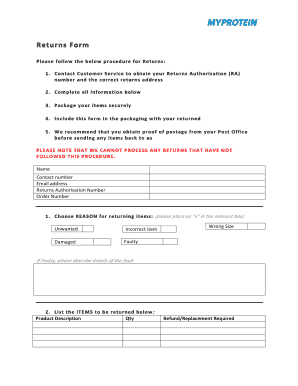
- Contact customer service to secure your Returns Authorisation (RA) number and obtain the correct return address.
- Carefully fill in all the required information on the form, ensuring accuracy for a smooth returns process.
- Select the reason for returning the items by placing an ‘x’ in the relevant box, such as wrong size, unwanted, incorrect item, faulty, or damaged.
- If you selected 'faulty,' provide specific details regarding the fault in the designated area.
- List the items you are returning in the space provided, including product descriptions and quantities.
- Indicate whether a refund or replacement is required by selecting the appropriate option.
- Securely package your items and include the completed form within the package.
- For verification, we recommend obtaining proof of postage from your post office before sending the items back.
Complete your Myprotein Returns form online today for a hassle-free returns experience.
Returned Myprotein items are typically inspected upon arrival at the warehouse. If the items meet the return criteria, they are processed for a refund or exchange. This process ensures that all returns are handled efficiently, paving the way for a positive experience for you as a customer making Myprotein Returns.