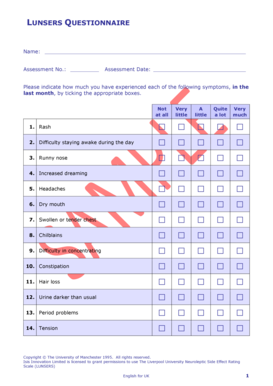
LUNSERS QUESTIONNAIRE Name: Assessment No.: Assessment Date: Please indicate how much you have experienced each of the following symptoms, in the last month, by ticking the appropriate boxes. Not.
Open form follow the instructions
Easily sign the form with your finger
Send filled & signed form or save
How to fill out the Lunsers Printable online
The Lunsers Printable is a questionnaire designed to assess various symptoms experienced by individuals. This guide will provide you with clear and step-by-step instructions on how to fill out the form accurately and efficiently.
Follow the steps to complete the Lunsers Printable form.
- Use the ‘Get Form’ button to access the Lunsers Printable questionnaire and open it in your preferred editor.
- Begin by entering your name in the designated space provided at the top of the form.
- Next, input your assessment number in the appropriate field. This number is essential for tracking your responses.
- Fill in the assessment date by selecting or writing the date when you are completing this questionnaire.
- For each symptom listed, indicate the level of experience over the last month. You will find five boxes to tick: 'Not at all', 'Very little', 'A little', 'Quite a lot', and 'Very much'. Choose the option that best reflects your experience.
- Make sure to complete each symptom statement with the corresponding checkbox for clear and accurate responses.
- Once you have filled out the form, review all entries to ensure accuracy and completeness.
- Finally, you can save your changes, download the completed form, print it out, or share it as needed.
Get started with filling out your Lunsers Printable questionnaire online today!
Experience a faster way to fill out and sign forms on the web. Access the most extensive library of templates available.
Related content
Commentary. The HDRS (also known as the Ham-D) is the most wide- ly used...
Download Free PDF. Liverpool University Neuroleptic Side-Effect Rating Scale (LUNSERS) as...
Get answers to your most pressing questions about US Legal Forms API.
What is the scoring form for LUnsers?
The scoring form for LUnsers is designed to facilitate the evaluation of side effects in a concise manner. This form outlines a clear scoring system based on patient responses. By utilizing the LUnsers printable scoring form, you can ensure consistent and accurate assessments, which ultimately aid in enhancing patient care and treatment strategies.
How is the LUnsers questionnaire scored?
The scoring of the LUnsers questionnaire is straightforward, allowing clinicians to interpret results effectively. Each question provides a scale that rates the severity of specific side effects. By totaling the scores, healthcare professionals can determine the overall impact of treatment on the patient, ensuring tailored adjustments as necessary.
What is lunsers?
Lunsers is a specialized questionnaire created to evaluate the side effects of antipsychotic medications. It focuses on capturing detailed patient experiences, making it easier for healthcare providers to understand the impact of treatment. When you opt for the LUnsers printable format, you gain a practical, user-friendly tool for your clinical practice.
What is the antipsychotic side effect rating scale?
The antipsychotic side effect rating scale is a comprehensive assessment tool that evaluates the side effects associated with antipsychotic drugs. It provides valuable insights into how these medications may affect patients, helping medical professionals make informed decisions. You can enhance your assessments by utilizing LUnsers printable forms to standardize the evaluation process.
What is the LUnsers side effect rating scale?
The LUnsers side effect rating scale serves as a structured tool designed to measure the severity of side effects caused by antipsychotic medications. This scale helps clinicians assess the impact of these medications on patients' daily lives. By using the LUnsers printable version, healthcare providers can easily track and monitor any changes over time, ensuring better patient management and care.
What is the Glasgow antipsychotic side effect Scale?
The Glasgow antipsychotic side effect Scale is a tool designed to evaluate the side effects of antipsychotic medications. It provides healthcare professionals with a structured way to acknowledge and manage these effects in patients. Understanding these side effects is crucial for improving patient care, making Lunsers Printable a valuable addition to your assessment toolkit.
What is the meaning of Lunser?
The Liverpool University Neuroleptic Side Effect Rating Scale (LUNSERS) is self-rating scale for measuring the side-effect of antipsychotic medications.
How is the Lunsers assessment scored?
The scale consists of 41 known side effects of neuroleptics. Each 'side-effect' listed is scored on a five point rating scale of 0 - 4, i.e. 0 = 'not at all' and 4 = Very much.... LUNSERS scorePercentileApproximate grade0 - 70 - 5%Very Low8 - 276 - 25%Low28 - 5826 - 74%Average59 - 8075 - 94%High1 more row
What is the Lunsers assessment tool?
The LUNSERS is designed to monitor medication-induced side effects. This psychiatric assessment tools allows for the monitoring of side effects related to neuroleptic (or anti-psychotic) medications. The test is a self-reported check-tick box format with a predefined scale from "not at all" to "very much".
What does Lunsers stand for?
Neuroleptic Side Effect Rating Scale.
Use professional pre-built templates to fill in and sign documents online faster. Get access to thousands of forms.
If you believe that this page should be taken down, please follow our DMCA take down process here.