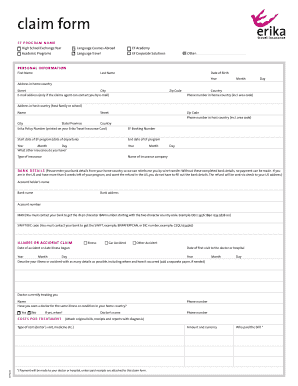
Get Erika Insurance Claim Form
How it works
-

Open form follow the instructions
-

Easily sign the form with your finger
-

Send filled & signed form or save
How to fill out the Erika Insurance Claim Form online
Navigating the Erika Insurance Claim Form can seem overwhelming, but we're here to guide you through the process step-by-step. This user-friendly guide will help you complete the form accurately and efficiently, ensuring that your claim is submitted without delays.
Follow the steps to fill out the Erika Insurance Claim Form online effectively.
- Click ‘Get Form’ button to access the Erika Insurance Claim Form and open it for editing.
- Begin by filling in your personal information. Enter your first name, last name, and date of birth. Make sure to provide your home country address, including the street, city, zip code, and country.
- Provide your email address, ensuring it is one you regularly check, as the claims agent may contact you here. Then, enter your phone number with the area code for your home country.
- Next, fill in your host country address, including the host family or school name, street, city, state/province, zip code, and country. Also, provide your phone number in the host country.
- Input your Erika Policy Number and EF Booking Number, both of which are crucial for processing your claim.
- Specify the start and end date of your EF program, providing the year, month, and day as required.
- If you have additional insurance, please describe it. Include the type of insurance and the name of the insurance company.
- Complete the bank details section accurately to facilitate reimbursement through wire transfer. This includes entering the account holder’s name, bank name, bank address, account number, IBAN, and SWIFT/BIC code.
- If you are claiming for an illness or accident, fill in the relevant dates and detail your condition, including the date it began and when you first visited a doctor or hospital.
- For treatment costs, state the type of costs incurred, the amount in the relevant currency, and who paid these bills. Remember to attach original bills, receipts, and reports if applicable.
- If you are making a property or baggage claim, describe the incident in detail, including where and when it occurred, and specify the type of damage or loss.
- Provide adequate documentation for your property/baggage claim, including police reports or other proof of ownership. Fill in the detailed description and the total amount you are claiming.
- For any other type of claims, give detailed descriptions as required.
- In the signature section, read through the statements carefully. By signing, you certify that the details provided are accurate and authorize the release of your personal data as required.
- Finally, perform a last check to ensure all relevant documents are attached, bank details are complete, your contact information is clear, and the claim form is signed.
- Once all sections are completed, save the changes to your form. You may then download, print, or share it as needed.
Start filling out your Erika Insurance Claim Form online today to ensure a smooth claims process.
When making an insurance claim, especially with the Erika Insurance Claim Form, be clear and concise about the situation. Start by stating your name and policy number to establish your account. Next, explain the incident in a straightforward manner, including any essential details that support your claim. Always maintain a calm and respectful tone, as this can facilitate a smoother interaction with your insurance provider.