Loading
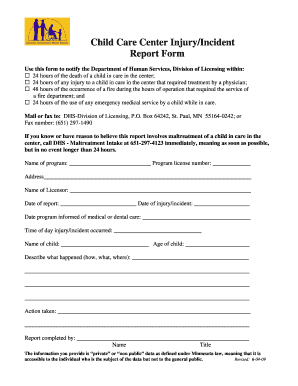
Get Child Care Incident Report Form
How it works
-

Open form follow the instructions
-

Easily sign the form with your finger
-

Send filled & signed form or save
How to fill out the Child Care Incident Report Form online
Filling out the Child Care Incident Report Form online is essential for notifying the appropriate authorities about any incidents in a childcare setting. This guide will lead you through the process, ensuring that you complete each section accurately and efficiently.
Follow the steps to successfully complete the form.
- Click 'Get Form' button to access the form and open it for editing.
- Enter the name of your program in the provided field. Make sure this is the official name of the childcare center where the incident occurred.
- Fill in the program license number. This number is typically found on your license documentation and is necessary for record-keeping.
- Detail the address of the childcare center in the designated space. This includes street, city, state, and zip code.
- Provide the name of the licensor who oversees your childcare program. This is critical for tracking and follow-up.
- Record the date of the report. This should reflect the date the incident was reported, not the date of the incident itself.
- Indicate the date of the injury or incident. Accuracy here is crucial, as it relates to timelines for reporting.
- Enter the date the program was informed of any medical or dental care provided to the child involved.
- Document the time of day when the injury or incident occurred. Provide the best estimate possible if the exact time is unknown.
- Input the name of the child involved in the incident and their age. This creates a clear record for the individual involved.
- In the 'Describe what happened' section, provide a detailed overview of the incident. Include key details about how, what, and where it occurred.
- Specify any action that was taken immediately following the incident. This could include medical treatment or notification of authorities.
- Complete the report with your name and title in the 'Report completed by' section. This identifies the individual responsible for the report.
- Finally, review all entries for accuracy. Once confirmed, save your changes, download a copy for your records, print the form, or share it as required.
Ensure compliance by completing the Child Care Incident Report Form online today.
To fill in an accident report form, similar to the Child Care Incident Report Form, ensure you provide accurate and complete information. Start with the basic details like the time, location, and description of the accident. Highlight any immediate actions taken and note down any witnesses to give a full picture of the incident.
Industry-leading security and compliance
US Legal Forms protects your data by complying with industry-specific security standards.
-
In businnes since 199725+ years providing professional legal documents.
-
Accredited businessGuarantees that a business meets BBB accreditation standards in the US and Canada.
-
Secured by BraintreeValidated Level 1 PCI DSS compliant payment gateway that accepts most major credit and debit card brands from across the globe.