Loading
Get Tb Clearance Letter
How it works
-

Open form follow the instructions
-

Easily sign the form with your finger
-

Send filled & signed form or save
How to fill out the Tb clearance letter online
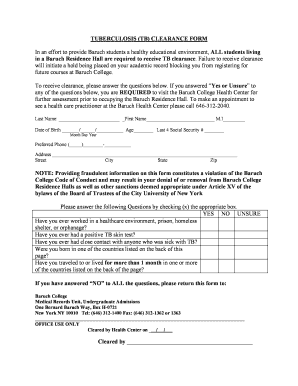
This guide provides a clear and supportive walkthrough for completing the Tuberculosis (TB) clearance letter online. Proper completion is essential for students residing in Baruch Residence Halls to ensure compliance with health regulations.
Follow the steps to complete the Tb clearance letter online
- Click ‘Get Form’ button to obtain the form and open it in the editor.
- Fill in your last name, first name, and middle initial in the designated fields.
- Enter your date of birth in the format MM/DD/YYYY, along with your age and the last four digits of your Social Security number.
- Provide your preferred phone number, ensuring it follows the correct format.
- Complete the address section by filling in your street address, city, state, and zip code.
- Carefully answer the questions regarding previous TB exposure and health history by checking the appropriate boxes (yes, no, unsure).
- If you answered 'no' to all questions, return the completed form to the Medical Records Unit at Baruch College using the provided contact details.
- Office personnel will review your form and indicate clearance in the office use section.
- Once completed, you can save your changes, download, print, or share the form as needed.
Start filling out your Tb clearance letter online today!
A TB clearance certificate is an official document confirming that a person has tested negative for active tuberculosis. It may be required for various settings, including schools and workplaces. To receive this certificate, you typically need results from a healthcare provider confirming your TB status. Obtaining a TB clearance letter is essential for meeting these requirements.