Loading
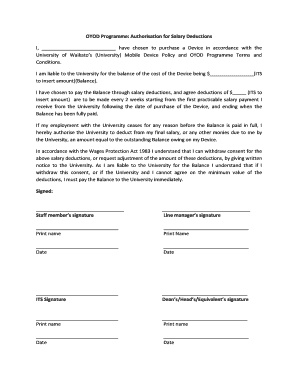
Get Oyod Programme: Authorisation For Salary Deductions I, Have ... - Waikato Ac
How it works
-

Open form follow the instructions
-

Easily sign the form with your finger
-

Send filled & signed form or save
How to fill out the OYOD Programme: Authorisation For Salary Deductions I, Have ... - Waikato Ac online
This guide provides clear and supportive instructions for completing the OYOD Programme: Authorisation For Salary Deductions form online. By following these steps, users can ensure that they accurately fill out the necessary information for salary deductions related to mobile device purchases.
Follow the steps to complete your salary deduction authorisation form.
- Utilize the 'Get Form' button to access the form and open it in your preferred document editor.
- In the first blank, enter your full name, indicating you are the person responsible for the device purchase under the University's terms.
- Next, input the total cost of the device in the designated field for the balance amount.
- Specify the amount to be deducted from your salary every two weeks. Ensure this amount allows for the balance to be paid off by the end of the payment agreement.
- Confirm that you agree to the deductions starting from your next applicable salary payment, and indicate when the final payment will occur.
- Read the section regarding the cessation of your employment and acknowledge the university's right to deduct the remaining balance from your final salary.
- Review your understanding of the Wages Protection Act 1983 and your rights to withdraw consent or adjust deductions. Make a note to provide written notice to the university if necessary.
- After filling out all sections, proceed to sign the form where indicated, and ensure to have your line manager also sign. Print names are required next to each signature.
- Finally, include the date beside each person's signature. Ensure the ITS and Dean/Head signatures and printed names are also filled in accordingly.
- Once all sections are completed, save changes to your document. You can then download, print, or share the completed form as required.
Complete your OYOD Programme authorisation for salary deductions online today!
Industry-leading security and compliance
US Legal Forms protects your data by complying with industry-specific security standards.
-
In businnes since 199725+ years providing professional legal documents.
-
Accredited businessGuarantees that a business meets BBB accreditation standards in the US and Canada.
-
Secured by BraintreeValidated Level 1 PCI DSS compliant payment gateway that accepts most major credit and debit card brands from across the globe.