Loading
Get Cara Isi Formulir Npwp Online
How it works
-

Open form follow the instructions
-

Easily sign the form with your finger
-

Send filled & signed form or save
How to use or fill out the Cara Isi Formulir Npwp Online online
This guide provides clear and detailed instructions on how to effectively fill out the Cara Isi Formulir Npwp Online. Whether you are a new user or have prior experience, this comprehensive manual will support you through each section of the form.
Follow the steps to successfully complete the form online.
- Press the ‘Get Form’ button to obtain the form and open it in your preferred editor.
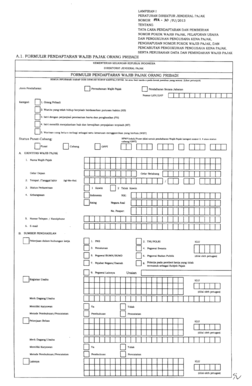
- Begin by selecting the type of registration by marking the appropriate box, either for ‘Permohonan Wajib Pajak’ or ‘Pendaftaran Secara Jabatan’.
- Fill in the ‘Nomor LHV/LHP’ if applicable, otherwise skip this field.
- Tick the box corresponding to your taxpayer category (Orang Pribadi, etc.) to identify your status.
- Specify your status as either NPWP Induk/Pusat or Cabang/OPPT based on your situation.
- In the ‘A. Identitas Wajib Pajak’ section, provide your full name, place and date of birth, marital status, nationality, and relevant identification numbers.
- Under ‘B. Sumber Penghasilan,’ outline your employment situation and any business activities, marking the relevant options.
- In the ‘C. Alamat’ section, accurately list your residential and business addresses.
- Complete ‘D. Informasi Tambahan’ by specifying the number of dependents and income range.
- Finally, review and confirm your details in the ‘E. Pernyataan’ section, ensuring everything is correct before submitting.
Complete your forms online today for a streamlined and efficient process.
To register for NPWP online, visit the official Indonesian tax authority's website and fill out the required forms. You will need to create an account and provide personal information, including your identification. This online process is designed to be user-friendly and accessible. By understanding the Cara Isi Formulir Npwp Online, you can complete your registration efficiently and accurately.