Loading
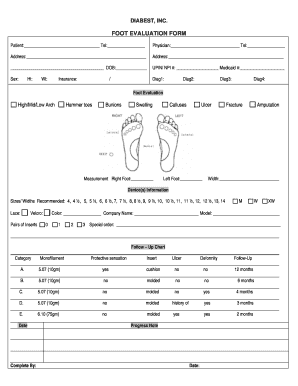
Get Foot Evaluation Form - Diabest Inc
How it works
-

Open form follow the instructions
-

Easily sign the form with your finger
-

Send filled & signed form or save
How to fill out the Foot Evaluation Form - Diabest Inc online
Filling out the Foot Evaluation Form from Diabest Inc online is an essential step in ensuring accurate assessment and treatment for foot-related issues. This guide provides clear, step-by-step instructions to help you complete the form efficiently.
Follow the steps to successfully complete the Foot Evaluation Form.
- Press the ‘Get Form’ button to access the Foot Evaluation Form and open it in your preferred digital editor.
- Begin by entering the patient's name and telephone number in the designated fields at the top of the form. This step is crucial for identifying the individual being evaluated.
- Next, fill in the physician's name and telephone number. This information is necessary for any follow-up communication regarding the patient's foot evaluation.
- Complete the address section where both the patient and physician reside. Providing accurate addresses helps with record-keeping and communications.
- Indicate the date of birth of the patient in the appropriate field. This assists in identifying the patient's age and may influence treatment options.
- Record the UPIN/NPI and Medicaid numbers, if applicable. These identifiers ensure that the patient's records are correctly managed within healthcare systems.
- Choose the sex of the patient from the options provided. This information is sometimes relevant for medical assessments.
- State any relevant diagnoses in the Diag fields, marking up to four potential conditions affecting the patient's feet.
- Provide the patient's height and weight in the designated fields, which are essential for assessing health and fitting options for devices.
- Select the patient's insurance information as needed.
- In the foot evaluation section, note important observations such as arch type, hammer toes, bunions, swelling, and any measurements for both the right and left feet.
- List any notable conditions like calluses, ulcers, fractures, or amputations in the provided areas to give a complete picture of the foot health.
- Fill out the device information, selecting sizes and widths for recommended shoes or inserts, including any special orders that may be needed.
- Detail the follow-up chart, marking observations and suggestions for future evaluations and treatments.
- Finalize by completing the progress note and any additional comments that might be relevant for the patient's file.
- Once all fields are accurately filled, save the changes, and download, print, or share the completed form as necessary.
Complete the Foot Evaluation Form online today to ensure proper assessment and care for your foot health.
To conduct a foot assessment, begin by gathering necessary information about your foot history and any existing conditions. Next, visually inspect and manually examine your feet, assessing for discomfort and mobility. Documenting your findings on the Foot Evaluation Form - Diabest Inc. streamlines the process and helps track changes over time.