Loading
Form preview
  • US Legal Forms
  • Other Templates
  • More Forms
  • More Multi-State Forms
  • Mse Application Form - Union Bank Of India

Get Mse Application Form - Union Bank Of India

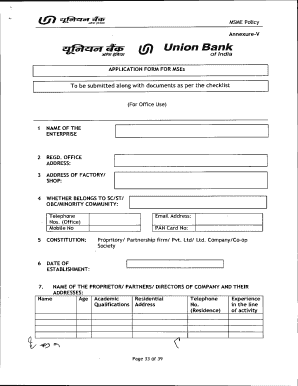
Cr Cif al* Cal et MSME Policymkt; InZTIAnnexureVte flaTa Union Bank of IndiaAPPLICATION FORM FOR MSEs To be submitted along with documents as per the checklist(For Office Use)1NAME OF THE ENTERPRISE2REGD.

How it works

  1. Open form

    Open form follow the instructions

  2. Easily sign form

    Easily sign the form with your finger

  3. Share form

    Send filled & signed form or save

How to fill out the MSE Application Form - Union Bank Of India online

Filling out the MSE Application Form for Union Bank of India can be a straightforward process when approached step-by-step. This guide is designed to assist users, regardless of their prior experience, to accurately complete the form online.

Follow the steps to successfully complete your application online.

  1. Click ‘Get Form’ button to obtain the form and open it in the editor.
  2. Begin by entering the name of your enterprise in the designated field. Ensure that this matches the registered name of your business.
  3. Provide the registered office address in the next field. This is critical for the official documentation.
  4. Input the address of your factory or shop. This should be the location where business activities are conducted.
  5. Indicate whether your enterprise belongs to the SC/ST/OBC/minority community. Fill in the specific telephone and mobile numbers associated with your business.
  6. Specify the legal constitution of your business such as proprietary, partnership, limited company, or cooperative society.
  7. Enter the date of establishment of your business. This helps in determining your experience and operational history.
  8. List the names and addresses of the proprietors, partners, or directors of the company. Include their academic qualifications and relevant experience in the activity line.
  9. In the next section, detail your current and proposed business activities. Make sure to clarify if you are suggesting a different activity than previously stated.
  10. Identify any associate concerns and describe the nature of their association. Clearly detail your interest within those associates.
  11. Provide information regarding any existing credit facilities, detailing types, limits, and amounts. Certify that your unit has no outstanding loans from other banks.
  12. Outline the proposed credit facilities you are applying for, including the types of loans and their purposes.
  13. If applying for a term loan, provide details about the machinery required, including types and costs.
  14. List any collateral security being offered, if applicable, and include all relevant details.
  15. Complete the section regarding past financial performance and future estimates for your business.
  16. Ensure all statutory obligations are met, marking compliance with a yes or no, and explaining any not applicable situations.
  17. Affix required photographs and provide your signature indicating that all information supplied is true and correct.
  18. Attach all necessary documents as outlined, ensuring you check off items from the checklist provided within the form.
  19. Finally, review all filled sections for accuracy, then save your changes. You can download, print, or share the form as needed.

Complete your MSE Application Form online today and take the next step towards your business growth!

Get form

Experience a faster way to fill out and sign forms on the web. Access the most extensive library of templates available.
Get form

Related content

FORM 20-F
The government of India has made it mandatory for business establishments with turnover...
Learn more
Vendor Setup Form - mse@osu.edu
When an invoice is paid, you will receive an email with an Excel attachment that contains...
Learn more
520990PUB0EPI1101Official0Us...
Apr 1, 2009 — All other queries on rights and licenses, including subsidiary rights...
Learn more

Related links form

Form-725 Raw Material Evaluation Form - Pharmaceutical Quality ... POTLATCH FOREST HOLDINGS - Potlatch Timber Sales FORM- 24 See Rule 69 Application For The Grant Of Or Renewal Of A Licence To Manufacture For Sale Five Guys Employee Handbook 2020

Questions & Answers

Get answers to your most pressing questions about US Legal Forms API.

Contact support

To enable SMS banking in Union Bank of India, simply visit the official website or your nearest branch for the application form. Follow the instructions to register your mobile number with the bank for secure banking transactions via SMS. Once activated, you will receive updates on your account and transactions, facilitating easier management of your finances, especially when applying for services like the MSE Application Form - Union Bank Of India.

Filling out Form A2 at Union Bank of India is straightforward. Begin by providing your personal details, including your name and address, followed by the purpose of the remittance. Be sure to have relevant documentation handy, as necessary information may be required for sections of the form. Completing the MSE Application Form - Union Bank Of India alongside form A2 ensures a smooth financial transaction process.

To submit your KYC documentation to Union Bank of India, you can visit your nearest branch with the necessary documents, such as your identification and address proof. Additionally, you can also use the bank's online platform to upload required documents. Completing your KYC is essential, especially when filling out the MSE Application Form - Union Bank Of India, as it ensures the bank verifies your identity and complies with regulations.

To take a mini statement in Union Bank of India, you can use the bank's ATM services or mobile banking app. Simply insert your debit card at an ATM and select the mini statement option. Alternatively, log in to the mobile banking app, navigate to the account section, and request the mini statement. This convenience helps you track your transactions easily while managing your finances effectively.

To fill the Union Bank account opening form online, visit the official website and select the account type. Provide your personal and financial details accurately. Completing this step smoothly can strengthen your position when you later apply with the MSE Application Form - Union Bank Of India.

Filling a stock statement for Union Bank of India involves providing accurate inventory data. List products, their quantities, and values honestly. This transparency is key when submitting the MSE Application Form - Union Bank Of India, ensuring a smoother approval process.

Typically, a minimum CIBIL score of 700 is recommended for securing the Union MSME credit card. A higher score can further improve your chances of approval. Maintaining a good credit score is crucial when applying with the MSE Application Form - Union Bank Of India.

Making a Union Bank statement requires accessing your account through online banking or the mobile app. Choose the 'Statements' option, and specify the date range you need. Having these statements handy can enhance your application process with the MSE Application Form - Union Bank Of India.

To fill the Union Bank stock statement form, first ensure you have all the necessary information ready. Input your business details accurately, followed by comprehensive stock details. This information is vital for verifying your eligibility when you complete the MSE Application Form - Union Bank Of India.

To fill out a stock statement, start by gathering essential information about your inventory. Include details like item description, quantity on hand, and valuation. Ensure that your figures are accurate to avoid discrepancies when submitting the MSE Application Form - Union Bank Of India.

Get This Form Now!

Use professional pre-built templates to fill in and sign documents online faster. Get access to thousands of forms.
Get form
If you believe that this page should be taken down, please follow our DMCA take down processhere.
Get MSE Application Form - Union Bank Of India
Get form
  • Adoption
  • Bankruptcy
  • Contractors
  • Divorce
  • Home Sales
  • Employment
  • Identity Theft
  • Incorporation
  • Landlord Tenant
  • Living Trust
  • Name Change
  • Personal Planning
  • Small Business
  • Wills & Estates
  • Packages A-Z
  • Affidavits
  • Bankruptcy
  • Bill of Sale
  • Corporate - LLC
  • Divorce
  • Employment
  • Identity Theft
  • Internet Technology
  • Landlord Tenant
  • Living Wills
  • Name Change
  • Power of Attorney
  • Real Estate
  • Small Estates
  • Wills
  • All Forms
  • Forms A-Z
  • Other Templates
  • Legal Hub
  • About Us
  • Help Portal
  • Legal Resources
  • Blog
  • Affiliates
  • Contact Us
  • Delete My Account
  • Site Map
  • Industries
  • Forms in Spanish
  • Localized Forms
  • State-specific Forms
  • Forms Kit
  • Real Estate Handbook
  • All Guides
  • Notarize
  • Incorporation services
  • For Consumers
  • For Small Business
  • For Attorneys
  • USLegal
  • FormsPass
  • pdfFiller
  • signNow
  • altaFlow
  • DocHub
  • Instapage
Form Packages
  • Adoption
  • Bankruptcy
  • Contractors
  • Divorce
  • Home Sales
  • Employment
  • Identity Theft
  • Incorporation
  • Landlord Tenant
  • Living Trust
  • Name Change
  • Personal Planning
  • Small Business
  • Wills & Estates
  • Packages A-Z
Form Categories
  • Affidavits
  • Bankruptcy
  • Bill of Sale
  • Corporate - LLC
  • Divorce
  • Employment
  • Identity Theft
  • Internet Technology
  • Landlord Tenant
  • Living Wills
  • Name Change
  • Power of Attorney
  • Real Estate
  • Small Estates
  • Wills
  • All Forms
  • Forms A-Z
  • Other Templates
Customer Service
  • Legal Hub
  • About Us
  • Help Portal
  • Legal Resources
  • Blog
  • Affiliates
  • Contact Us
  • Delete My Account
  • Site Map
  • Industries
  • Forms in Spanish
  • Localized Forms
  • State-specific Forms
  • Forms Kit
Legal Guides
  • Real Estate Handbook
  • All Guides
Prepared for you
  • Notarize
  • Incorporation services
Our Customers
  • For Consumers
  • For Small Business
  • For Attorneys
Our Sites
  • USLegal
  • FormsPass
  • pdfFiller
  • signNow
  • altaFlow
  • DocHub
  • Instapage
Social Media
Call us now toll free:
+1 833 426 79 33
As seen in:
© Copyright 1999-2026 airSlate Legal Forms, Inc. 17 Station Street, Ste. 203, Brookline, MA 02445
  • Your Privacy Choices
  • Terms of Service
  • Privacy Notice
  • Content Takedown Policy
  • Bug Bounty Program