Loading
Get Indusind Bank Csp Online Apply
How it works
-

Open form follow the instructions
-

Easily sign the form with your finger
-

Send filled & signed form or save
How to fill out the Indusind Bank Csp Online Apply online
This guide provides clear instructions on how to complete the Indusind Bank Csp Online Apply form efficiently. Follow these steps to ensure all required information is accurately provided.
Follow the steps to complete the online form.
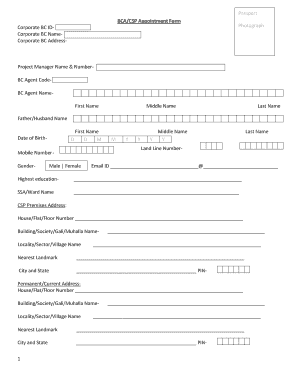
- Click ‘Get Form’ button to obtain the form and open it in the editor.
- Fill in the Corporate BC ID and Corporate BC Name. Ensure accuracy as this identifies your business correspondence.
- Provide the Corporate BC Address. Include all relevant details to ensure proper identification of your location.
- Upload a recent photograph as specified in the guidelines of the form.
- Complete personal details: enter the Project Manager Name and Number, BC Agent Code, and BC Agent Name as they relate to your application.
- Add your First Name, Middle Name (if applicable), and Last Name along with Father or Partner's Name.
- Input your Date of Birth by selecting the day, month, and year.
- Fill in your Land Line Number and Mobile Number. Ensure the mobile number is reachable.
- Select your Gender from the options provided.
- Enter your Email ID, ensuring it is valid for communication.
- Indicate your highest education level attained.
- CSP Premises Address: Fill out your House/Flat/Floor Number, Building/Society/Gali/Muhalla Name, Locality/Sector/Village Name, Nearest Landmark, City, State, and PIN Code.
- Permanent/Current Address: Provide your House/Flat/Floor Number, Building/Society/Gali/Muhalla Name, Locality/Sector/Village Name, Nearest Landmark, City, State, and PIN Code as required.
- For Reference 1 and Reference 2, enter names, mobile numbers, landline numbers, addresses, and city/state/PIN details for individuals other than immediate family members.
- Fill in KYC documents, including proof of identity and proof of address, along with Aadhaar, PAN, Passport, Voter ID, and Driving License numbers as applicable.
- Enter your bank details: include Bank Name, Account Number, and IFSC Code.
- Fill in the Police Verification Reference Number as required.
- At the end of the form, provide the place and date of filing.
- Ensure to include BCA/CSP Signature and details for verification by the respective branch.
- Review all the entered information for accuracy, then proceed to save changes, download a copy, print, or share the form as necessary.
Complete your documents online today to enhance your application process.
Yes, NRIs can open an IndusInd savings account, provided they comply with the necessary regulations. They need to fulfill certain documentation requirements and verify their status as non-residents. This process can be initiated through the Indusind Bank website, making it easy to Indusind Bank Csp Online Apply and secure an account from abroad.