Loading
Form preview
  • US Legal Forms
  • Form Library
  • More Forms
  • More Multi-State Forms
  • Dmv 204

Get Dmv 204

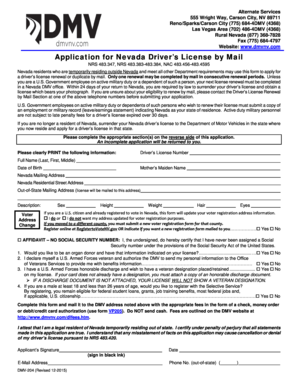
84-4797 Website: www.dmvnv.com Application for Nevada Driver s License by Mail NRS 483.347, NRS 483.383-483.384, NAC 483.456-483.4595 Nevada residents who are temporarily residing outside Nevada and meet all other Department requirements may use this form to apply for a driver s license renewal or duplicate by mail. Only one renewal may be completed by mail in consecutive renewal periods. Unless you are a U.S. Government employee on active military duty or a dependent of such a person, you.

How it works

  1. Open form

    Open form follow the instructions

  2. Easily sign form

    Easily sign the form with your finger

  3. Share form

    Send filled & signed form or save

How to fill out the Dmv 204 online

Filling out the Dmv 204 form online is a streamlined process designed for Nevada residents temporarily living outside the state. This guide provides clear, step-by-step instructions for completing each section of the form to ensure a successful submission.

Follow the steps to complete the Dmv 204 form online.

  1. Click ‘Get Form’ button to obtain the form in your preferred format.
  2. Begin by entering your full legal name as it appears on your birth certificate in the designated fields. Include your last name, first name, and middle name if applicable.
  3. Provide your date of birth, and select your sex by circling either M or F.
  4. Fill in your primary physical address, ensuring accuracy to avoid any issues with your application.
  5. Enter your weight, hair color, eye color, and height in feet and inches.
  6. Indicate your Nevada DL/DAC/ID number and provide your birthplace, including the city, state, or country.
  7. Complete the section for optional information such as your daytime phone number and email address.
  8. If applicable, fill in any out-of-state mailing address and indicate whether you wish to register to vote or update your voter registration information.
  9. Declare your veteran status and organ donation preference. Make selections as needed, including the request for a veteran designation on your license.
  10. Complete the affidavit regarding your Social Security number and any disabilities, if applicable.
  11. Renewal applicants must have the vision examination section filled out by a licensed professional, dated within the last 90 days.
  12. If you are 71 years or older, ensure that the physical evaluation section is completed and signed by your physician.
  13. Review all entered information for accuracy and clarity before finalizing the form.
  14. Save your changes, and consider whether to download, print, or share the completed form before mailing it along with the required fees.

Start your online application for the Dmv 204 today!

Get form

Experience a faster way to fill out and sign forms on the web. Access the most extensive library of templates available.
Get form

Related content

dmv204.pdf
The Application for Driving Privilege or ID Card By Mail (DMV 204) has been replaced by...
Learn more
Dmv Form For Drivers License
If you currently have a commercial. Use this form to apply for a virginia driver's license...
Learn more
Commercial Driver License Manual
This manual provides driver license testing information for drivers who wish to have a...
Learn more

Related links form

Horse Show Program Template Student Organization Day Trip Form - Brooklyn College - Student ... Claim Form - City Of Pomona - Ci Pomona Ca Homenet Homeownership Center

Questions & Answers

Get answers to your most pressing questions about US Legal Forms API.

Contact support

The best day to book a DMV appointment tends to be toward the middle of the week, particularly Tuesday or Wednesday. These days often see lower foot traffic, allowing you more time and attention during your visit. By scheduling your appointment wisely, you can ensure a smoother experience, especially when dealing with processes like those related to Dmv 204.

Yes, California does offer a DMV app that makes it easier for users to manage their DMV-related tasks. You can conveniently check your status, schedule appointments, and even upload necessary documents directly from your mobile device. This app also keeps you informed about Dmv 204 processes, streamlining your experience.

To upload documents to the California DMV, start by accessing their official website and navigating to the appropriate upload section. You will need to create or log into your account if you haven’t done so already. Each document must meet specific requirements related to Dmv 204, so review the guidelines carefully for best results.

The best document to prove residency often includes utility bills, rental agreements, or bank statements that display your name and current address. Each state, including those tied to Dmv 204 requirements, may have specific preferences, so it’s wise to confirm with your local DMV. Ensuring you have the right documents prepared enhances your chances of a successful process.

Reinstating a suspended license in Nevada involves several steps, beginning with meeting all your requirements for the suspension. You can typically start the process online by going to the Nevada DMV website. Remember to check if you need to provide any documentation related to your Dmv 204 situation, as penalties may vary by case.

To upload documents at the California DMV, visit their official website. Look for the designated section on document uploads, which provides clear instructions on what to do next. Make sure to follow each step carefully, as this process is essential when handling your Dmv 204 requirements.

To secure a California ID, applicants need several documents including proof of identity, residency, and an application form. Most common forms of ID include a passport or birth certificate, along with a utility bill or bank statement for residency verification. Utilizing the Dmv 204 can ensure you have all necessary documents ready.

Yes, a foreigner can obtain a California ID given that they provide valid identification and proof of residency in California. Ensure you have the required documents, such as a passport and utility bill, to prove your identity and address. The Dmv 204 can help simplify the application steps and required documentation.

Making an appointment at the Nevada DMV can save you time and reduce wait times. You can schedule your appointment online through the DMV website or by calling their customer service line. It is recommended to prepare your information ahead of time to ensure a smooth experience. For assistance, consider templates like Dmv 204 that guide you through the process.

To non-operationally register a vehicle in Nevada, you must fill out a specific application form and provide any necessary documentation. This includes proof that the vehicle is not in use, such as a declaration form. Once submitted to the Nevada DMV, this will ensure your vehicle is properly classified, avoiding penalties. Utilizing the Dmv 204 can make the process clearer and more manageable.

Get This Form Now!

Use professional pre-built templates to fill in and sign documents online faster. Get access to thousands of forms.
Get form
If you believe that this page should be taken down, please follow our DMCA take down processhere.

Industry-leading security and compliance

US Legal Forms protects your data by complying with industry-specific security standards.
  • In businnes since 1997
    25+ years providing professional legal documents.
  • Accredited business
    Guarantees that a business meets BBB accreditation standards in the US and Canada.
  • Secured by Braintree
    Validated Level 1 PCI DSS compliant payment gateway that accepts most major credit and debit card brands from across the globe.
Get Dmv 204
Get form
  • Adoption
  • Bankruptcy
  • Contractors
  • Divorce
  • Home Sales
  • Employment
  • Identity Theft
  • Incorporation
  • Landlord Tenant
  • Living Trust
  • Name Change
  • Personal Planning
  • Small Business
  • Wills & Estates
  • Packages A-Z
  • Affidavits
  • Bankruptcy
  • Bill of Sale
  • Corporate - LLC
  • Divorce
  • Employment
  • Identity Theft
  • Internet Technology
  • Landlord Tenant
  • Living Wills
  • Name Change
  • Power of Attorney
  • Real Estate
  • Small Estates
  • Wills
  • All Forms
  • Forms A-Z
  • Form Library
  • Legal Hub
  • About Us
  • Help Portal
  • Legal Resources
  • Blog
  • Affiliates
  • Contact Us
  • Delete My Account
  • Site Map
  • Industries
  • Forms in Spanish
  • Localized Forms
  • State-specific Forms
  • Forms Kit
  • Real Estate Handbook
  • All Guides
  • Notarize
  • Incorporation services
  • For Consumers
  • For Small Business
  • For Attorneys
  • USLegal
  • FormsPass
  • pdfFiller
  • signNow
  • altaFlow
  • DocHub
  • Instapage
Form Packages
  • Adoption
  • Bankruptcy
  • Contractors
  • Divorce
  • Home Sales
  • Employment
  • Identity Theft
  • Incorporation
  • Landlord Tenant
  • Living Trust
  • Name Change
  • Personal Planning
  • Small Business
  • Wills & Estates
  • Packages A-Z
Form Categories
  • Affidavits
  • Bankruptcy
  • Bill of Sale
  • Corporate - LLC
  • Divorce
  • Employment
  • Identity Theft
  • Internet Technology
  • Landlord Tenant
  • Living Wills
  • Name Change
  • Power of Attorney
  • Real Estate
  • Small Estates
  • Wills
  • All Forms
  • Forms A-Z
  • Form Library
Customer Service
  • Legal Hub
  • About Us
  • Help Portal
  • Legal Resources
  • Blog
  • Affiliates
  • Contact Us
  • Delete My Account
  • Site Map
  • Industries
  • Forms in Spanish
  • Localized Forms
  • State-specific Forms
  • Forms Kit
Legal Guides
  • Real Estate Handbook
  • All Guides
Prepared for you
  • Notarize
  • Incorporation services
Our Customers
  • For Consumers
  • For Small Business
  • For Attorneys
Our Sites
  • USLegal
  • FormsPass
  • pdfFiller
  • signNow
  • altaFlow
  • DocHub
  • Instapage
Social Media
Call us now toll free:
+1 833 426 79 33
As seen in:
© Copyright 1999-2026 airSlate Legal Forms, Inc. 3720 Flowood Dr, Flowood, Mississippi 39232
  • Your Privacy Choices
  • Terms of Service
  • Privacy Notice
  • Content Takedown Policy
  • Bug Bounty Program