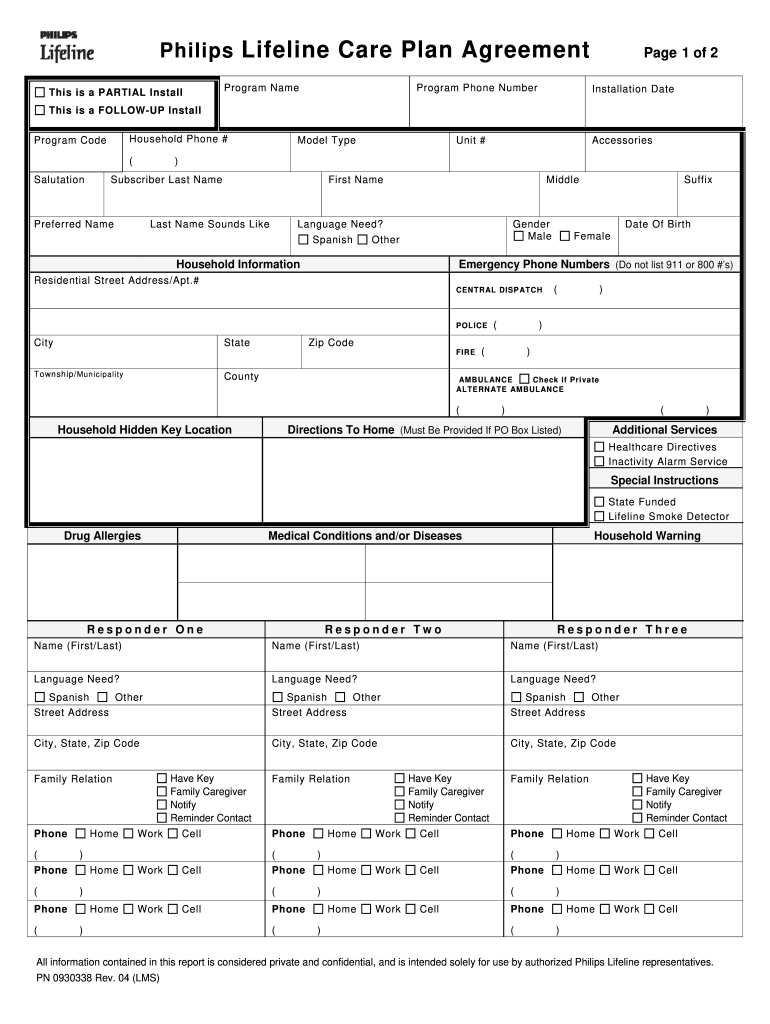
Ation Unit # Model Type Accessories ) First Name Subscriber Last Name Preferred Name Last Name Sounds Like Middle Gender Male Language Need? Spanish Other Household Information CENTRAL DISP ATCH POLICE State Zip Code FIRE Township/ Municipality Date Of Birth Female Emergency Phone Numbers (Do not list 911 or 800 # s) Residential Street Address/Apt.# City Suffix County ( ( ) ) ( ) AMBULANCE Check if Private ALTERNATE AMBULANCE ( Household Hidden Key Location ).
Loading

Open form follow the instructions

Easily sign the form with your finger

Send filled & signed form or save
How to fill out the Philips Lifeline Where To Mail Care Plan online
Filling out the Philips Lifeline Where To Mail Care Plan is a crucial step in ensuring that you receive timely and effective support. This guide provides a detailed, step-by-step approach to assist users in completing the form accurately and efficiently, ensuring that all necessary information is captured.
Follow the steps to complete your Philips Lifeline Care Plan effectively.
- Press the ‘Get Form’ button to obtain the form and open it in the editor. This will allow you to start filling it out accurately.
- Begin by entering the program name and program phone number as listed on the form. Make sure the contact details are correct for efficient communication.
- Next, provide your salutation, first name, last name, and preferred name. Ensure that the name entered matches your identification documents.
- Fill in your address information, including residential street address, city, state, zip code, and county. Ensure accuracy to avoid delays in service delivery.
- Enter the date of birth and gender, and specify any language needs you may have. This information helps tailor services to your preferences.
- In the household information section, provide emergency contact numbers. Do not list emergency services such as 911; instead, include personal family contacts.
- Detail specific medical conditions or allergies in the designated section. This information is vital for providing the best possible emergency response.
- List responders as described on the form. Include their names, phone numbers, and their relation to you. Make sure to confirm their willingness to act in an emergency.
- Upon completing your sections, review all information to ensure accuracy. Once satisfied, proceed to save your progress or finalize your document.
- Choose to download, print, or share the completed form as needed. Ensure that all saved changes have been correctly implemented before submission.
Start filling out your Philips Lifeline Care Plan online today for a smoother service experience.
Experience a faster way to fill out and sign forms on the web. Access the most extensive library of templates available.
Related content
With the Personal Emergency Response System, by Philips. Lifeline, help is a button push...
Sign in to MyHumana.com, go to MyHealth tab, select MyDirectives in “Health support for...
If Lifeline cannot reach any of the Responders you've listed, they will contact emergency...
Get answers to your most pressing questions about US Legal Forms API.
How to get Life Alert covered by insurance?
To get Life Alert covered by insurance, start by checking if your policy includes coverage for medical alert systems. You may also need a doctor’s prescription or recommendation, highlighting the necessity of the system. If understanding the coverage options feels overwhelming, USLegalForms can guide you through the requirements and paperwork, ensuring you know exactly where to mail your care plan for processing.
How does Lifeline verify eligibility?
Philips Lifeline verifies eligibility through a straightforward process that includes collecting personal information and assessing healthcare needs. They may require documentation to confirm your eligibility for specific programs, which allows them to provide tailored services. This process ensures you receive the most appropriate support and resources. Always keep your care plan information handy for efficient communication.
Is Philips Lifeline covered by insurance?
In many cases, Philips Lifeline may be covered by certain insurance plans, including Medicare and Medicaid, depending on individual circumstances. To determine eligibility, consult your insurance provider for specific coverage details. If you need assistance navigating this process or understanding your options, consider platforms like USLegalForms. They can help you find the information needed regarding insurance claims.
What happened to Philips Lifeline?
Recently, Philips Lifeline underwent some structural changes as part of Philips' larger strategic plan. Despite these shifts, the core of their service remains intact, offering reliable medical alert systems for users. If you are curious about updates or changes in services, it’s best to visit their official website. They continue to support their customers with the same commitment to safety and care.
How to get a Life Alert through Medicare?
To obtain a Life Alert through Medicare, you'll need to follow specific steps, including obtaining a prescription from your doctor that recognizes your need for a personal emergency response system. Additionally, contacting your Medicare representative to gather information on coverage is crucial. The Philips Lifeline service is often a featured option under Medicare. If you're unsure of the process, uslegalforms can assist you with resources and forms to facilitate your care plan.
Where to mail a lifeline application?
If you're looking to send your Philips Lifeline application, you can mail it to the specified address provided during the application process. Typically, this address is included on the application form itself. It’s essential to ensure you follow any additional instructions included with your form to avoid delays. For specifics about where to mail your care plan, always refer back to the Philips Lifeline documentation.
How do I cancel my Philips Lifeline?
To cancel your Philips Lifeline service, you can reach out to their customer service team via phone or online. They guide you through the cancellation process, ensuring you have everything you need. If you have specific questions regarding how to mail your Care Plan as part of the service, their representatives can assist you.
What is the best life alert system for seniors?
The best life alert system for seniors often depends on individual needs; however, Philips Lifeline ranks highly for its reliability and features. It offers various options, including in-home and mobile systems that ensure safety on the go. Researching systems can help you choose the right one for your circumstances, and using resources like uslegalforms can simplify your selection process.
Does Philips still own Lifeline?
Yes, Philips currently owns Lifeline and continues to innovate and enhance the service. The company remains committed to providing reliable emergency response systems that cater to the needs of seniors. With ongoing improvements, users can expect a robust and trustworthy experience from Philips Lifeline.
How do you set up Lifeline?
Setting up your Philips Lifeline is straightforward. You'll receive a package containing everything you need along with clear instructions. Just plug the base unit into a power outlet, connect it to your phone line, and wear the help button. For questions, remember, you can always refer to resources on how to mail your Care Plan to ensure you get it right.
Use professional pre-built templates to fill in and sign documents online faster. Get access to thousands of forms.
If you believe that this page should be taken down, please follow our DMCA take down process here.