Get Wage Type Creation/change Request Form Wage Type Creation ... - Broward K12 Fl
How it works
-

Open form follow the instructions
-

Easily sign the form with your finger
-

Send filled & signed form or save
How to fill out the WAGE TYPE Creation/Change Request Form WAGE TYPE Creation ... - Broward K12 Fl online
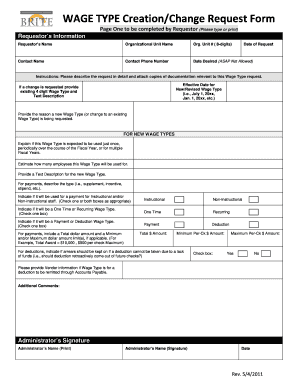
Filling out the WAGE TYPE Creation/Change Request Form is essential for initiating changes or requests for new wage types within Broward K12. This guide provides clear and concise instructions to ensure a smooth and efficient submission process.
Follow the steps to accurately complete your wage type request form.
- Click ‘Get Form’ button to obtain the form and open it for editing.
- Begin by entering the requestor's information. This includes your name, organizational unit name, organization unit number, date of request, contact name, and contact phone number. Ensure that all information is accurate and up-to-date.
- Specify the desired date for the wage type to take effect. Note that ASAP is not an acceptable option.
- Provide a detailed description of your request. Attach any relevant documentation that supports your wage type request.
- If creating a new wage type, indicate the effective date for the new or revised wage type.
- If making a change, provide the existing four-digit wage type and its text description.
- Explain the reason for requesting a new wage type or a change to an existing one.
- For new wage types, specify if it will be used once, periodically, or for multiple fiscal years. Estimate how many employees will utilize the wage type.
- Provide a text description for the new wage type, detailing its purpose (e.g., supplement, incentive, stipend). Specify if it is for instructional and/or non-instructional staff by checking the appropriate boxes.
- Indicate whether the wage type will be a one-time or recurring payment by selecting the appropriate checkbox.
- State whether it will be a payment or deduction. Provide the total dollar amount, and the minimum and/or maximum dollar amounts if applicable.
- For deductions, indicate if any arrears should be kept on if a deduction cannot be taken due to a lack of funds.
- If applicable, provide vendor information for deductions to be remitted through Accounts Payable.
- Add any additional comments that may assist in processing your request.
- Ensure your administrator signs the form by printing their name and signing it, along with the date.
- Once all fields are completed, save your changes, and you have the option to download, print, or share the form as needed.
Complete your WAGE TYPE Creation/Change Request Form online today for a swift processing experience.
Changing a wage type in SAP requires accessing the specific wage type settings and modifying the necessary attributes. Ensure that you follow the correct protocols to avoid disruptions in payroll processing. For users dealing with the WAGE TYPE Creation/Change Request Form WAGE TYPE Creation ... - Broward K12 Fl., understanding how to make these changes is essential for maintaining accurate payroll management.