Loading
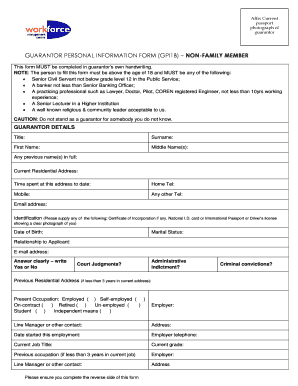
Get Guarantor Information Form
How it works
-

Open form follow the instructions
-

Easily sign the form with your finger
-

Send filled & signed form or save
How to fill out the Guarantor Information Form online
Filling out the Guarantor Information Form correctly is essential for ensuring that all necessary information is accurately recorded. This guide will walk you through each section of the form to help you complete it with ease.
Follow the steps to effectively complete the form.
- Click ‘Get Form’ button to obtain the form and open it in the editor.
- Begin by providing your personal details in the Guarantor Details section. Fill in your Title, Surname, First Name, and Middle Name(s). Ensure that all names are as they appear on official documents.
- If applicable, include any previous names in full. Then, enter your current residential address and indicate how long you have lived there.
- Provide your contact information, including Home Telephone, Mobile, and any other telephone number, along with your Email address.
- Select your identification type and upload a document that meets the requirements, such as a National I.D. card or an International Passport.
- Fill in your Date of Birth and select your Marital Status. Providing a Relationship to the Applicant is also required.
- Answer questions regarding Court Judgments and Administrative Indictments clearly with 'Yes' or 'No.' If you have moved in the last three years, provide your previous residential address.
- Indicate your current occupation by selecting the appropriate option and provide details about your current employer, including their name, address, and your Line Manager or contact person.
- List your Current Job Title and Current Grade. If you have changed jobs in the last three years, provide previous occupation details similarly.
- Complete the Bank Details by entering the Bank Name and Address associated with your account.
- Confirm you are acting as a guarantor by writing the full name of the prospective employee as it appears on the employment data form.
- Review the statements regarding information verification and your liabilities as a guarantor. After reading, provide your Signature and the Date.
- Finally, ensure you complete the reverse side of the form. You can now save changes, download, print, or share the form.
Complete the Guarantor Information Form online today to ensure all information is accurately submitted.
To have a guarantor form notarized, you must first complete the form accurately. Next, schedule an appointment with a notary public, who will verify your identity and witness the signing of the document. It's essential to have all parties present when you get the guarantor information form notarized to ensure legal validity.