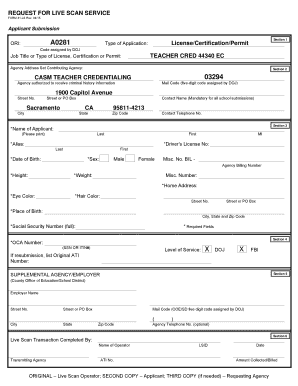
Get Form 41-ls Request For Live Scan Service. Form 41-ls Request For Live Scan Service Rev. 06/09 - Ctc
How it works
-

Open form follow the instructions
-

Easily sign the form with your finger
-

Send filled & signed form or save
How to fill out the Form 41-LS Request For Live Scan Service Rev. 06/09 - Ctc online
Filling out the Form 41-LS Request For Live Scan Service is an essential step in the process of obtaining a background check for various licenses and certifications. This guide provides clear, step-by-step instructions designed to assist all users, regardless of their prior experience with legal documents.
Follow the steps to complete the form with ease:
- Click the ‘Get Form’ button to access the form and open it in your preferred editing application.
- In Section 1, provide the required information regarding your application type, including the job title or type of license, certification, or permit you are applying for, as well as the associated code assigned by the Department of Justice (DOJ).
- In Section 2, enter the details for the agency that will receive the criminal history information. Include the agency’s name, address, and contact information. Ensure that you fill in the mandatory fields accurately.
- Proceed to Section 3 to fill out your personal information. Input your full name, alias (if applicable), date of birth, sex, height, weight, eye color, hair color, and place of birth. Make sure to include your driver’s license number and social security number, as these fields are marked as required.
- In Section 4, indicate the level of service needed by marking DOJ, FBI, or both as applicable. If this is a resubmission, list the original ATI number.
- Section 5 requires entry of supplemental agency or employer information. Provide the employer’s name and address, and if applicable, include the transmitting agency and their mail code.
- In Section 6, the final section, provide the name of the live scan operator, their ATI number, and the amount collected or billed. This section may also require specific signatures or information related to the transaction.
- After completing the form, review all entries for accuracy. You can then save your changes, download, print, or share the form as needed.
Begin completing your Form 41-LS online today to streamline your application process.
Related links form
Yes, you can request a Live Scan from out-of-state, but there are specific steps involved. You will need to identify a Live Scan provider that can accommodate your situation and send them your completed Form 41-LS Request For Live Scan Service. It is advisable to check with the California Department of Justice to ensure all regulations and procedures are followed to facilitate this process effectively.
Industry-leading security and compliance
-
In businnes since 199725+ years providing professional legal documents.
-
Accredited businessGuarantees that a business meets BBB accreditation standards in the US and Canada.
-
Secured by BraintreeValidated Level 1 PCI DSS compliant payment gateway that accepts most major credit and debit card brands from across the globe.