Loading
Form preview
  • US Legal Forms
  • Other Templates
  • More Forms
  • More Uncategorized Forms
  • Formulario 3911 Del Irs En Español

Get Formulario 3911 Del Irs En Español

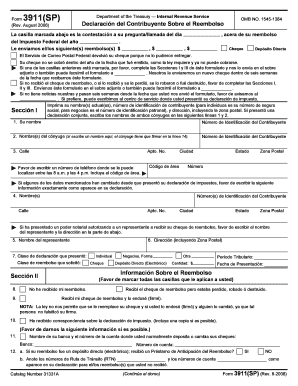
Testaci n a su pregunta/llamada del d a del Impuesto Federal del a o . ,$ ,$ Le enviamos el/los siguiente(s) reembolso(s) $ , acera de su reembolso Cheque Dep sito Directo El Servicio de Correo Postal Federal devolvi su cheque porque no lo pudieron entregar. Su cheque no se cobr dentro del a o de la fecha que fu emitido, como la ley requiere y ya no puede cobrarse. Si una de las casillas anteriores est marcada, por favor, complete las Secciones I y III de ste formulario y nos l.

How it works

  1. Open form

    Open form follow the instructions

  2. Easily sign form

    Easily sign the form with your finger

  3. Share form

    Send filled & signed form or save

How to fill out the Formulario 3911 Del Irs En Español online

Filling out the Formulario 3911 Del Irs En Español is an essential step for users who need to resolve issues related to their tax refunds. This guide provides clear instructions for completing the form online, ensuring a seamless experience.

Follow the steps to fill out your form accurately.

  1. Click ‘Get Form’ button to acquire the Formulario 3911 Del Irs En Español and open it in your editing tool.
  2. In Section I, print your current name(s) and taxpayer identification number. For individuals, this is your social security number; for businesses, provide your employer identification number. Include your address in full, including a ZIP code.
  3. If filing jointly, enter both partners' names in lines 1 and 2, along with their identification numbers.
  4. Provide a contact phone number where you can be reached between 8 a.m. and 4 p.m., including the area code, and fill out your city and state information.
  5. If any personal information has changed since you filed your taxes, please provide that updated information exactly as it appears on your return.
  6. If you have authorized someone to receive your refund check, include their name and address as requested.
  7. Indicate the type of return you filed and the refund type you requested, marking all relevant boxes.
  8. In Section II, provide information regarding whether you have received your refund check, if it was lost, stolen, or destroyed.
  9. If applicable, provide your bank's name and the account number for where you usually deposit your checks.
  10. Complete Section III by signing the form where required. Ensure you sign as you did on your tax return.
  11. Finalizing your submission, check that all sections are filled accurately. Save your changes, download a copy, and print or share the completed form as necessary.

Complete your Formulario 3911 Del Irs En Español online to expedite your tax refund inquiry.

Get form

Experience a faster way to fill out and sign forms on the web. Access the most extensive library of templates available.
Get form

Related content

Acerca del Formulario 3911, Declaración ...
El formulario 3911 es completado por el contribuyente para proporcionar al Servicio de...
Learn more
Form 3911 - Printable Study Planner
Web form 3911 is taxpayer statement regarding refund. Web form 3911 can be filed with the...
Learn more
FORM 10-K REALTY INCOME CORPORATION
Feb 23, 2021 — The company is structured as a real estate investment trust, or REIT...
Learn more

Related links form

Company Vacation Planner Dinner Photo Calendar 2019 Simple Family Photo Calendar Student Weekly Schedule

Questions & Answers

Get answers to your most pressing questions about US Legal Forms API.

Contact support

Filling out a 3911 form requires careful attention to detail. Start with your personal information, and ensure all sections are completed accurately without any omissions. By using the Formulario 3911 Del Irs En Espaol, language barriers are minimized, making it easier to understand the requirements. For additional clarity, you might find it beneficial to consult resources on platforms like USLegalForms.

Currently, Form 3911 cannot be filed online directly through the IRS website. However, you can complete the form online, print it, and then mail it to the appropriate IRS office. To streamline this process, consider using the Formulario 3911 Del Irs En Espaol for accuracy. Platforms like USLegalForms also offer tools that guide users through the form preparation steps.

You should use Form 3911 when you need to initiate a request to locate a missing refund check or payment. This form is particularly helpful after you have confirmed with the IRS that your payment was sent but you have not received it. Using the Formulario 3911 Del Irs En Espaol can assist non-English speakers in managing this essential process smoothly. It is a crucial step in ensuring that taxpayers can claim what is rightfully theirs.

The IRS typically takes around 6 to 8 weeks to process Form 3911. Processing times can depend on various factors such as the complexity of your case and the volume of submissions they are handling. If you filed your Formulario 3911 Del Irs En Espaol correctly, you can expect updates within this range. Always keep your contact information updated to receive any notifications from the IRS promptly.

The processing time for Form 3911 can vary, but generally, it takes about 6 to 8 weeks after submission. It’s essential to ensure all information is accurately filled out to avoid delays. If you submitted your Formulario 3911 Del Irs En Espaol accurately, you should receive a status update within this timeframe. Tracking your request online can also provide insight into the processing status.

To fill out the 3911 form, begin by entering your personal information such as name, address, and Social Security number. Next, provide the details about what you are requesting, like lost funds or inquiries regarding your tax refund. It’s helpful to refer to the Formulario 3911 Del Irs En Espaol to ensure clarity. Utilizing resources from platforms like USLegalForms can also assist in correctly completing the form.

Filling out a 3911 form for a lost stimulus check requires you to provide details about your identity, including your Social Security number and address. In the form, clearly indicate that the stimulus check was lost and include any relevant information about the payment. Using the Formulario 3911 Del Irs En Espaol may simplify this process for Spanish-speaking users. Ensure you send the form promptly to avoid delays in receiving your funds.

To file Form CT-3911, you need to complete the form accurately with your personal information and relevant details about your tax situation. Make sure you download the correct version of the Formulario 3911 Del Irs En Espaol to ensure everything is filled out correctly. After completion, submit the form according to the instructions provided to the IRS. Consider using online platforms like USLegalForms for guided assistance throughout this process.

You should send Form 3911 to the IRS at the address specified in the instructions included with the form. If you are using the Formulario 3911 Del Irs En Espaol, the instructions will provide specific details on where to mail it. Sending the form to the right address is essential to ensure a timely response. Double-check for the latest information to avoid any mistakes.

To file Form CT 3911, you need to accurately complete all required fields, ensuring all information matches your original tax return. Then, send the completed Formulario 3911 Del Irs En Espaol to the IRS via mail, making sure to use the appropriate address listed on the form. You can also track the status of your request online, which offers added convenience. Ensure you keep a copy for your records as well.

Get This Form Now!

Use professional pre-built templates to fill in and sign documents online faster. Get access to thousands of forms.
Get form
If you believe that this page should be taken down, please follow our DMCA take down processhere.
Get Formulario 3911 Del Irs En Español
Get form
  • Adoption
  • Bankruptcy
  • Contractors
  • Divorce
  • Home Sales
  • Employment
  • Identity Theft
  • Incorporation
  • Landlord Tenant
  • Living Trust
  • Name Change
  • Personal Planning
  • Small Business
  • Wills & Estates
  • Packages A-Z
  • Affidavits
  • Bankruptcy
  • Bill of Sale
  • Corporate - LLC
  • Divorce
  • Employment
  • Identity Theft
  • Internet Technology
  • Landlord Tenant
  • Living Wills
  • Name Change
  • Power of Attorney
  • Real Estate
  • Small Estates
  • Wills
  • All Forms
  • Forms A-Z
  • Other Templates
  • Legal Hub
  • About Us
  • Help Portal
  • Legal Resources
  • Blog
  • Affiliates
  • Contact Us
  • Delete My Account
  • Site Map
  • Industries
  • Forms in Spanish
  • Localized Forms
  • State-specific Forms
  • Forms Kit
  • Real Estate Handbook
  • All Guides
  • Notarize
  • Incorporation services
  • For Consumers
  • For Small Business
  • For Attorneys
  • USLegal
  • FormsPass
  • pdfFiller
  • signNow
  • altaFlow
  • DocHub
  • Instapage
Form Packages
  • Adoption
  • Bankruptcy
  • Contractors
  • Divorce
  • Home Sales
  • Employment
  • Identity Theft
  • Incorporation
  • Landlord Tenant
  • Living Trust
  • Name Change
  • Personal Planning
  • Small Business
  • Wills & Estates
  • Packages A-Z
Form Categories
  • Affidavits
  • Bankruptcy
  • Bill of Sale
  • Corporate - LLC
  • Divorce
  • Employment
  • Identity Theft
  • Internet Technology
  • Landlord Tenant
  • Living Wills
  • Name Change
  • Power of Attorney
  • Real Estate
  • Small Estates
  • Wills
  • All Forms
  • Forms A-Z
  • Other Templates
Customer Service
  • Legal Hub
  • About Us
  • Help Portal
  • Legal Resources
  • Blog
  • Affiliates
  • Contact Us
  • Delete My Account
  • Site Map
  • Industries
  • Forms in Spanish
  • Localized Forms
  • State-specific Forms
  • Forms Kit
Legal Guides
  • Real Estate Handbook
  • All Guides
Prepared for you
  • Notarize
  • Incorporation services
Our Customers
  • For Consumers
  • For Small Business
  • For Attorneys
Our Sites
  • USLegal
  • FormsPass
  • pdfFiller
  • signNow
  • altaFlow
  • DocHub
  • Instapage
Social Media
Call us now toll free:
+1 833 426 79 33
As seen in:
© Copyright 1999-2026 airSlate Legal Forms, Inc. 17 Station Street, Ste. 203, Brookline, MA 02445
  • Your Privacy Choices
  • Terms of Service
  • Privacy Notice
  • Content Takedown Policy
  • Bug Bounty Program