Loading
Get Mass Probate Forms
How it works
-

Open form follow the instructions
-

Easily sign the form with your finger
-

Send filled & signed form or save
How to fill out the Mass Probate Forms online
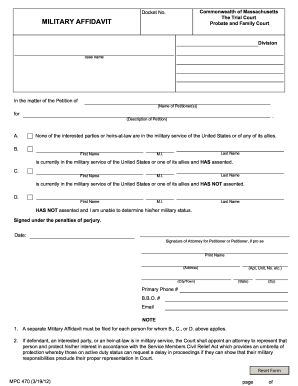
Filling out the Mass Probate Forms online can seem daunting, but with clear guidance, you can navigate the process smoothly. This guide will assist you in completing the forms accurately and efficiently.
Follow the steps to complete the Mass Probate Forms online.
- Click ‘Get Form’ button to obtain the form and access it in your preferred online editor.
- Begin by entering the docket number at the top of the form.
- Fill in the division and case name related to your petition.
- In the section that begins with ‘In the matter of the Petition of’, include the name of the petitioner or petitioners.
- For section A, describe the nature of your petition clearly and concisely.
- In section B, if any interested parties are currently in military service and have given their assent, include their first name, last name, and middle initial.
- Complete section C in a similar manner for interested parties in military service who have not assented.
- For section D, provide the information for any party whose military status you are unable to determine.
- At the bottom of the form, sign the affidavit to affirm the information is accurate under penalties of perjury. Include your name, address, city, state, zip code, primary phone number, and email.
- Finally, don’t forget to save your changes. You can then choose to download, print, or share the completed form as needed.
Start completing your Mass Probate Forms online today!
To start the probate process in Massachusetts, you need to file a petition in the probate court. This includes submitting vital documents such as the will and death certificate. Utilizing Mass Probate Forms can help you gather and complete the necessary paperwork efficiently. This ensures that you meet all legal requirements to initiate the probate process with confidence.