Loading
Get Alumni Form Pdf
How it works
-

Open form follow the instructions
-

Easily sign the form with your finger
-

Send filled & signed form or save
How to fill out the Alumni Form Pdf online
Filling out the Alumni Form Pdf online can help you connect with fellow alumni and support your institution. This guide provides comprehensive instructions to ensure a smooth experience as you complete the form online.
Follow the steps to successfully complete the Alumni Form Pdf online.
- Press the ‘Get Form’ button to obtain the form and open it in your preferred editor.
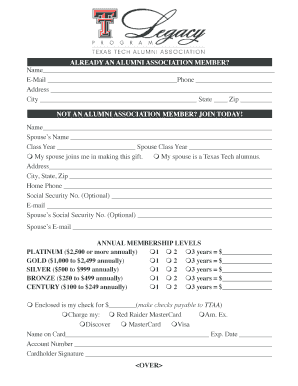
- Begin filling in your name, email, and phone number in the designated fields for alumni who are already members. Ensure all contact information is accurate.
- If you are not a member yet, provide your name and your spouse’s name. Include the class years for both you and your spouse to complete this section.
- Indicate whether your spouse joins you in making this gift and confirm if they are a Texas Tech alumnus.
- Fill in your complete address, city, state, and zip code along with your home phone number and optional social security numbers for both you and your spouse.
- Select your annual membership level from the provided options: Platinum, Gold, Silver, Bronze, or Century. Enter the corresponding donation amount for the duration you choose (1, 2, or 3 years).
- If choosing to pay by check, specify the amount. If using a credit card, fill out the card details, including the name on the card, expiration date, and account number. Ensure to add your signature.
- For legacy membership information, fill in details for up to three children, including their names, genders, relationships, birthdates, and anticipated high school graduation years.
- If you have more than three children to enroll in the Legacy Program, follow the instruction to contact Courtney Marshall for assistance.
- Once all sections are completed, save your changes to the form. You can download, print, or share the completed form as needed.
Complete your Alumni Form Pdf online today to reconnect and support the alumni community!
The proper form of alumni refers to how the term is applied to former students collectively. It can denote both male and female graduates, while the singular form for one individual is alumnus for a male and alumna for a female. Understanding and utilizing the correct form helps maintain respect within the alumni community and can be facilitated with tools like the Alumni Form Pdf.