Loading
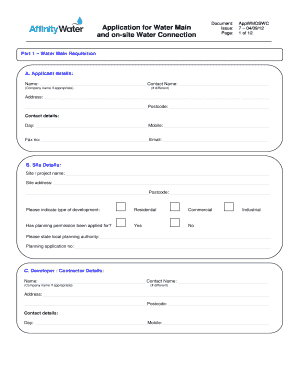
Get Application For S41 New Main 04.09.12 - Affinity Water
How it works
-

Open form follow the instructions
-

Easily sign the form with your finger
-

Send filled & signed form or save
How to fill out the Application For S41 New Main 04.09.12 - Affinity Water online
This guide provides clear, step-by-step instructions on completing the Application For S41 New Main 04.09.12 with Affinity Water online. Follow these guidelines to ensure a smooth and efficient application process.
Follow the steps to successfully complete your application online.
- Click ‘Get Form’ button to obtain the Application For S41 New Main 04.09.12 form and open it in your editor.
- Complete Part 1 – Water Main Requisition. - Section A requires you to provide your applicant details, including name, contact name, address, and contact information. Make sure to fill out all required fields accurately. - In Section B, provide site details including the project name, site address, and type of development (residential, commercial, or industrial). Ensure to check whether planning permission has been applied for and indicate the local planning authority details. - In Section C, fill in the developer or contractor details with relevant contact information.
- Continue to Section D for owner's details. If the work is on behalf of someone else, fill in their information as requested.
- In Section E, indicate the former use of the land. Provide details regarding previous development and water supply history, as well as any contamination details that apply.
- Fill out Section F for new development details, including the anticipated start and completion dates for the on-site work, and the timing for laying new mains.
- Section G requires road and footpath details, including a site plan highlighting public highways and footpaths as instructed. Ensure to indicate correctly the width of service strips.
- Move to Section H to provide details about any trees on the site that need to be preserved or that may be subject to a Tree Preservation Order (TPO).
- Complete Section I by ticking to confirm that you have attached all required plans, including the site location plan.
- For housing developments in Section J, provide your development program, including the number of each type of property planned.
- In Section K for commercial/industrial developments, provide similar details regarding the building type and expected water usage.
- Section L requires filling out the fittings table if there was a previously developed site. Accurately list all water fittings.
- Section M includes fee details. Enter the number of units and enclosed fee as applicable.
- Complete the declaration, ensuring all provided information is accurate.
- In Section N, provide any necessary information related to the Construction Design Management regulation.
- Finally, check your form thoroughly and submit it along with any required payment.
Complete your application online now to ensure a timely response!
Affinity Water provides water that meets strict quality standards, making it safe and drinkable. Regular tests ensure that the water delivered to your tap is clean and complies with health regulations. When you use Affinity Water, you can have confidence in the quality of your drinking water.
Industry-leading security and compliance
US Legal Forms protects your data by complying with industry-specific security standards.
-
In businnes since 199725+ years providing professional legal documents.
-
Accredited businessGuarantees that a business meets BBB accreditation standards in the US and Canada.
-
Secured by BraintreeValidated Level 1 PCI DSS compliant payment gateway that accepts most major credit and debit card brands from across the globe.