Loading
Get Dowling College Transcripts
How it works
-

Open form follow the instructions
-

Easily sign the form with your finger
-

Send filled & signed form or save
How to fill out the Dowling College Transcripts online
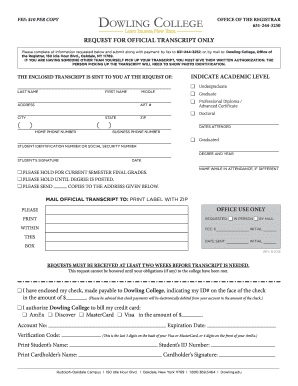
This guide will help you navigate the process of filling out the Dowling College Transcripts online form. By following these steps, you will ensure that your request is processed efficiently and accurately.
Follow the steps to complete your transcript request seamlessly.
- Click ‘Get Form’ button to obtain the transcript request form and open it in your editor.
- Indicate your academic level by selecting one of the following options: Undergraduate, Graduate, Professional Diploma/Advanced Certificate, or Doctoral.
- Provide your last name, first name, and middle initial in the respective fields.
- Enter your address details, including Apt. #, city, state, and zip code.
- Fill in your home and business phone numbers where indicated.
- Specify the dates you attended Dowling College and provide your Student Identification Number or Social Security Number.
- Indicate the degree you obtained and the year of graduation.
- Sign and date the form at the designated area.
- If applicable, indicate any name changes that occurred during your attendance.
- Choose any specific holds for current semester final grades or degree postings if necessary.
- If you are requesting copies be sent elsewhere, fill in the mail address in the provided fields.
- Decide how you would like to receive your transcript, by indicating preferences for in-person pickup or mailing.
- Make the payment of $10 per copy by including a check or credit card information as instructed.
- Ensure all information is correct before submitting your form via fax or mail to the Office of the Registrar.
- Finally, save your changes, and if desired, download, print, or share the completed form for your records.
Start completing your Dowling College Transcripts online today!
The processing time for Dowling College transcripts generally takes about five to ten business days after your request is received. However, in some cases, you can request expedited services for faster delivery. For the most efficient handling of your request, use a reliable platform like US Legal Forms to guide you through the process.