Get Notes On Freedom Of Information Applications - Royal Perth Hospital - Rph Wa Gov
How it works
-

Open form follow the instructions
-

Easily sign the form with your finger
-

Send filled & signed form or save
How to fill out the Notes On Freedom Of Information Applications - Royal Perth Hospital - Rph Wa Gov online
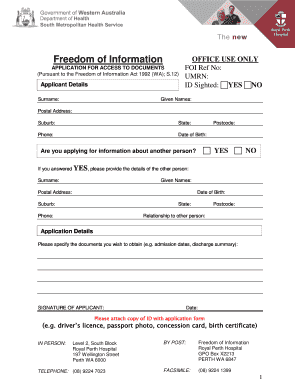
This guide provides step-by-step instructions on how to complete the Notes On Freedom Of Information Applications form for access to documents at Royal Perth Hospital. By following these instructions, users can submit their applications efficiently and accurately.
Follow the steps to complete your application successfully.
- Click the 'Get Form' button to access the application form. Ensure that you have a stable internet connection to download and open the form in your preferred editing tool.
- Begin by filling out the applicant details section. Provide your surname, given names, postal address (suburb, state, and postcode), phone number, and date of birth. Ensure that all information is accurate as this will be used for identification.
- If you are applying on behalf of another person, indicate this by selecting 'YES' and complete the relevant fields for the other individual, including their surname, given names, postal address, date of birth, phone number, postcode, and your relationship to them.
- In the application details section, specify the documents you wish to obtain. Be clear and detailed about the types of documents or information you are requesting, for instance, admission dates or discharge summaries.
- Sign and date the application form in the designated areas to confirm that the information provided is true and correct. This step is essential for processing your request.
- Prepare a copy of your identification to attach with the application form. Accepted forms of ID include a driver’s licence, passport, concession card, or birth certificate.
- Choose your submission method. You can submit the form in person at the Royal Perth Hospital, via post to the specified address, or by facsimile. Ensure that you retain a copy of the application for your records.
- After submission, monitor for confirmation of your application and any further steps that may be necessary. Keep track of your application reference number for follow-ups.
Take the first step towards accessing your documents by completing the application online today.
To contact the eCourts portal of Western Australia, visit their official website where you can access support options. They provide information on how to navigate the portal and resolve issues related to court services. For inquiries that may extend to legal practices or freedom of information, refer to the comprehensive guidance available in Notes On Freedom Of Information Applications - Royal Perth Hospital - Rph Wa Gov.
Industry-leading security and compliance
-
In businnes since 199725+ years providing professional legal documents.
-
Accredited businessGuarantees that a business meets BBB accreditation standards in the US and Canada.
-
Secured by BraintreeValidated Level 1 PCI DSS compliant payment gateway that accepts most major credit and debit card brands from across the globe.