Loading
Form preview
  • US Legal Forms
  • Form Library
  • Foreign Forms
  • Foreign Australia Other Forms
  • Au Ms014 2020

Get Au Ms014 2020-2026

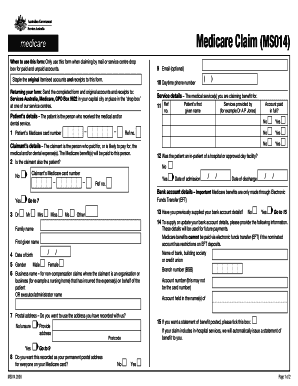
Medicare Claim (MS014) When to use this form: Only use this form when claiming by mail or service centre drop box for paid and unpaid accounts. Staple the original itemised accounts and receipts to.

How it works

  1. Open form

    Open form follow the instructions

  2. Easily sign form

    Easily sign the form with your finger

  3. Share form

    Send filled & signed form or save

How to fill out the AU MS014 online

The AU MS014 form is essential for claiming Medicare benefits for medical and dental expenses. This guide provides clear, step-by-step instructions on how to accurately fill out the form online, ensuring a smooth submission process.

Follow the steps to complete the AU MS014 form online.

  1. Press the ‘Get Form’ button to access the AU MS014 form and open it in your preferred editor.
  2. Begin with the patient's details. Enter the patient's Medicare card number and first given name. Ensure that the information is accurate to prevent delays in processing your claim.
  3. Provide the claimant's details. Identify whether the claimant is also the patient by marking 'Yes' or 'No'. Input the claimant's Medicare card number if applicable.
  4. Complete the service details section. Include the reference number and specify the medical services provided (e.g., the name of the provider like Dr. A P Jones).
  5. Indicate if the patient was an in-patient of a hospital or approved day facility by selecting 'Yes' or 'No'. If 'Yes', provide the dates of admission and discharge.
  6. Enter the bank account details if you wish to receive Medicare benefits through Electronic Funds Transfer (EFT). Enter the name of the bank, branch number (BSB), and account number.
  7. If you wish to receive a statement of benefit posted to you, tick the appropriate box. Ensure your postal address is correct and select if this is to be your permanent address for everyone on your Medicare card.
  8. Complete the claimant's declaration by acknowledging the information is accurate, not for purposes of insurance, and no claims have been made through private health insurance for dental expenses.
  9. Sign and date the form upon completion, ensuring to print the document. Submit the completed form along with original accounts and receipts.
  10. Finally, save your changes, download a copy for your records, print the form, and share it as necessary before sending it to the appropriate address.

Complete your Medicare claims easily by filling out the AU MS014 form online today.

Get form

Experience a faster way to fill out and sign forms on the web. Access the most extensive library of templates available.
Get form

Related content

Passenger Equipment Safety Standards
Apr 3, 2023 — FRA is proposing to amend its Passenger Equipment Safety Standards to...
Learn more
fy 2025 five-year capital outlay plan
Oct 24, 2023 — ... AU UNIT IS NOT RUNNING BUT. DISPLAYING ACTIVE, BUT FEEL NO AIR. NEED...
Learn more
Spares Kit Handbook
Power Supplies & Power Controls. Some Power Supplies are spared individually and may not...
Learn more

Related links form

AU TAFE NSW Enrolment Form 2023 Canada Form F31 2015 Canada Affidavit Of Sole Support Status - Ontario 2017 IE PIAB Medical Assessment Form (Form B) 2021

Questions & Answers

Get answers to your most pressing questions about US Legal Forms API.

Contact support

Claiming Medicare in Australia involves several steps designed to make the process user-friendly. Begin by obtaining the necessary claim forms, such as the AU MS014, which allows you to outline your medical expenses. Fill out the form accurately, attach relevant documents, and then submit your claim online through Medicare or via mail. Staying organized and keeping copies of all your submissions can further ensure a smooth claiming process.

Submitting a claim form to Medicare is straightforward. You can fill out the required AU MS014 form online or use a paper version available at local Medicare offices. After completing the form, attach any necessary documents like invoices or receipts, and ensure everything is correctly filled. Then, submit your claim either online or by mailing it to Medicare.

To claim Medicare for amounts over 10,000 in Australia, you need to follow specific steps. First, ensure you have all the relevant documentation to support your claim, including receipts and medical records. Next, consider utilizing the AU MS014 form, which helps streamline the process and ensures you submit everything properly. Finally, submit your claim online through the Medicare system or by mail.

The CM1500 form is a standardized claim form used by healthcare providers to bill Medicare for services rendered. It includes important information about the patient, provider, and services. Familiarizing yourself with the AU MS014 can provide additional context on how these forms interact in the reimbursement process. Access templates and guides through the US Legal Forms platform for clarity.

The Medicare rebate is a refund made to eligible beneficiaries for medical expenses covered by Medicare. When you submit a claim through the AU MS014, you may receive a rebate based on the services you utilized. This financial assistance can significantly help manage healthcare costs. Check the US Legal Forms for detailed instructions on claims submission.

The MS014 form, commonly referred to as the AU MS014, is a necessary document for Medicare claims. It captures essential details related to the services you received and forms the basis of your reimbursement request. You can complete this form on the US Legal Forms platform, making the process simpler and more efficient.

You can request a letter from Medicare by contacting their customer service or accessing your online account. Ensure you provide your personal information to verify your identity. Additionally, form AU MS014 may assist in detailing the specifics of your situation if needed in your request.

To find your Medicare case number, review your Medicare card where it is typically listed. If you cannot find it there, you may contact Medicare directly or visit the US Legal Forms platform. Accessing the AU MS014 form can also help you gather the necessary documentation related to your case.

To obtain Medicare reimbursement, you must first submit a claim with the appropriate documentation. Complete the AU MS014 form, which outlines the services received and associated costs. Ensure you keep a copy of the form for your records. After submitting, monitor your Medicare account for updates on the status of your reimbursement.

Get This Form Now!

Use professional pre-built templates to fill in and sign documents online faster. Get access to thousands of forms.
Get form
If you believe that this page should be taken down, please follow our DMCA take down processhere.

Industry-leading security and compliance

US Legal Forms protects your data by complying with industry-specific security standards.
  • In businnes since 1997
    25+ years providing professional legal documents.
  • Accredited business
    Guarantees that a business meets BBB accreditation standards in the US and Canada.
  • Secured by Braintree
    Validated Level 1 PCI DSS compliant payment gateway that accepts most major credit and debit card brands from across the globe.
Get AU MS014
Get form
  • Adoption
  • Bankruptcy
  • Contractors
  • Divorce
  • Home Sales
  • Employment
  • Identity Theft
  • Incorporation
  • Landlord Tenant
  • Living Trust
  • Name Change
  • Personal Planning
  • Small Business
  • Wills & Estates
  • Packages A-Z
  • Affidavits
  • Bankruptcy
  • Bill of Sale
  • Corporate - LLC
  • Divorce
  • Employment
  • Identity Theft
  • Internet Technology
  • Landlord Tenant
  • Living Wills
  • Name Change
  • Power of Attorney
  • Real Estate
  • Small Estates
  • Wills
  • All Forms
  • Forms A-Z
  • Form Library
  • Legal Hub
  • About Us
  • Help Portal
  • Legal Resources
  • Blog
  • Affiliates
  • Contact Us
  • Delete My Account
  • Site Map
  • Industries
  • Forms in Spanish
  • Localized Forms
  • State-specific Forms
  • Forms Kit
  • Real Estate Handbook
  • All Guides
  • Notarize
  • Incorporation services
  • For Consumers
  • For Small Business
  • For Attorneys
  • USLegal
  • FormsPass
  • pdfFiller
  • signNow
  • altaFlow
  • DocHub
  • Instapage
Form Packages
  • Adoption
  • Bankruptcy
  • Contractors
  • Divorce
  • Home Sales
  • Employment
  • Identity Theft
  • Incorporation
  • Landlord Tenant
  • Living Trust
  • Name Change
  • Personal Planning
  • Small Business
  • Wills & Estates
  • Packages A-Z
Form Categories
  • Affidavits
  • Bankruptcy
  • Bill of Sale
  • Corporate - LLC
  • Divorce
  • Employment
  • Identity Theft
  • Internet Technology
  • Landlord Tenant
  • Living Wills
  • Name Change
  • Power of Attorney
  • Real Estate
  • Small Estates
  • Wills
  • All Forms
  • Forms A-Z
  • Form Library
Customer Service
  • Legal Hub
  • About Us
  • Help Portal
  • Legal Resources
  • Blog
  • Affiliates
  • Contact Us
  • Delete My Account
  • Site Map
  • Industries
  • Forms in Spanish
  • Localized Forms
  • State-specific Forms
  • Forms Kit
Legal Guides
  • Real Estate Handbook
  • All Guides
Prepared for you
  • Notarize
  • Incorporation services
Our Customers
  • For Consumers
  • For Small Business
  • For Attorneys
Our Sites
  • USLegal
  • FormsPass
  • pdfFiller
  • signNow
  • altaFlow
  • DocHub
  • Instapage
Social Media
Call us now toll free:
+1 833 426 79 33
As seen in:
© Copyright 1999-2026 airSlate Legal Forms, Inc. 3720 Flowood Dr, Flowood, Mississippi 39232
  • Your Privacy Choices
  • Terms of Service
  • Privacy Notice
  • Content Takedown Policy
  • Bug Bounty Program