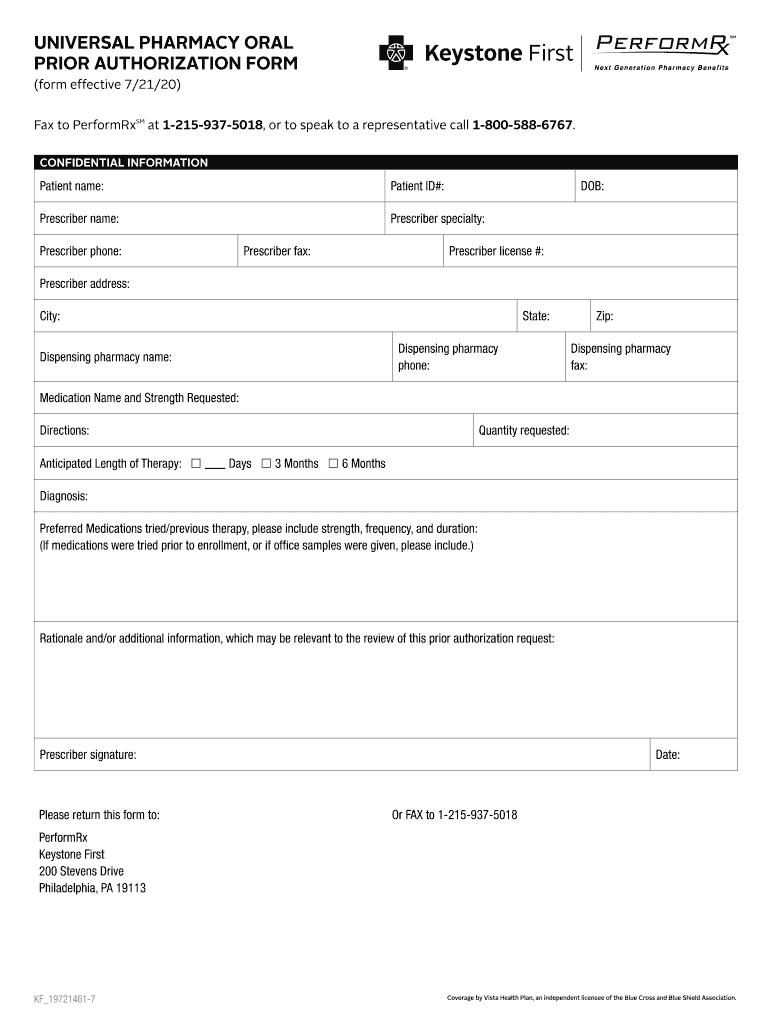
UNIVERSAL PHARMACY ORAL PRIOR AUTHORIZATION FORM (form effective 7/21/20)Fax to PerformRxSM at 12159375018, or to speak to a representative call 18005886767. CONFIDENTIAL INFORMATIONPatient name:Patient.
Loading

Open form follow the instructions

Easily sign the form with your finger

Send filled & signed form or save
How to fill out the Keystone First Universal Pharmacy Oral Prior Authorization Form online
Filling out the Keystone First Universal Pharmacy Oral Prior Authorization Form is an essential process for obtaining medication approvals. This guide provides step-by-step instructions to help users complete the form accurately and efficiently.
Follow the steps to fill out the form online effectively.
- Press the ‘Get Form’ button to access the document and open it for editing.
- Begin by entering the patient's name and patient ID number in the designated fields. Ensure accuracy, as this information is crucial for identification.
- Fill in the prescriber’s information, including their name, specialty, phone number, fax number, license number, and address. This information helps verify the prescriber and streamlines the approval process.
- Provide the date of birth for the patient. This field is important for age-related medication considerations.
- In the dispensing pharmacy section, input the name, phone number, fax number, and address of the pharmacy that will be filling the prescription.
- Specify the medication name and strength requested, along with clear directions for use. This should accurately reflect the prescription order.
- Indicate the quantity requested and select the anticipated length of therapy. Choose between the options of days or months as applicable.
- State the diagnosis for the medication request. This information is critical for assessment and approval.
- List any preferred medications that have been tried, including their strength, frequency, and duration. Previous therapies contribute to the rationale for the current request.
- Add any additional relevant information or rationale that may assist in the review of the prior authorization request.
- Obtain the prescriber’s signature and date the form. This is necessary for the form to be valid and accepted.
- Once completed, save your changes to the document. You can then download, print, or share the form as needed.
Complete your forms online today for a smoother approval process.
Experience a faster way to fill out and sign forms on the web. Access the most extensive library of templates available.
Related content
o Transplant Prior Authorization Request. (form and instructions) o Mental Health Form...
Sep 18, 2025 — The first form is the Immunization Record. When you complete this form...
In 2017, Robert started the largest annual conference on virtual reality and healthcare...
Get answers to your most pressing questions about US Legal Forms API.
How to submit a prior authorization on CoverMyMeds?
To submit a prior authorization on CoverMyMeds, create an account or log in if you already have one. Select the appropriate Keystone First Universal Pharmacy Oral Prior Authorization Form for your medication and fill it out completely. Once finalized, submit the form directly through the platform. CoverMyMeds will assist with tracking the request until you receive an update from the insurance company.
How hard is it to get a prior authorization?
Getting a prior authorization can be challenging, as it often depends on the insurance company’s policies and the specific medication being requested. However, using the Keystone First Universal Pharmacy Oral Prior Authorization Form can simplify the process. Ensuring accurate documentation and adhering to guidelines improves approval chances. It’s essential to stay patient and keep communication open with the insurance provider.
How to do a prior authorization?
To conduct a prior authorization, begin by obtaining the required patient details and medication specifics. Fill out the Keystone First Universal Pharmacy Oral Prior Authorization Form accurately, ensuring all necessary fields are addressed. Submit the completed form to the insurance provider and monitor for a response. If additional information is requested, providing it promptly will assist in expediting the process.
How does a pre-authorization work?
Pre-authorization works by requiring health care providers to submit a request to the insurance company before delivering specific services or medications. Once the Keystone First Universal Pharmacy Oral Prior Authorization Form is completed, it is sent for evaluation. The insurance reviews the request based on medical necessity and coverage guidelines. Following their review, they will either grant or deny the authorization.
What is prior authorization in simple words?
Prior authorization is a process in health care where a patient’s doctor must obtain approval from the insurance company before prescribing a specific medication. It ensures that the treatment is necessary and covered under the patient’s plan. The Keystone First Universal Pharmacy Oral Prior Authorization Form streamlines this process by collecting all required information. This helps both the provider and the patient navigate through the approval stage.
How to fill out a prior authorization form for Ozempic?
Filling out a prior authorization form for Ozempic requires you to gather pertinent patient and medication information first. On the Keystone First Universal Pharmacy Oral Prior Authorization Form, clearly indicate the patient's diagnosis, treatment goals, and any previous medications tried. Providing thorough documentation enhances the chances of approval. Once completed, submit the form to the patient's insurance provider.
How to perform a prior authorization?
To perform a prior authorization, start by collecting the necessary patient information and the specific medication. Next, complete the Keystone First Universal Pharmacy Oral Prior Authorization Form with accurate details. After filling out the form, submit it to the relevant health insurance provider for review. Keep track of the submission and follow up if necessary.
Why is it so hard to get a prior authorization?
Obtaining a prior authorization can sometimes be challenging due to varying insurance policies, required documentation, and the medical necessity of treatments. Additionally, certain medications or procedures may have stricter criteria that need to be met. The Keystone First Universal Pharmacy Oral Prior Authorization Form can help clarify these requirements and streamline the submission process.
What are three drugs that require prior authorization?
Many medications require prior authorization to ensure they are medically necessary. Common drugs that often need this process include Ozempic, , and Gilead medications. To find more information, you can utilize the Keystone First Universal Pharmacy Oral Prior Authorization Form, which provides clarity on which drugs require authorization.
How to obtain prior authorization?
After that, your provider will submit the form to your insurance for review.
Use professional pre-built templates to fill in and sign documents online faster. Get access to thousands of forms.
If you believe that this page should be taken down, please follow our DMCA take down process here.