Get Medical Form For Teachers
How it works
-

Open form follow the instructions
-

Easily sign the form with your finger
-

Send filled & signed form or save
How to fill out the Medical Form For Teachers online
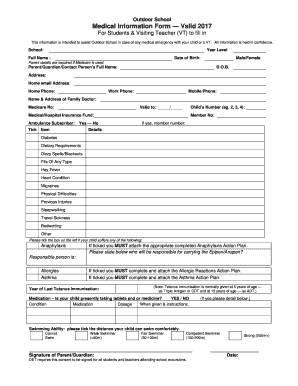
Filling out the Medical Form For Teachers online is a straightforward process designed to collect essential medical information for the safety of individuals during outdoor school activities. This guide provides clear instructions to ensure you complete the form accurately and efficiently.
Follow the steps to complete the medical form seamlessly.
- Click ‘Get Form’ button to obtain the form and open it in the editor.
- Begin by entering the school name and the year level of your child or the visiting teacher.
- Provide the full name and date of birth of the individual for whom the form is being filled out.
- Select the gender by choosing either Male or Female.
- Fill in the details of the parent or guardian, including their full name, date of birth, and contact information (address, home email, home phone, work phone, and mobile phone).
- List the name and address of the family doctor along with the Medicare number, if applicable. Ensure to indicate the validity of this Medicare coverage.
- Indicate the number of children involved, using a number (e.g., 2, 3, 4).
- Select the medical or hospital insurance fund and whether the user is an ambulance subscriber by ticking 'Yes' or 'No'.
- For existing medical conditions, details about diabetes, dietary requirements, dizzy spells, fits, allergies, asthma, and any other conditions must be indicated by ticking the corresponding boxes.
- If anaphylaxis is ticked, be sure to attach the completed Anaphylaxis Action Plan and specify who will carry the or Anapen.
- If allergies or asthma are indicated, ensure to complete and attach the respective action plans for allergic reactions and asthma.
- The date of the last tetanus immunization must be recorded based on the provided guidelines.
- If applicable, indicate if the child is currently taking any medications, including condition, medication name, dosage, and instructions.
- Assess and tick the appropriate swimming ability category that best describes your child’s swimming skills.
- Finally, ensure that the form is signed by the parent or guardian and dated to confirm consent for participation in excursions.
Complete your medical form online to ensure a smooth and safe experience for all involved.
A medical release form usually includes the child's name, date of birth, contact information for parents or guardians, and emergency contact details. It may also request information about the child's medical history and any specific health conditions. This information is vital for ensuring appropriate medical treatment is provided. When utilizing a Medical Form For Teachers, all necessary details can be organized and submitted seamlessly.