Loading
Get Wbcomtax
How it works
-

Open form follow the instructions
-

Easily sign the form with your finger
-

Send filled & signed form or save
How to fill out the Wbcomtax online
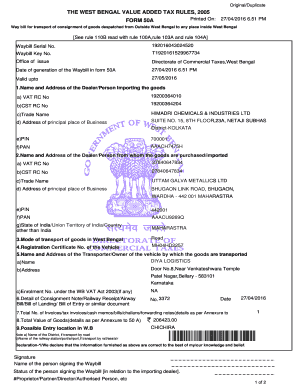
Filling out the Wbcomtax form accurately is essential for the successful transport of goods into West Bengal. This guide will provide step-by-step instructions to ensure that you complete this process efficiently and correctly.
Follow the steps to fill out the Wbcomtax form accurately.
- Press the ‘Get Form’ button to obtain the Wbcomtax form and open it for completion.
- Begin filling out the 'Name and Address of the Dealer/Person Importing the Goods' section. Provide your VAT and CST registration numbers, along with the trade name, principal place of business address, postal PIN code, and PAN.
- Complete the section for the 'Name and Address of the Dealer/Person from whom the goods are purchased/imported.' Include all required registration numbers, trade name, business address, postal PIN code, and PAN of the seller.
- Indicate the 'Mode of Transport' for the goods within West Bengal, choosing 'Road', 'Rail', 'Air', or other options as appropriate.
- Fill in the 'Registration Certificate No. of the Vehicle' used for transportation.
- Provide details regarding the 'Name and Address of the Transporter/Owner of the Vehicle'. Include the transporter's name, address, and any enrolment number under the WB VAT Act if applicable.
- Document the 'Detail of Consignment Note/Railway Receipt/Airway Bill/Bill of Lading or similar document' including the document number and date.
- List the 'Total Number of Invoices/Tax Invoices/Cash Memos/Bills/Challans' as detailed in the annexure. Ensure accurate counting of the documents.
- State the 'Total Value of Goods' as specified in the annexure, ensuring that this amount is precisely calculated.
- Identify the 'Possible Entry Location in West Bengal,' specifying the destination district or railway station if applicable.
- Complete the declaration statement affirming that all provided information is correct. Sign the document by including your name and status in relation to the importing dealer.
- Review the completed Wbcomtax form for accuracy, then save your changes, download, print, or share the form as needed.
Complete your Wbcomtax form online now to ensure a seamless import process.
Filling a virtual form with Wbcomtax is simple and user-friendly. Start by accessing the platform and navigating to the specific form you need. Follow the prompts to enter your information, ensuring accuracy and completeness. Once you have filled out the form, review the information provided, and submit it electronically for processing.