Loading
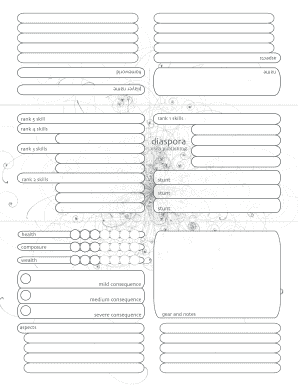
Get Diaspora Character Sheet Con.pdf
How it works
-

Open form follow the instructions
-

Easily sign the form with your finger
-

Send filled & signed form or save
How to fill out the Diaspora Character Sheet Con.pdf online
This guide provides a clear and supportive overview for users looking to fill out the Diaspora Character Sheet Con.pdf online. By following these steps, you will be able to systematically complete each section of the form to accurately reflect your character.
Follow the steps to complete your Diaspora character sheet effectively.
- Click ‘Get Form’ button to access the Diaspora Character Sheet Con.pdf and open it in the editor.
- Begin by filling in the ‘homeworld’ section, specifying the originating location of your character in the context of the game. This will help provide background to your character's traits and experiences.
- Enter the 'name' section with your character's chosen name, ensuring it reflects the character you wish to portray.
- In the 'player name' section, input your own name as the person managing the character. This section is important for record-keeping.
- For skills, categorize them into ranks 1 through 5. Start with 'rank 1 skills', listing your character's foundational abilities. Continue with 'rank 2', 'rank 3', 'rank 4', and 'rank 5 skills', ensuring each skill reflects the proficiency level you envision for your character.
- Document any 'stunts' that your character possesses, using multiple entries as necessary. Each stunt enhances specific skills or abilities and can be crucial for gameplay.
- In the health section, indicate your character's overall wellness. Next, note 'composure', which reflects the character's mental state, and 'wealth', which indicates their financial status within the game world.
- Describe the consequences your character might face under stress, such as 'mild consequence', 'medium consequence', and 'severe consequence'. These sections help contextualize the risks associated with actions in the game.
- Complete the 'aspects' section by outlining important characteristics or story elements that define your character. This is integral to role-playing and should represent key traits.
- Finally, fill out the 'gear and notes' section. This is where you can note any equipment, personal items, or other relevant details about your character that may come into play during the game.
- Once you have filled out all sections of the document, ensure to save your changes. You may then download, print, or share the completed form as needed.
Start filling out your Diaspora Character Sheet Con.pdf online today to bring your character to life!
While Roll20 does not directly offer a PDF export feature, you can still get your character sheet into a PDF format. Use the print option in your web browser to save the character sheet as a PDF. This way, you'll have a formatted document that mirrors your Roll20 sheet, allowing for easy access and reference just like the Diaspora Character Sheet Con.pdf.