Loading
Form preview
  • US Legal Forms
  • Form Library
  • More Forms
  • More Multi-State Forms
  • Air Canada Receipt

Get Air Canada Receipt

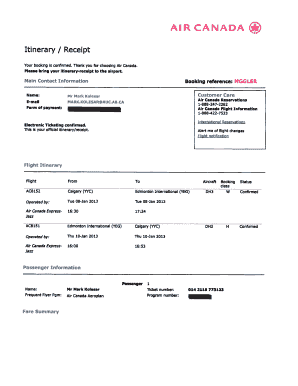
AIR CANADA Itinerary / Receipt Your booking is confirmed. Thank you for choosing Air Canada. Please bring your itineraryreceipt to the airport. Main Contact Information Name: Email Form of payment:.

How it works

  1. Open form

    Open form follow the instructions

  2. Easily sign form

    Easily sign the form with your finger

  3. Share form

    Send filled & signed form or save

How to fill out the Air Canada Receipt online

This guide provides clear, step-by-step instructions for filling out the Air Canada Receipt form online. Whether you are a first-time user or someone needing a refresher, this comprehensive guide aims to support your journey.

Follow the steps to complete your Air Canada Receipt online.

  1. Click the ‘Get Form’ button to access the Air Canada Receipt and open it in the designated editor.
  2. Locate the 'Main Contact Information' section. Fill in your name, email address, and form of payment. Ensure that the information is accurate to avoid any travel complications.
  3. Next, find the ‘Booking Reference’ field. Input your booking reference code, which is essential for retrieving your flight details.
  4. In the ‘Flight Itinerary’ section, review the flight information provided. Confirm the details including the flight number, routes, departure, and arrival times are correct.
  5. In the ‘Passenger Information’ field, provide your full name as it appears on your identification and any frequent flyer program number if applicable.
  6. Review the 'Fare Summary' section. Make sure that the ticket number and fare amount are correct. This will include taxes and any fees that apply.
  7. Check the ‘Fare Rules’ and ‘Important Information’ sections to understand your ticket’s terms, including refund policies and travel document requirements.
  8. Once all fields have been accurately filled out, you can save changes, download, print your receipt, or share it for your record.

Complete your documents conveniently online to ensure a smooth travel experience.

Get form

Experience a faster way to fill out and sign forms on the web. Access the most extensive library of templates available.
Get form

Related content

before the department of transportation
Air Canada only offers flight vouchers or credits in such situations and claims in its...
Learn more
Travel Guide - Financial Affairs - UC Santa Cruz
Note: Photocopies of receipts are not an acceptable substitute for original receipts...
Learn more
Air Canada
After reserving the hotel room directly, confirm the reservation with the hotel receipt in...
Learn more

Related links form

Kalki Malayalam Movie Download With English Subtitles Topaz T80i - TLC Electrical Supplies Walmart Authorization Form Revised Sept 2010.DOC Illuminati666

Questions & Answers

Get answers to your most pressing questions about US Legal Forms API.

Contact support

To redeem an Air Canada electronic travel voucher, go to the Air Canada website and start the booking process. When you reach the payment screen, you can enter your voucher code. Remember to have your Air Canada Receipt since it may include important details needed for a successful redemption.

The Air Canada booking number typically consists of six alphanumeric characters. You can find this number on your Air Canada Receipt or confirmation email, making it easy to reference when checking in or managing your booking. Having this information readily available will streamline your travel experience.

Claiming your Air Canada travel credit involves accessing your account on the Air Canada website. Navigate to the travel credit section and follow the prompts to submit your request. Having your Air Canada Receipt on hand will simplify the process and speed up claim processing, allowing you to enjoy your travel credit sooner.

To use a travel voucher, visit the Air Canada website and proceed to the booking section. During checkout, you can enter the voucher code in the relevant field. Make sure to have your Air Canada Receipt available, as this can help in confirming the voucher's value and ensuring a smooth transaction.

Yes, you can use your Air Canada flight trip credit to book a flight for someone else. However, it is important to ensure that the traveler’s name matches the details on the Air Canada Receipt associated with the trip credit. This flexibility allows you to share your travel perks with family or friends, making your credits more valuable.

To redeem your Air Canada travel credit, start by logging into your Air Canada account. Find the section designated for managing travel credits and select the one you wish to use. During your booking process, simply apply the travel credit at checkout, ensuring that you have your Air Canada Receipt handy to confirm the credit details.

To email Air Canada for a refund request, locate the customer service section on their website, where you can find the appropriate contact information. Be sure to include your booking reference number, personal details, and mention your Air Canada receipt to facilitate the process. Sending clear and concise information will help expedite your refund request.

Valid reasons for seeking Air Canada compensation include flight cancellations, significant delays, and downgrades in service class. If your flight meets specific criteria, you may be eligible for compensation, which will be documented on your Air Canada receipt. Remember, having to handle this promptly increases your chances of a successful claim.

Air Canada processes refunds based on the ticket type and the circumstances of the request. For eligible tickets, you can request a refund online, and Air Canada will send an email confirmation along with your Air Canada receipt. Refund timelines can vary, so it’s essential to check your account or contact customer service for updates.

Yes, you can add your Aeroplan number even after finalizing your booking. To do this, log into your Air Canada account and find your reservation. Enter your Aeroplan number in the designated area to ensure you earn the points from your trip, all while keeping your Air Canada receipt intact for your records.

Get This Form Now!

Use professional pre-built templates to fill in and sign documents online faster. Get access to thousands of forms.
Get form
If you believe that this page should be taken down, please follow our DMCA take down processhere.

Industry-leading security and compliance

US Legal Forms protects your data by complying with industry-specific security standards.
  • In businnes since 1997
    25+ years providing professional legal documents.
  • Accredited business
    Guarantees that a business meets BBB accreditation standards in the US and Canada.
  • Secured by Braintree
    Validated Level 1 PCI DSS compliant payment gateway that accepts most major credit and debit card brands from across the globe.
Get Air Canada Receipt
Get form
  • Adoption
  • Bankruptcy
  • Contractors
  • Divorce
  • Home Sales
  • Employment
  • Identity Theft
  • Incorporation
  • Landlord Tenant
  • Living Trust
  • Name Change
  • Personal Planning
  • Small Business
  • Wills & Estates
  • Packages A-Z
  • Affidavits
  • Bankruptcy
  • Bill of Sale
  • Corporate - LLC
  • Divorce
  • Employment
  • Identity Theft
  • Internet Technology
  • Landlord Tenant
  • Living Wills
  • Name Change
  • Power of Attorney
  • Real Estate
  • Small Estates
  • Wills
  • All Forms
  • Forms A-Z
  • Form Library
  • Legal Hub
  • About Us
  • Help Portal
  • Legal Resources
  • Blog
  • Affiliates
  • Contact Us
  • Delete My Account
  • Site Map
  • Industries
  • Forms in Spanish
  • Localized Forms
  • State-specific Forms
  • Forms Kit
  • Real Estate Handbook
  • All Guides
  • Notarize
  • Incorporation services
  • For Consumers
  • For Small Business
  • For Attorneys
  • USLegal
  • FormsPass
  • pdfFiller
  • signNow
  • altaFlow
  • DocHub
  • Instapage
Form Packages
  • Adoption
  • Bankruptcy
  • Contractors
  • Divorce
  • Home Sales
  • Employment
  • Identity Theft
  • Incorporation
  • Landlord Tenant
  • Living Trust
  • Name Change
  • Personal Planning
  • Small Business
  • Wills & Estates
  • Packages A-Z
Form Categories
  • Affidavits
  • Bankruptcy
  • Bill of Sale
  • Corporate - LLC
  • Divorce
  • Employment
  • Identity Theft
  • Internet Technology
  • Landlord Tenant
  • Living Wills
  • Name Change
  • Power of Attorney
  • Real Estate
  • Small Estates
  • Wills
  • All Forms
  • Forms A-Z
  • Form Library
Customer Service
  • Legal Hub
  • About Us
  • Help Portal
  • Legal Resources
  • Blog
  • Affiliates
  • Contact Us
  • Delete My Account
  • Site Map
  • Industries
  • Forms in Spanish
  • Localized Forms
  • State-specific Forms
  • Forms Kit
Legal Guides
  • Real Estate Handbook
  • All Guides
Prepared for you
  • Notarize
  • Incorporation services
Our Customers
  • For Consumers
  • For Small Business
  • For Attorneys
Our Sites
  • USLegal
  • FormsPass
  • pdfFiller
  • signNow
  • altaFlow
  • DocHub
  • Instapage
Social Media
Call us now toll free:
+1 833 426 79 33
As seen in:
© Copyright 1999-2026 airSlate Legal Forms, Inc. 3720 Flowood Dr, Flowood, Mississippi 39232
  • Your Privacy Choices
  • Terms of Service
  • Privacy Notice
  • Content Takedown Policy
  • Bug Bounty Program