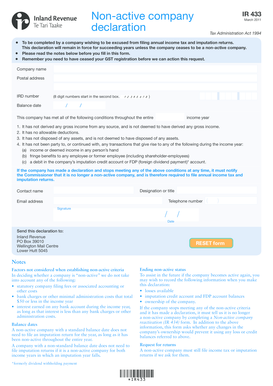
Nonactive company declaration IR 433 March 2011 Tax Administration Act 1994 be completed by a company wishing to be excused from filing annual income tax and imputation returns. To This declaration.
Loading
Open form follow the instructions
Easily sign the form with your finger
Send filled & signed form or save
How to fill out the Ir433 online
The Ir433 form is a declaration used by companies wishing to be excused from filing annual income tax and imputation returns. This guide provides step-by-step instructions to help you fill out the form accurately and efficiently.
Follow the steps to complete the Ir433 form online.
- Click the ‘Get Form’ button to download the Ir433 form and open it in your preferred editor.
- Fill in the company name in the designated field. Ensure that this matches the legal name of the company as registered.
- Enter the postal address for the company in the respective section. This should be the address where official correspondence can be sent.
- Input the IRD number. This is an 8-digit number that must start in the second box. Ensure it is accurate as this is essential for processing the declaration.
- Specify the balance date of the company. This is important as it determines the reporting period.
- Indicate whether the company has met all the specified conditions for being considered non-active throughout the income year by checking the corresponding boxes.
- Provide the designation or title of the person completing the form in the designated field.
- Fill in the contact name, telephone number, and email address of the person responsible for any follow-up communication.
- Sign and date the form. Ensure that the date is accurate to avoid any processing delays.
- After reviewing the completed form for accuracy, save your changes and choose to download, print, or share the form as needed.
Complete your non-active company declaration online to ensure compliance.
Experience a faster way to fill out and sign forms on the web. Access the most extensive library of templates available.
Related content
I / We agree to pay the federal taxes shown above, PLUS PENALTIES AND INTEREST PROVIDED BY...
International Relations (IR) is an interdisciplinary major focusing on the changing...
Get answers to your most pressing questions about US Legal Forms API.
How to fill out a third party authorization form?
Filling out a third-party authorization form requires you to provide details about both the third party and the reasons for authorization. It is essential to specify what permissions you are granting clearly. Ir433 can assist you in outlining the necessary information in an efficient manner.
What is an example of an expense claim?
An example of an expense claim might include travel expenses for a business meeting, such as airfare, hotel stays, and meals. When using Ir433, you can easily categorize and compile such claims, ensuring each expense is tracked and justified. Always remember to attach receipts and proper documentation.
How to fill out a requisition form?
Filling out a requisition form involves entering details about the goods or services requested, including quantity and description. Make sure to include your department information along with any necessary approvals. You can use Ir433 for templates and checklists that ensure you don’t miss any critical steps.
How to fill an expense claim form?
Begin by gathering all necessary information including date, description, and amount of the expense. Input these details into the appropriate sections of the expense claim form, ensuring clarity and accuracy. The Ir433 service can provide you with structured formats that simplify this task.
How to fill up an asset declaration form?
To fill up an asset declaration form, begin by listing all your assets, including properties, investments, and personal valuables. Be accurate in providing details like value and ownership status. Using the Ir433 platform can further enhance your experience by offering guidance on the required disclosures.
How to fill out an expense claim form?
Filling out an expense claim form involves detailing each expense, including the date, description, and amount. Make sure to categorize your expenses clearly and ensure all information is accurate. With Ir433, you can streamline this process and avoid common pitfalls.
How to fill an expense form?
To fill an expense form, start by entering your personal details, followed by the date and description of each expense incurred. Ir433 provides a template that simplifies this process, which makes it easier for you to input amounts and categorize them appropriately. Make sure to attach any receipts or relevant documentation to support your claims.
What is the process of expense claims?
The process of expense claims typically begins with documenting your expenses, followed by submitting them through the appropriate channels. With Ir433, you can easily track your expenses, ensuring accuracy and compliance. Once submitted, the claims are usually reviewed by a manager or finance department for approval.
How to file a company tax return in NZ?
Filing a company tax return in New Zealand requires completing the appropriate forms, including the IR433, and submitting them to Inland Revenue. The process involves reporting business income, expenses, and any deductions your company may claim. If you find the process overwhelming, Uslegalforms simplifies it by providing templates and guidance for accurate completion and timely submission.
What is a qualifying company in NZ?
A qualifying company in New Zealand is a structure that allows certain tax benefits, including simplified taxation rules and relief from certain compliance obligations. This type of company can be beneficial for small businesses and family-owned enterprises in managing their tax positions effectively. For insights into how Ir433 applies to qualifying companies, Uslegalforms offers comprehensive tax filing support.
Use professional pre-built templates to fill in and sign documents online faster. Get access to thousands of forms.
If you believe that this page should be taken down, please follow our DMCA take down process here.
This form is available in several versions. Select the version you need from the drop-down list below.