Loading
Form preview
  • US Legal Forms
  • Other Templates
  • More Forms
  • More Multi-State Forms
  • Ahca 15 Day Adverse Incident Report Form

Get Ahca 15 Day Adverse Incident Report Form

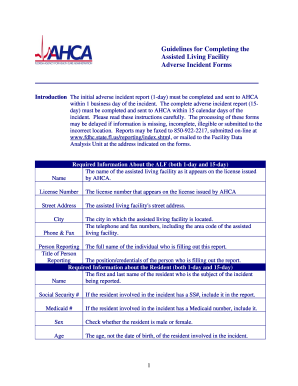
Guidelines for Completing the Assisted Living Facility Adverse Incident Forms Introduction The initial adverse incident report 1-day must be completed and sent to AHCA within 1 business day of the incident.

How it works

  1. Open form

    Open form follow the instructions

  2. Easily sign form

    Easily sign the form with your finger

  3. Share form

    Send filled & signed form or save

How to fill out the Ahca 15 Day Adverse Incident Report Form online

Completing the Ahca 15 Day Adverse Incident Report Form is essential for documenting incidents within assisted living facilities. This guide provides an easy-to-follow process that ensures accurate and complete submission of the report online.

Follow the steps to successfully complete the form online.

  1. Click 'Get Form' button to obtain the form and open it in the editor.
  2. Enter the required information about the assisted living facility. Fill in the facility's name as it appears on the license, the license number, street address, city, and telephone and fax numbers.
  3. Provide the name of the person reporting the incident and their title.
  4. Input required information about the resident involved in the incident, including their first and last name, Social Security number (if available), Medicaid number (if applicable), sex, and age.
  5. If applicable, include information regarding the facility's risk manager, including name, credentials, and phone number.
  6. Document the date of the incident and check the relevant outcomes that occurred as a result of the incident.
  7. Clearly describe the circumstances of the incident, addressing who, what, where, when, and why. Use additional sheets if necessary.
  8. If the incident involves issues of abuse, neglect, or exploitation, specify the immediate actions taken and whether authorities were notified.
  9. For the 15-day report, provide the name and contact information for the resident's representative.
  10. If the incident resulted in a transfer of the resident, indicate the location to which they were transferred and whether the Medical Examiner was contacted.
  11. List the names and credentials of individuals involved in or witnessing the incident, and provide their relevant details.
  12. Provide an analysis of the incident cause based on findings and outline corrective actions taken to prevent recurrence.
  13. If you determine the incident does not meet adverse criteria, check the appropriate block; otherwise, complete the required signatures.
  14. Once you have filled out all necessary sections, save any changes, and download, print, or share the form as needed.

Complete your incident report online today for effective documentation.

Get form

Experience a faster way to fill out and sign forms on the web. Access the most extensive library of templates available.
Get form

Related content

HB 673 Reporting Of Adverse Incidents In Planned...
Jan 23, 2018 — The bill authorizes DOH to adopt rules to develop the adverse incident...
Learn more
Assisted Living Facility Full Adverse Incident...
The facility must submit a full report to the agency within 15 days by electronic mail...
Learn more
MMA Provider Manual
Medical records are required to be audited to determine compliance with Sunshine Health's...
Learn more

Related links form

Ppmo Fm25f005 DENTAL REGISTRATION AND HISTORY 2J: PATIENT Report Of Notifiable Disease (NDR)*

Questions & Answers

Get answers to your most pressing questions about US Legal Forms API.

Contact support

The five rules of incident reporting include documenting all incidents promptly, capturing accurate details, focusing on factual information, maintaining objectivity, and ensuring consistency in reporting formats. Following these rules improves the quality and reliability of incident reports. Utilizing the AHCA 15 Day Adverse Incident Report Form can help fulfill these guidelines effectively.

Filling out an incident report form starts with ensuring you have all necessary information, including the incident's specifics and involved persons. Next, carefully complete the AHCA 15 Day Adverse Incident Report Form, paying close attention to each section's requirements. Clear and straightforward language is essential to convey the facts accurately.

To file an incident report, complete the required reporting form with accurate and clear details about the incident. Once you have properly filled out the AHCA 15 Day Adverse Incident Report Form, it should be submitted to the appropriate agency or administrative body. For assistance and guidance, consider using resources like USLegalForms, which provide tailored templates.

A code 15 report refers to a specific type of incident report required by the AHCA in Florida, detailing adverse incidents that impact patient safety or well-being. This report ensures that such incidents are documented and reviewed, which helps improve care quality and safety in healthcare facilities. The AHCA 15 Day Adverse Incident Report Form is the required format for submitting these reports.

You generally have 15 days to submit an incident report to the AHCA after the occurrence of the incident. Adhering to this timeline is essential for compliance and helps maintain accountability in reporting. Using the AHCA 15 Day Adverse Incident Report Form ensures that you meet the necessary deadlines and regulatory requirements.

Filing an incident report form involves completing the necessary information accurately and submitting it to the relevant authorities or departments. For the AHCA 15 Day Adverse Incident Report Form, ensure you adhere to the specific filing guidelines set by the AHCA. Additionally, you can utilize platforms like USLegalForms to access templates and guidance.

An incident reporting form is a structured document used to capture details about an unexpected event that affects health, safety, or the environment. This form allows organizations to systematically record incidents, evaluate them, and implement corrective actions. The AHCA 15 Day Adverse Incident Report Form is specifically designed for reporting incidents in compliance with state regulations.

To properly make an incident report, start by gathering all relevant details about the incident, including date, time, and individuals involved. Clearly describe what occurred, focusing on factual information. Make sure to use the AHCA 15 Day Adverse Incident Report Form for consistency and compliance, ensuring all necessary sections are filled out accurately.

To create an incident report form, identify key sections that need to be included, such as incident details, individuals involved, and corrective actions taken. You can design your own form, or you can choose to use the Ahca 15 Day Adverse Incident Report Form to simplify the process and ensure compliance with regulations.

Completing an incident report form involves carefully filling out each section with accurate details. You need to provide information such as the incident description, the parties involved, the date and time, and actions taken. Utilizing the Ahca 15 Day Adverse Incident Report Form can streamline this process and ensure you don't miss crucial information.

Get This Form Now!

Use professional pre-built templates to fill in and sign documents online faster. Get access to thousands of forms.
Get form
If you believe that this page should be taken down, please follow our DMCA take down processhere.
Get Ahca 15 Day Adverse Incident Report Form
Get form
  • Adoption
  • Bankruptcy
  • Contractors
  • Divorce
  • Home Sales
  • Employment
  • Identity Theft
  • Incorporation
  • Landlord Tenant
  • Living Trust
  • Name Change
  • Personal Planning
  • Small Business
  • Wills & Estates
  • Packages A-Z
  • Affidavits
  • Bankruptcy
  • Bill of Sale
  • Corporate - LLC
  • Divorce
  • Employment
  • Identity Theft
  • Internet Technology
  • Landlord Tenant
  • Living Wills
  • Name Change
  • Power of Attorney
  • Real Estate
  • Small Estates
  • Wills
  • All Forms
  • Forms A-Z
  • Other Templates
  • Legal Hub
  • About Us
  • Help Portal
  • Legal Resources
  • Blog
  • Affiliates
  • Contact Us
  • Delete My Account
  • Site Map
  • Industries
  • Forms in Spanish
  • Localized Forms
  • State-specific Forms
  • Forms Kit
  • Real Estate Handbook
  • All Guides
  • Notarize
  • Incorporation services
  • For Consumers
  • For Small Business
  • For Attorneys
  • USLegal
  • FormsPass
  • pdfFiller
  • signNow
  • altaFlow
  • DocHub
  • Instapage
Form Packages
  • Adoption
  • Bankruptcy
  • Contractors
  • Divorce
  • Home Sales
  • Employment
  • Identity Theft
  • Incorporation
  • Landlord Tenant
  • Living Trust
  • Name Change
  • Personal Planning
  • Small Business
  • Wills & Estates
  • Packages A-Z
Form Categories
  • Affidavits
  • Bankruptcy
  • Bill of Sale
  • Corporate - LLC
  • Divorce
  • Employment
  • Identity Theft
  • Internet Technology
  • Landlord Tenant
  • Living Wills
  • Name Change
  • Power of Attorney
  • Real Estate
  • Small Estates
  • Wills
  • All Forms
  • Forms A-Z
  • Other Templates
Customer Service
  • Legal Hub
  • About Us
  • Help Portal
  • Legal Resources
  • Blog
  • Affiliates
  • Contact Us
  • Delete My Account
  • Site Map
  • Industries
  • Forms in Spanish
  • Localized Forms
  • State-specific Forms
  • Forms Kit
Legal Guides
  • Real Estate Handbook
  • All Guides
Prepared for you
  • Notarize
  • Incorporation services
Our Customers
  • For Consumers
  • For Small Business
  • For Attorneys
Our Sites
  • USLegal
  • FormsPass
  • pdfFiller
  • signNow
  • altaFlow
  • DocHub
  • Instapage
Social Media
Call us now toll free:
+1 833 426 79 33
As seen in:
© Copyright 1999-2026 airSlate Legal Forms, Inc. 17 Station Street, Ste. 203, Brookline, MA 02445
  • Your Privacy Choices
  • Terms of Service
  • Privacy Notice
  • Content Takedown Policy
  • Bug Bounty Program