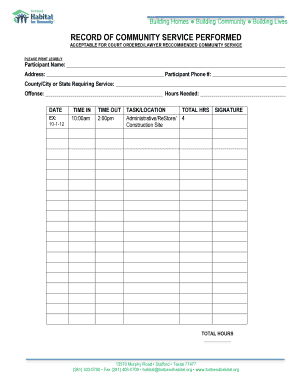
Get Community Service Timesheet - Fort Bend Habitat For Humanity
How it works
-

Open form follow the instructions
-

Easily sign the form with your finger
-

Send filled & signed form or save
How to fill out the Community Service Timesheet - Fort Bend Habitat For Humanity online
This guide provides clear instructions on how to accurately complete the Community Service Timesheet for Fort Bend Habitat For Humanity. It is designed to assist users in filling out the form correctly to ensure all necessary information is provided.
Follow the steps to complete your timesheet successfully.
- Click ‘Get Form’ button to obtain the form and open it for editing.
- Begin by entering the participant's name in the designated field. Ensure that the name is printed legibly to avoid any complications.
- Next, input the participant's address, ensuring to include the street address, city, state, and ZIP code for complete information.
- Fill in the participant’s phone number in the provided field so that communication can be established if necessary.
- Specify the county, city, or state requiring service in the appropriate section. This information is essential for verifying the service obligation.
- Indicate the offense related to the community service if applicable. Be concise and accurate.
- List the number of service hours needed in the corresponding field. This helps in tracking the required commitment.
- Record the date of service by following the provided format (e.g., 10-1-12). This ensures proper documentation.
- Enter the time in and time out for each service session. Ensure that both times are recorded accurately in the specified fields.
- Describe the task performed or the location where the service took place. This provides context and clarity regarding the service rendered.
- Calculate and write down the total hours served for each entry and ensure that it matches the recorded time in and time out.
- Obtain the necessary signatures in the signature field provided to validate the completion of the community service tasks.
- At the end of the completion, save your changes, download, print, or share the form as needed to ensure successful submission.
Complete your Community Service Timesheet online today and ensure your hours are accurately recorded.
Habitat for Humanity has specific guidelines regarding accepted items for donation. Commonly, they do not accept items like hazardous materials, food, or items in poor condition. For a comprehensive list, check the Community Service Timesheet - Fort Bend Habitat For Humanity for resources that outline accepted donations. It's important to check local guidelines to ensure your donations support the mission effectively.
Industry-leading security and compliance
-
In businnes since 199725+ years providing professional legal documents.
-
Accredited businessGuarantees that a business meets BBB accreditation standards in the US and Canada.
-
Secured by BraintreeValidated Level 1 PCI DSS compliant payment gateway that accepts most major credit and debit card brands from across the globe.